




With and without Pie
Your Team Knows the Edge Case. It Keeps Losing to the Backlog.
Stop arguing over which edge cases earn a day of scripting. Describe one in a sentence and Pie drafts the test.
- hours to clear that backlog
- 240
- what that costs
- $15,600
- weeks of one engineer
- 6
Book a demo → We’ll walk through your backlog with you.
Edge cases by flow
Pick a Flow. See What Usually Breaks It.
Start with the cases that cost you most. Each line reads the way you’d write it for Pie, and each flow links to our long guide.
Checkout
-
Pay with a test card that gets declined.
Check the error says why, then pay with a good card.
-
Pay with a test card that has no funds.
Check the message differs from a decline.
-
Apply a promo code, then remove the last item.
Check the total isn’t negative.
-
Go back from the confirmation page.
Check you can’t pay for the order twice.
What you set up
Your payment provider’s test mode, for the flows Pie supports, and test data like a coupon or a saved card.
What stays with your team
Apple Pay and Google Pay sheets on a phone, and the one live charge you run before a release.
Sign-in
-
Enter a wrong password.
Check the message doesn’t say which field was wrong.
-
Leave the email blank and submit.
Check for a clear error, not a server page.
-
Sign out, then press the browser’s back button.
Check the dashboard doesn’t come back. A real run, see below
-
Fail the password past your lockout limit.
Check even the right password gets the generic error.
What you set up
A dedicated test login, and an account you can lock and reset.
What stays with your team
Proving the session ended on the server, and live SMS or authenticator codes. For those, use a fixed test code, a script that reads your test inbox, or a test account with 2FA off.
Password Reset
-
Use a reset link twice.
Check the second try is rejected.
-
Request two resets in a row.
Check the first link no longer works.
-
Reset the password.
Check the old one no longer signs in.
-
Open a link past its expiry.
Check for a clear expired-link message.
What you set up
A script that reads your test inbox, and a test-only hook that ages the token.
What stays with your team
Whether your mail reaches real inboxes. Pie reads a test inbox.
Search
-
Search with an empty box, then with only spaces.
Check the page stays usable.
-
Search for asdfqwerzxcv.
Check for a clear no-results message.
-
Search with a stray quote and an emoji.
Check they’re treated as text.
-
Search LAPTOP, then laptop.
Check both return the same count.
What you set up
Seeded test data, so results don’t move between runs.
What stays with your team
How fast search responds at scale. That’s load testing, and Pie doesn’t do it.
Long Lists
-
With no orders, open Orders.
Check for an empty state, not “Page 1 of 0”.
-
With exactly one page of orders, open Orders.
Check Next is off and there’s no empty page 2.
-
With 23 orders at 10 a page, go to the last page.
Check it lists 3.
-
Sort the list while on page 2.
Check paging starts over with no repeats.
What you set up
A script that seeds the records through your test API before the run.
What stays with your team
ID-by-ID totals and your API’s own paging. Those stay in your test code.
Multi-Step Forms
-
Fill two steps, go back, then go forward.
Check your values held.
-
Leave a required field blank.
Check you can’t reach the next step.
-
Refresh the page on step two.
Check it resumes or restarts cleanly.
-
Change your answer on step two.
Check the right steps follow.
What you set up
Your decision on what a refresh should do. Write it in the test.
What stays with your team
Whether an abandoned form left a half-saved record. A screen can’t show that, so add a script that asks your test API.
File Uploads
-
Upload a file over the size limit.
Check for a clear message, not a hang.
-
Upload an empty file.
Check it’s rejected cleanly.
-
Upload a PDF where an image belongs.
Check for a clear message about the file type.
-
Upload a corrupt image.
Check it fails cleanly, not with a crash.
What you set up
On web apps, register each test file once in Pie.
What stays with your team
Cutting the connection mid-upload, and checking what an exported file actually holds.
How you add one
Say It in a Sentence. Pie Drafts the Test.
Turn the case your team just thought of into a test. No test code to write, no locators to break, and the test runs when you say so.
- Say it like a teammate would.One sentence is enough to start.
- Read it before it runs.Every step and check is there in plain words. Ask for a change until it’s right.
- You say when.Pie creates the test and runs it when you press the button.
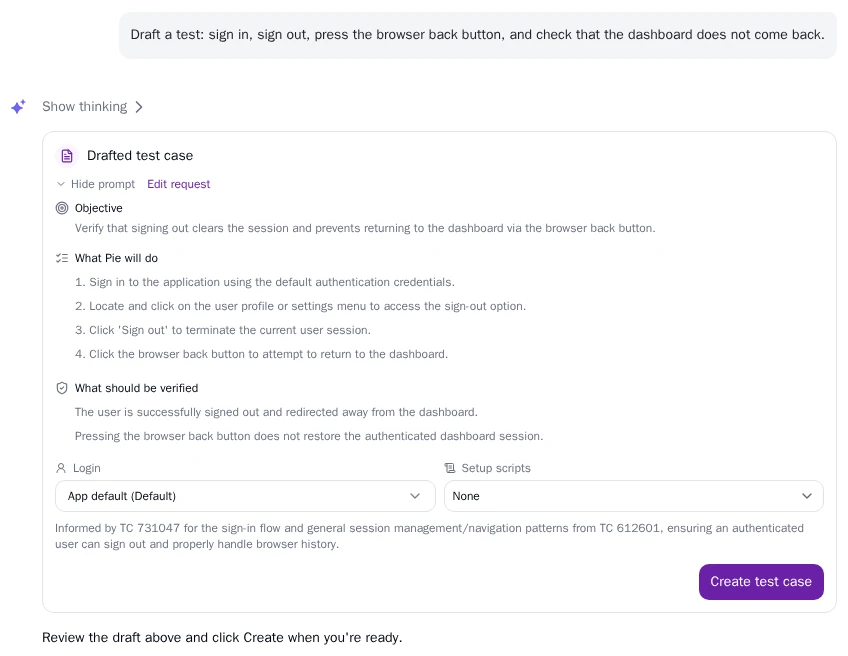
Draft a test: sign in, sign out, press the browser back button, and check that the dashboard does not come back.
Drafted test case
Objective
Verify that signing out clears the session and prevents returning to the dashboard via the browser back button.
What Pie will do
- Sign in to the application using the default authentication credentials.
- Locate and click on the user profile or settings menu to access the sign-out option.
- Click ‘Sign out’ to terminate the current user session.
- Click the browser back button to attempt to return to the dashboard.
What should be verified
- The user is successfully signed out and redirected away from the dashboard.
- Pressing the browser back button does not restore the authenticated dashboard session.
What comes back
It Worked on the Happy Path. Here’s Where It Didn’t.
See what your customer would see, with every step to get there. This one’s from a real run. Pie signed out of a test app, pressed back and the dashboard returned.

Failed
Verify User Sign-Out and Session Termination
- Enter the user email.
- Enter the password.
- Tap the Sign in button.
- Open the user profile section.
- Select the sign-out option.
- Click the browser’s back button.
What it checked
Performing a back-browser action does not grant access to the dashboard.
What Pie saw
The Dashboard, with the user still shown as signed in, after going back from the login screen.
Cached page or live session? That’s your team’s call. Track it and Pie re-checks it on every run, or dismiss it.
The basics
New to Edge Case Testing? Start Here.
Get up to speed in eight short answers, from what an edge case is to which ones earn a test.
Edge case testing checks what your app does when someone leaves normal use behind. They leave a field empty, paste a 10,000-character name, press back after signing out or remove the last item from a cart.
The happy path never goes there, so a green suite says nothing about it. Each case is rare on its own, but together they reach real customers.
Our guide to test coverage shows where these cases fit in the rest of your testing.
A shopper applies a promo code, then removes the last item from the cart. The total should read $0.00. Instead it reads −$50.00, and Pay stays on.
Here’s a real one, the run shown on this page. A user signs out, presses the browser’s back button and lands on the dashboard again.
An edge case pushes one condition to its limit, like a name at the maximum length. A corner case needs several at once, like that name on an expired session during a slow upload.
Boundary testing is a way to find them. For a field that takes 1 to 10, you try 0, 1, 10 and 11.
Negative testing sends what the app should reject and checks that it fails cleanly. Teams use these words loosely, so agree on what yours mean.
Start with bugs you’ve already shipped and your support tickets. Then walk each flow and ask what happens at none, one, the maximum and one past it, and what happens if someone goes back, refreshes or leaves halfway.
A person exploring the app finds the ones nobody thought to list. In Pie, you can also ask Chat “What edge cases should I be testing?” and it answers from your own tests, runs and issues.
Rank each one by what it costs when it breaks and how often real users get there. Money, sign-in and lost data go first.
Add every odd case that has already reached a customer, so it can’t come back unnoticed. A rare case that does no harm can wait.
It can suggest them and it can run them, but it can’t tell you which ones matter to your business. That call stays with your team.
Pie’s agents explore the flows they can reach and write tests, and Chat can suggest where to look next. Neither promises every odd input on every form, so write down the cases you can’t afford to miss. Here’s what AI testing can and can’t do.
Automate the ones you’d hate to ship twice and the ones a person forgets to retry. Keep by hand what needs judgment or real hardware.
With scripts, that choice is expensive. Each case takes time to write and more time to keep working. Written in plain English, a case costs a sentence, so more of them earn a place in the suite.
You get more ways to interrupt a flow, like a denied permission, an old OS version or an app sent to the background.
Pie tests iOS apps on the iOS Simulator and Android apps on the Android Emulator, so a bug that only shows on real hardware needs a physical device. Keep a short pass on your lowest and highest supported OS versions. Here’s when each one fits.
Customers
Faster Releases, Without Breaking What Works.

“As we scale our products and offerings it’s really important to make sure we don’t ship something that breaks the existing experience for our users.”


“After evaluating multiple vendors, Pie was the only solution that consistently executed our most complex end‑to‑end workflows with reliability across builds.”
Security
Yes, Security Will Ask. Here’s What to Tell Them.
- You Pick the Test Account.Pie signs in with the test login you give it. A setup script can call your test API to create the data first.
- We Never Use Your Source Code to Train AI Models.Source code here means the files and code changes in your repositories.
- Logins Reach Pie’s Agents Only While a Test Runs.You keep them in Pie’s credential settings.
- Pie Has a SOC 2 Type 2 Report.Our most recent report is available on request. Data is encrypted in transit.