



Your options on Android
Renting Phones Is Easy. Writing the Tests Isn’t.
Hand off the tests, not just the phones. Every option here runs your app on Android, and most leave the writing and the upkeep to your team.
| Option | Who writes the tests | Where they run | What it does best |
|---|---|---|---|
| By hand | Nobody. Someone taps through each flow. | The phones on your desk | Judgement. A person spots what no test asks about. |
| Espresso and UI Automator | Your Android developers, in Kotlin or Java | Emulators, your phones or a device cloud | Google’s own frameworks. Fast, native tests that live in your codebase. |
| Appium | Engineers, in Java, Python or JavaScript | Emulators, your phones or a device cloud | One codebase for Android and iOS. |
| Maestro | Engineers, as YAML flows | Emulators, your phones or Maestro’s cloud | Readable flows that are quick to start. |
| Device clouds | Your team brings the tests. Some clouds also crawl the app with no script. | Real phones and virtual ones | Real hardware, at scale. |
 Pie | Pie drafts them from plain English, and your team confirms them | Android emulators | No scripts or locators to maintain. |
Your release week
Three Days by Hand. A Few Hours With Pie.
Hand the Android test pass to Pie and your team gets its release week back. Slide the numbers to see what that’s worth.
- hours a month on the Android pass today
- 48
- what that costs a year
- $37,440
Book a demo → We’ll walk through your numbers with you.
Why scripts break
Your Script Needs a Test Tag. Pie Only Needs the Screen.
Stop fixing tests that broke for no reason. Write the test in plain English and Pie works from what’s on screen, so a renamed tag breaks nothing.
add_button add_to_cartA sample Compose test · SearchTest.kt
FailedCould not find any node with TestTag = “add_button”. The app is fine, and the test fails anyway.
PassedFinds the button by its test tag.
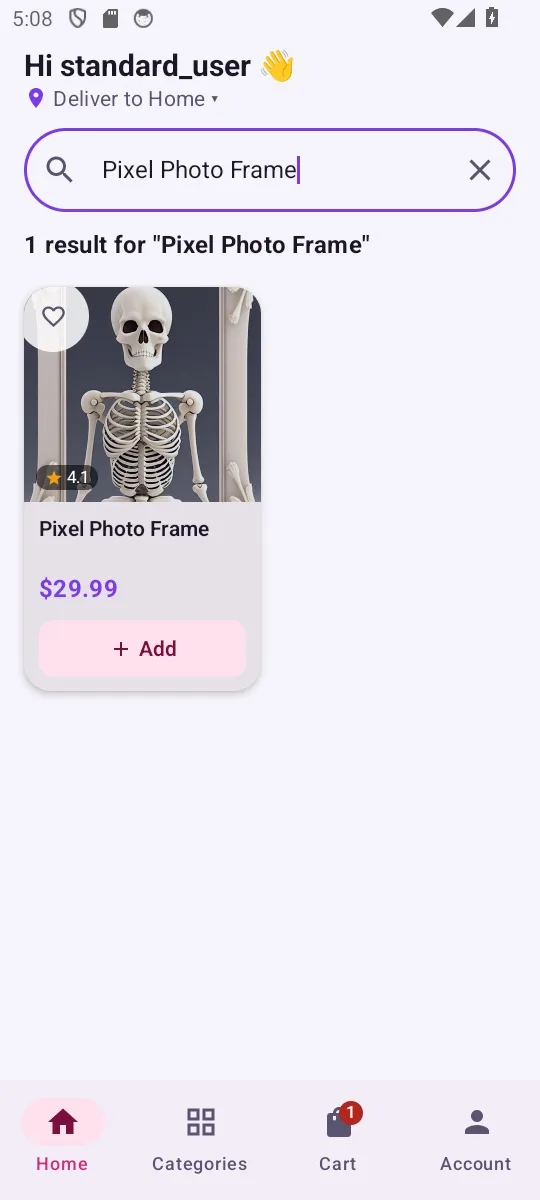
Our demo store, in a real run.
The same test in Pie
- PassedSearch for Pixel Photo Frame.
- PassedCheck that one result shows.
- PassedTap Add on the Pixel Photo Frame.
Nothing on screen changed, so the test still passes.
How it runs
One APK. No Emulators to Babysit.
Hand Pie an APK and the emulators are its problem. It runs your suite on the Android version you pick, from Android 14 to 17, on a phone, a tablet or a foldable.
-
Build an APK
Debug or a staging flavor, pointed at your test environment. An .aab won’t work. Here’s how.
-
Upload It or Send It From Your Pipeline
Upload the APK in Pie as it is, or let a GitHub Action or the API send each build.
-
Pick What Starts the Run
A schedule, a call from your CI, or a new build once we’ve set that trigger up with you.
Pie Runs Every Test
On the Android versions and devices you pick. Nobody has to watch it.
This run
The Report Is Waiting
1 passed2 failed2 issues
What broke, with the steps and a screenshot of each.
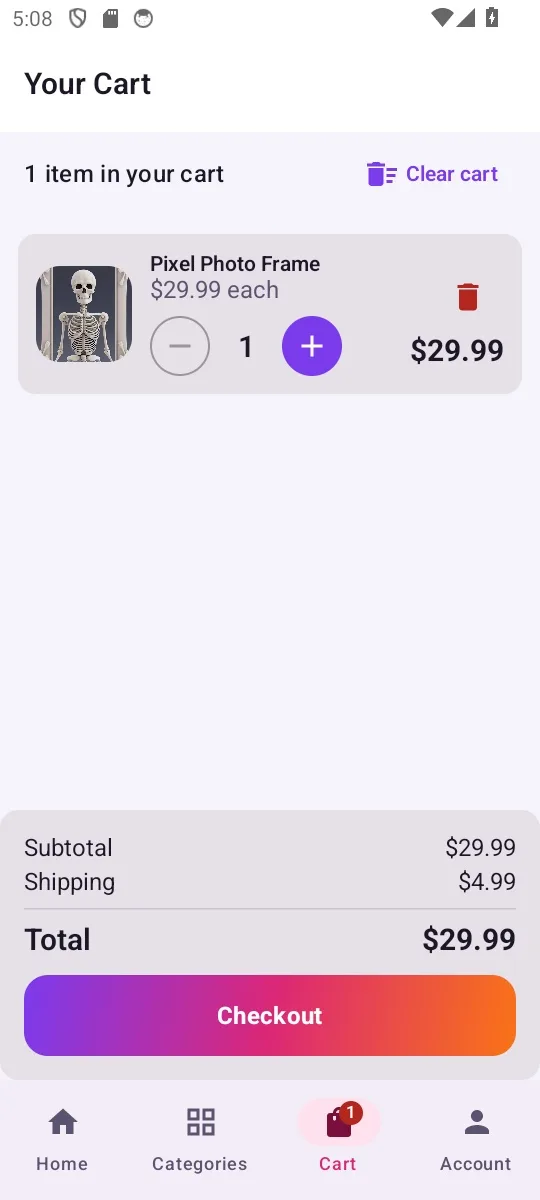
A real run on our demo store
Subtotal $29.99. Shipping $4.99. Total $29.99.
Pie checks the math, not just the screen, and hands your Android developer the bug with every step. We planted this one in our own store. Pie filed it.
- You make the call.Track it and Pie re-checks it on every run, or dismiss it.
- No back-and-forth.It says what the total should have been and what it was.
- Proof at every step.All 22 steps keep their screenshot. The failed one shows in red.
The basics
New to Android App Testing? Start Here.
Get up to speed in eight short answers, from how to test an Android app to when you still need a real phone. The guides go deeper.
Android app testing checks that your app works on the phones, tablets and Android versions your users run, before they download it.
It goes from small to large. Unit tests check the code, UI tests check the screens, a closed test on Google Play puts the app in front of real people, and a final pass walks the flows that matter most.
Our mobile app testing guide covers each layer.
Run unit tests on every change. Cover your key flows with UI tests, written in Espresso or handed to an agent like Pie. Send a build to testers through a closed track on Google Play. Then check what only hardware can show on a real phone.
These mobile testing best practices go through it in order.
Use both, for different jobs. An emulator is quick to run across Android versions and screen sizes. A real phone is the only place to check the hardware.
| What you’re checking | Emulator | Real phone |
|---|---|---|
| Sign-in, forms, checkout logic | Yes | Yes |
| Layouts across versions and screen sizes | Yes | Only those you own |
| NFC, Bluetooth pairing, camera hardware | No | Yes |
| Cellular radio, battery and heat | No | Yes |
This guide to real devices, emulators and simulators shows how to split them.
Start from your own analytics, not the whole market. Cover the versions most of your users run, your minimum supported version, and the newest release before it reaches them.
Then add the shapes your users hold, such as a small phone, a tablet and a foldable if your app supports one.
Yes, and it’s where most teams start. Write down the flows that matter, walk each one on a few phones, and note what broke with a screenshot.
It stops scaling when every release means every flow on every phone. That’s the pass to automate first. Here’s when manual testing still wins.
Espresso is Google’s own framework, fast and native, for Android alone. Appium drives Android and iOS from one codebase. Maestro writes tests as readable YAML flows. All three need someone to write the tests and keep them working.
Compare Espresso and Appium, Maestro and Appium, or see the wider field of frameworks.
Start with what costs you most when it breaks, usually sign-in, onboarding and checkout. A single test can walk the whole journey.
Then add what Android brings with it, such as permission prompts, push notifications, deep links, fingerprint sign-in and upgrades from your last version. Each guide says what you can automate.
Android runs on far more phones, from many makers, across more versions at once. Apple makes every iPhone, so iOS has fewer models to cover.
The builds differ too. Pie takes an .apk for Android, a simulator .app for iOS and a URL for the web, and each platform gets its own suite.
Here are the differences between iOS and Android testing.
Customers
Mobile Teams That Moved It Off the Calendar.

“As we scale our products and offerings it’s really important to make sure we don’t ship something that breaks the existing experience for our users.”


“After evaluating multiple vendors, Pie was the only solution that consistently executed our most complex end‑to‑end workflows with reliability across builds.”
Security
Yes, Security Will Ask. Here’s What to Tell Them.
- You Pick the Test Account.Pie signs in with the test login you give it, and you choose the environment your build points at.
- We Never Use Your Source Code to Train AI Models.Source code here means the files and code changes in your repositories.
- Logins Reach Pie’s Agents Only While a Test Runs.You keep them in Pie’s credential settings.
- Pie Has a SOC 2 Type 2 Report.Our most recent report is available on request. Data is encrypted in transit.