Best Mobile App Testing Tools in 2026: Five Categories, One Question
Most mobile testing tool lists rank frameworks against device clouds. This guide sorts all five categories by who fixes the test when the screen changes.

Every “best mobile app testing tools” list is really five different lists wearing one headline. Appium sits next to BrowserStack sits next to Testsigma as if they compete, and they don’t. One is a scripting framework. One is a rack of devices. One is a record-and-playback studio. Putting them in a single ranked list is how teams end up buying a device lab to solve a maintenance problem, then wondering why the tests still break.
So sort them by category first. Then sort the categories by one question, the only one that predicts whether you solved your problem or moved it: when a designer ships a new screen next sprint, who fixes the test? For most of these tools the answer is you. For one category it’s the tool.
What you’ll learn
- The five categories of mobile testing tools, and why lists that blur them mislead you
- The leading tools in each category, and what each one does for you
- Who repairs a broken test in each category, the question that decides fit
- How to assemble a stack instead of betting everything on one tool
Why Most Mobile Testing Tool Lists Mislead You
Most mobile testing tool lists mislead you because they rank tools that live in different categories against each other, then hide the one variable that matters. A scripting framework, a device cloud, and an autonomous platform aren’t competing for the same job, so a single ranked list forces a false choice. The variable they bury is maintenance, meaning who keeps the test suite green as the app changes.
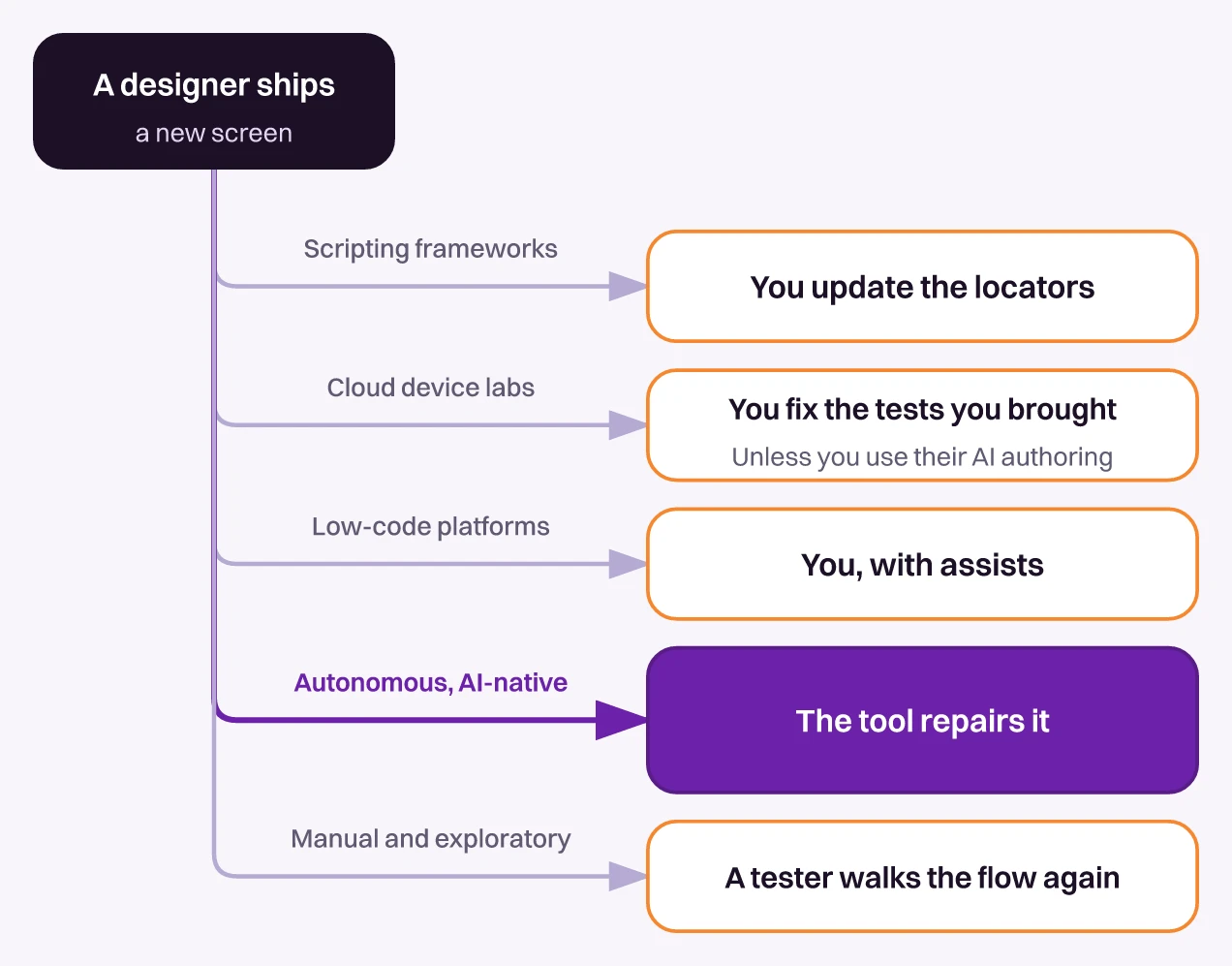
That variable is getting more expensive. Developers in a survey Sonar published in January 2026 expect AI-generated or AI-assisted code to reach 65% of what they commit by 2027. More code per sprint means more screens change per sprint, and every locator-bound mobile test is one redesign away from breaking. If you’ve watched mobile E2E tests flake after a screen you didn’t touch got restyled, you’ve seen the mechanism.
A mobile team shipping every two weeks put the trade to us in one line. They could test the new features or maintain the tests, not both, and most of their suite had broken by the time we spoke.
So read any tool list by asking what it takes off that treadmill. Some tools remove the device-provisioning chore and keep the selectors. Some remove the code and keep a person authoring every flow. One category removes the authoring and the repair. Where a tool sits on that scale is the whole decision.
Five Mobile Testing Tool Categories at a Glance
Mobile app testing tools fall into five categories, from scripting frameworks and cloud device labs to low-code platforms, autonomous AI-native platforms, and manual testing. Each solves a different problem, and a mature team runs two or three of them together instead of picking one. The table sorts them on the question that predicts fit, and the sections after it name the leading tools in each.
| Category | What you author | Who fixes a broken test | Device reach | Best for |
|---|---|---|---|---|
| Scripting frameworks | Code, bound to locators | You | Emulators, or a lab | Deep, specific control |
| Cloud device labs | Your own tests, or their AI authoring | You, unless their AI heals it | Real devices at scale | Device and OS coverage |
| Low-code platforms | Recordings and steps | You, with assists | Built-in or a lab | Non-engineer authoring |
| Autonomous, AI-native | Plain-English intent, or nothing | The tool | Varies by vendor | Coverage that stays current |
| Manual and exploratory | Test charters | Not applicable | Whatever is in hand | Feel, edge cases, first looks |
1. Scripting Frameworks: Appium, Espresso, XCUITest, Detox, Maestro
Scripting frameworks are the code-first foundation of mobile automation, and they give you the most precise control of any category. You write tests in a real programming language, bind each step to a locator or an accessibility ID, and run them against emulators or real devices. The five that matter in 2026 split cleanly by platform reach:
- Appium. The cross-platform standard, the mobile equivalent of Selenium. One API drives iOS and Android through platform drivers, which is its appeal and its tax. Element hierarchies differ per platform, so a shared suite carries platform-specific locators anyway.
- Espresso. Google’s native Android framework. Fast and reliable because it waits for the app’s UI to go idle before each action, but Android only.
- XCUITest. Apple’s native iOS framework. Deep iOS integration, iOS only, and it runs as a separate process that drives the app through accessibility data.
- Detox. Built for React Native. It monitors the app’s asynchronous work and waits for it to settle instead of relying on fixed sleeps, which is how it attacks flakiness at the source.
- Maestro. The newcomer, open source, with YAML flows, automatic waiting, and the gentlest learning curve of the group. Lower ceiling on complex logic than the code-first tools.
Every framework in this list shares one design decision and one consequence. Each test is bound to a selector, so when the UI changes, tests that had nothing to do with the change break, and a person repairs each one by hand. The category works this way by design. For the trade-offs between the native and cross-platform options in depth, we compared the top mobile testing frameworks head to head, and ranked the Appium alternatives worth a look when Appium’s upkeep is the problem.
2. Cloud Device Labs: BrowserStack, Sauce Labs, TestMu AI, Firebase Test Lab
Cloud device labs solve the hardware problem, not the test problem. They give you thousands of real devices and OS versions on demand, so you can answer the question mobile teams keep hitting: does the build that passed on your Pixel also pass on an older Android skin, a low-memory device, and last year’s iPhone? BrowserStack, Sauce Labs, and TestMu AI (formerly LambdaTest) lead the commercial end. Google’s Firebase Test Lab has a no-cost tier of 10 virtual-device and 5 physical-device test runs a day.
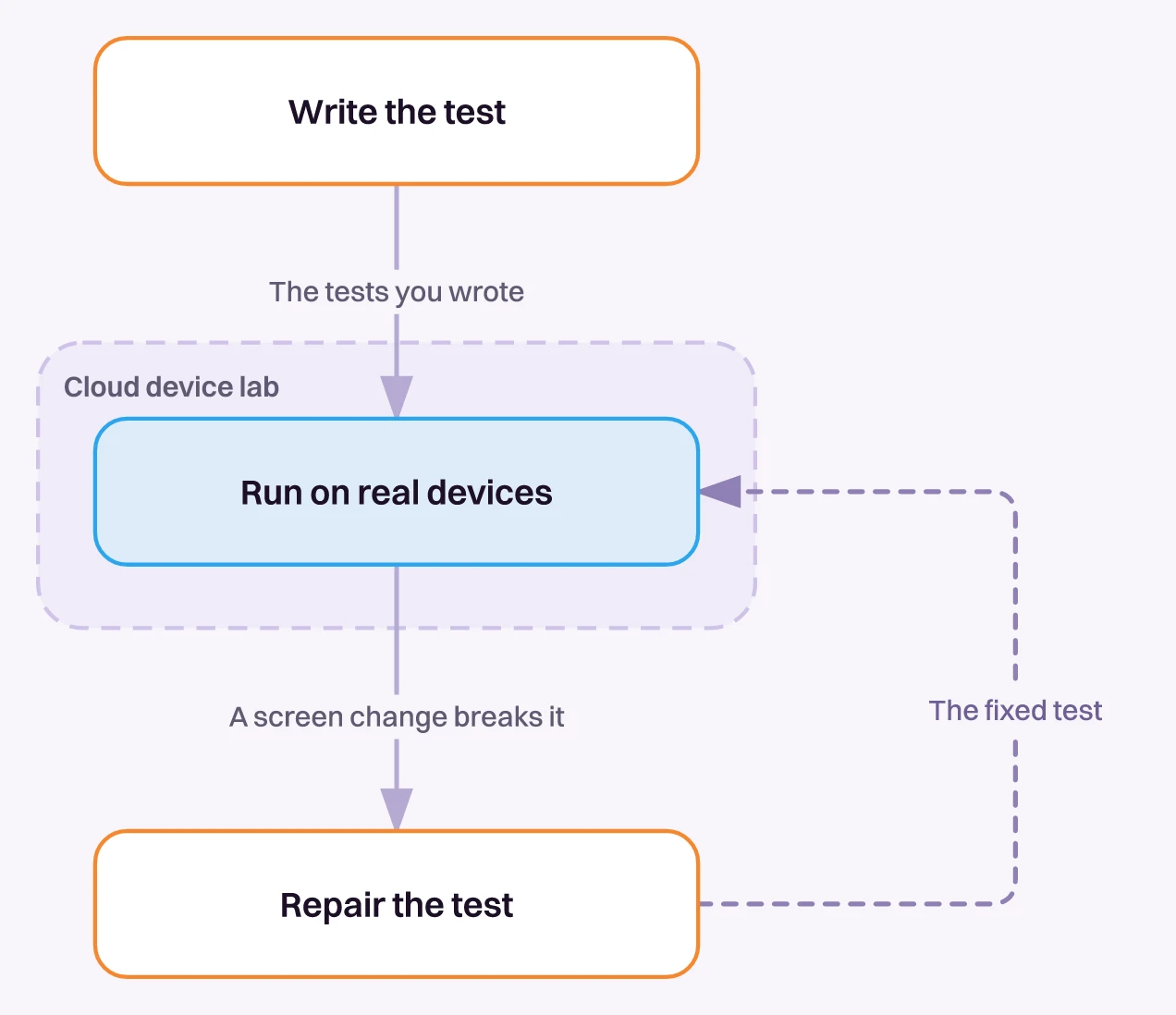
The device cloud itself runs the tests you bring. It’s the where, not the who. If your Appium suite is flaky, running it on 200 real devices gives you flaky results on 200 real devices, faster. Fragmentation is real, and iOS and Android differ enough that a passing Android run tells you little about iOS. The lab earns its place on that alone.
All three commercial labs now also sell AI authoring on top, through BrowserStack’s AI agents, Sauce AI for Test Authoring, and TestMu AI’s KaneAI. Treat those as a separate decision from the devices, and judge them on the same question as every other tool here.
See Autonomous Coverage on Your Mobile App
Hand Pie a staging build. Get back a suite you didn't write.
Book a Demo3. Low-Code and Record-and-Playback: Testsigma, Katalon
Low-code platforms exist to get non-engineers authoring tests. You record a flow by tapping through the app, or assemble steps in a visual editor, and the platform turns that into a runnable test without a programming language in the way. Testsigma leans into plain-English and AI-assisted authoring, and Katalon wraps a full studio around Appium and Selenium with record-and-playback on top. Both lower the barrier that keeps a manual tester from contributing automation.
The limit shows up where the recording meets a redesign. A recorded flow is pinned to elements under the hood, so a UI change breaks it and someone re-records or repairs the step. Both platforms now add self-healing that swaps in a new locator when the old one fails, and both are adding agents that generate tests from requirements, which pulls them toward the AI-native end of this map.
Healing still needs an element to heal toward. When a redesign restructures a screen instead of renaming a button, the step can fail and a person fixes it. Low-code shifts who can author a test. On its own, it doesn’t remove the maintenance.
4. Autonomous, AI-Native Platforms: Pie, Panto AI, testRigor, MobileBoost, Momentic
Autonomous, AI-native platforms are the category that answers the maintenance question with “the tool” instead of “you.” Where a framework executes scripts you author against locators, they work from plain-English intent or from the rendered screen, generate the tests, and repair them when the UI changes. A renamed element is far less likely to break a run, though how far each one leaves selectors behind varies. It’s also the most crowded corner of the mobile testing market right now:
- Pie. Autonomous QA for web and native iOS and Android, with native runs on iOS simulators and Android emulators. Agents explore your app, generate the regression suite, and adapt the tests as the UI moves.
- Panto AI. Turns plain-English feature descriptions into Appium or Maestro scripts, runs them on 150+ real iOS and Android devices, and auto-fixes them when the UI changes.
- testRigor. Tests are plain-English descriptions, and generative AI repairs them when the UI changes. It can also generate tests from an app description, an AI crawler, or production user analytics, and it covers native iOS and Android.
- MobileBoost (GPT Driver). Mobile-focused. Its natural-language tests don’t depend on element IDs, and it can run native Appium code first and fall back to AI when a step fails.
- Momentic. AI-native and web-first by origin, now running on iOS and Android, where its planner-style agent drafts a flow up front and self-heals on failure.
All five generate tests and repair them to some degree, and Panto AI and GPT Driver are strong on mobile depth. Three things separate Pie:
- Discovery first. Pie’s agents map the app and generate the regression suite before anyone writes a test. Panto AI and GPT Driver start from flows you describe, and testRigor pairs plain-English authoring with a crawler that proposes tests.
- One definition across web and native. Pie runs the same test definition on web, iOS, and Android, while Panto AI and GPT Driver focus on mobile.
- Vision on mobile. On iOS and Android, Pie acts on the rendered screen, so there’s no locator or UI-hierarchy query to break. GPT Driver runs native Appium code first and falls back to AI, and Panto AI’s tests run as generated scripts.
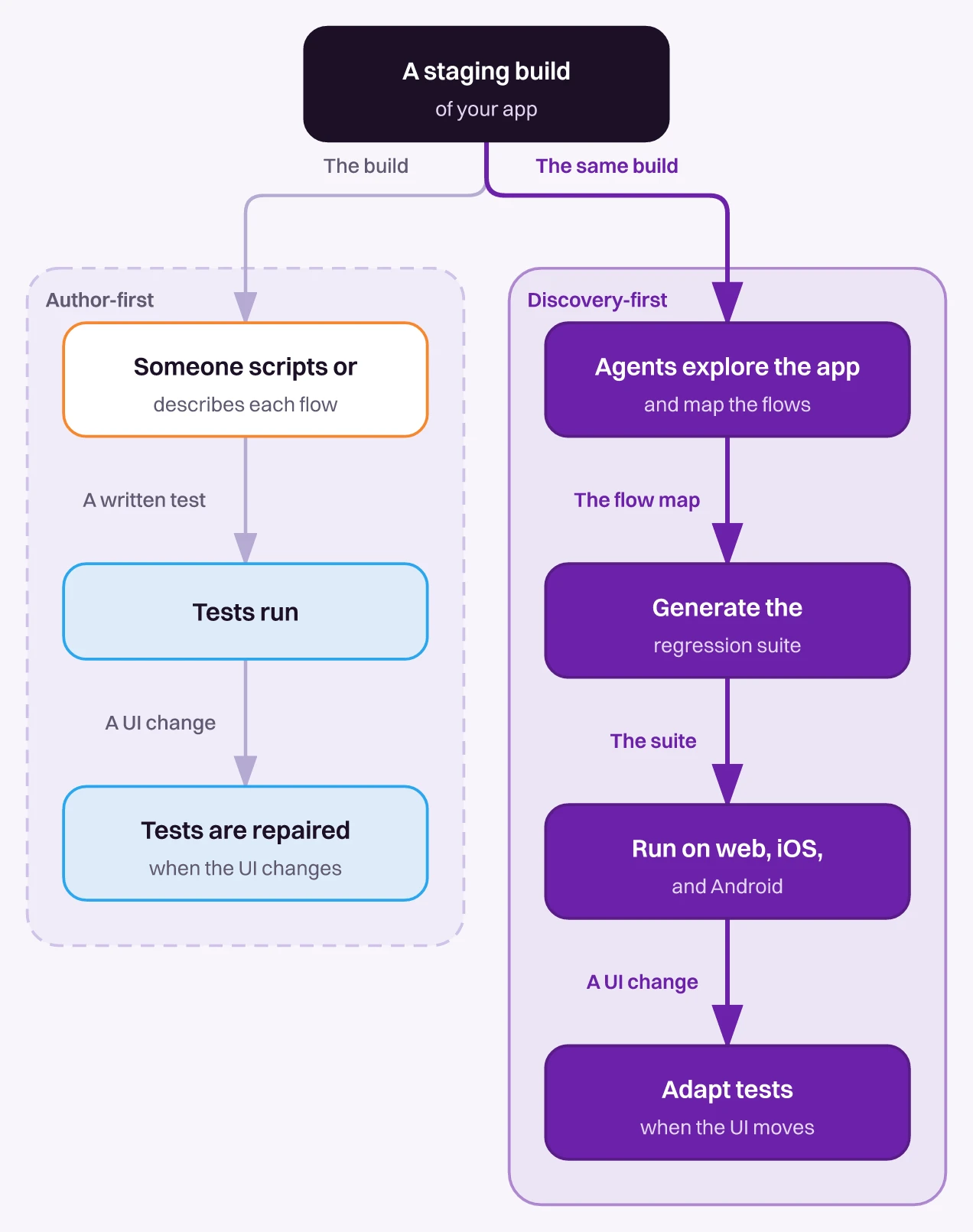
The trade-off is control. For one deep scenario on one platform, a hand-written Espresso or XCUITest test runs faster and reaches closer to the code, which is why the stack below keeps a framework in it.
Pie runs native apps on iOS simulators and Android emulators, so a device lab owns the real-device matrix. What you get back is mobile app automated testing that starts without an authoring phase. For a direct three-way on the mobile-native options, we put Pie against Maestro and Mobile Next.
Fi, the smart dog collar company, runs Pie on its iOS and Android app, and the Fi customer story covers the rollout. Philip Hubert, its Director of Mobile Engineering, describes the adoption cost:
“The way that Pie set up has allowed Fi to work alongside our development process. We didn’t have to change how we did things.”
— Philip Hubert, Director of Mobile Engineering, Fi5. Manual and Exploratory Testing (and Where It Still Belongs)
Manual testing is the one layer you can’t automate away, and it’s staying. A person installing the build and walking the app by hand is still the best way to judge how a feature feels, to catch the edge cases a script would never invent, and to give a brand new flow its first serious look. Exploratory testing, where a tester follows their nose rather than a checklist, finds the bugs that structured automation is blind to. Mature mobile teams keep this layer.
Where manual testing stops paying is regression. Re-running the same checklist by hand every release takes days, blocks the release until it passes, and burns out whoever owns it. The repetitive, high-frequency layer is what to automate or hand to an autonomous platform. Moving it is also the fastest way to shorten a mobile regression testing cycle. Keep humans on judgment and discovery. Move the repetition off their plate.
How to Choose Your Mobile Testing Stack
Pick a stack instead of a tool, because these categories complement each other more than they compete. A 2026 mobile stack that holds up looks like this:
- Regression backbone. An autonomous platform owns the flows that run every release and break the most.
- Surgical control. Keep Espresso or XCUITest for the deep, platform-specific scenarios that reward hand-written precision.
- Device coverage. A device lab runs whatever you have across the real-device matrix your users carry.
- Human judgment. Manual and exploratory testing on feel, usability, and new features.
The same question sets the order. Whatever eats the most engineering time in repairs is the layer to move to an autonomous tool first. If you’re mapping the fundamentals before you build the stack, start with our mobile app testing guide, then come back and slot each tool into the category it belongs to.
Buy the Category, Not the Logo
The mistake is shopping for a tool. The move is shopping for a category, then asking who fixes the test when the screen changes. Frameworks, device labs, and low-code studios leave most of that repair with your engineers, which was fine when a release was a quarterly event and stops working when AI helps rewrite your UI every sprint.
At Square I was on the platform team pushing product teams to build test coverage. Writing it was hard, and keeping it alive was harder, hard enough to be a full-time role.
We built Pie to carry that upkeep. It explores your app, writes the coverage, runs it across iOS and Android, and repairs the tests when the screen moves. That’s the category worth buying.
Stop Maintaining Mobile Tests by Hand
Bring the flow that breaks every release. Leave with tests that repair themselves.
Book a DemoFrequently Asked Questions
No single tool wins, but one category does. Autonomous, AI-native platforms such as Pie, Panto AI, testRigor, MobileBoost's GPT Driver, and Momentic generate mobile tests and repair them when the UI changes.
Pick by how much you still author. Pie explores the app and writes the suite.
Run the same build across a matrix of devices and OS versions, since a pass on one phone proves little about another. Cloud device labs like BrowserStack, Sauce Labs, TestMu AI, and Firebase Test Lab rent that matrix.
The lab runs your tests. Keeping them green is a separate job.
A person installs the build, walks the critical flows by hand, tries the edge cases a script would never invent, and judges how the app feels. It suits exploratory testing and a first look at a new feature.
For the regression checks you repeat every release, automate instead.
Pick one of three routes. Write code against a framework such as Appium, Espresso, XCUITest, Detox, or Maestro. Record flows in a low-code platform such as Testsigma or Katalon. Or let an autonomous platform generate and maintain the suite.
Choose the route you can keep green as the app changes.
Some are. Appium, Espresso, Detox, and Maestro are open source, XCUITest ships free with Xcode, and Firebase Test Lab has a no-cost daily quota. Most device labs and AI-native platforms are paid.
The licence is the smaller cost. Repairing broken tests is the bigger one.
A framework such as Appium or Espresso runs the tests you write, each bound to a locator you update when the UI changes. An autonomous platform such as Pie explores the app, generates the tests, and repairs them.
You trade some fine-grained control for coverage that stays current.
Yes. On mobile, Pie is vision-based, so it acts on the rendered screen the same way on iOS and Android instead of on platform-specific selectors. You define a flow once and Pie runs it on both.
Upload a build and a test login, and Pie's agents generate the suite.
13 years building mobile infrastructure at Square, Facebook, and Instacart. Now building the QA platform he wished existed the whole time. LinkedIn →