Best Appium Alternatives in 2026: The Maintenance Trap Most of Them Miss
Compare the best Appium alternatives in 2026 by setup, platform reach, and test maintenance, so you can match the right tool to your team's real bottleneck.

A mobile team we know switched off Appium and onto Maestro. Setup got faster, flakiness dropped. Then a redesign landed, half the flows went red, and an engineer spent two days rewriting YAML by hand. Same maintenance bill, new envelope.
The relief was real, and temporary. Almost every Appium alternative fixes the setup pain and some of the flakiness, so a switch feels like progress right up until the next redesign. The cost that actually pushes teams off Appium is test maintenance, and most alternatives leave it untouched. Four of the five in this guide change how you pay that bill. One changes what your tests are bound to in the first place.
What you’ll learn
- The real reasons teams replace Appium, not just the marketing ones
- How Pie, Maestro, Detox, Espresso, XCUITest, and cloud labs compare
- Which alternative fits your stack, team, and platform mix
- The maintenance tax most alternatives still carry, and how to lower it
Why Teams Leave Appium: 3 Costs That Compound
Appium earned its place as the de facto standard for mobile automation, and for good reason. One open-source tool drives almost any app in almost any language. Teams leave it for three recurring costs, and they do not bite equally. Appium is an HTTP server that translates generic WebDriver commands into platform-specific calls through drivers like XCUITest for iOS and UiAutomator2 for Android. Every layer in that chain is a place where configuration breaks and latency stacks up.
The one that pushes teams out the door, ranked by how much it hurts:
- Maintenance that never stops. Appium tests bind to locators (IDs, XPaths, accessibility identifiers), and locators break whenever the UI changes. This is not unique to Appium, but it is brutal on mobile, where the same logical screen renders differently across devices, OS versions, and screen sizes. It is a common reason suites get abandoned, and on mobile it compounds, because selectors break across devices, not just across releases.
- Slow and flaky execution. The WebDriver translation layer adds latency, and black-box waits turn into retries. Suites that take too long to run get run less often, which defeats the point.
- Setup complexity. Standing up drivers, dependencies, and device configuration is real work. It shows up loudly on day one, so people blame it, but it is a one-time tax.
Here is the part that surprised us when we instrumented it. The loud cost, setup, is the one people optimize for, and the quiet cost, maintenance, is the one that actually drains the year. A screenshot of the Appium Inspector makes the trap obvious. Every element you want to tap resolves to an accessibility ID, a class name, or an XPath, and every one of those is a string that a redesign can invalidate.
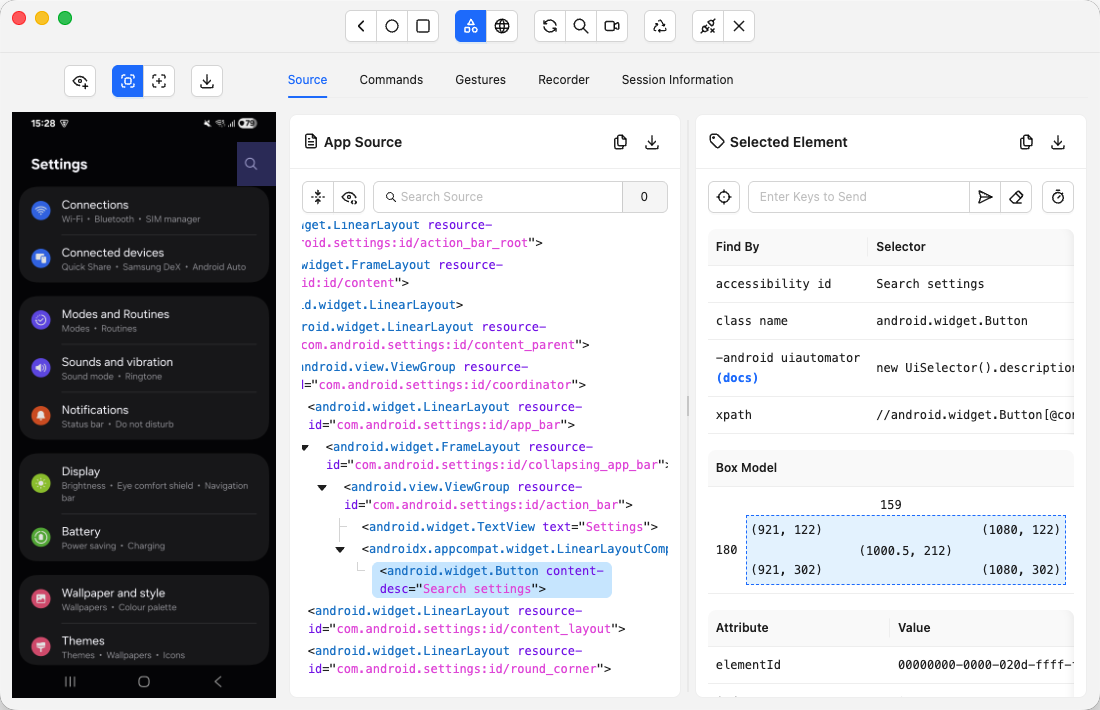
So the trap is subtle. A new framework makes the loud cost go away on day one and quietly keeps the expensive one. Teams feel the relief, ship a clean suite, and then meet the same red wall on the next redesign. The framework changed. The thing the test points at did not.
A faster or simpler framework changes how you pay the maintenance bill. It does not cancel it. Any tool that binds tests to selectors or hard-coded flows still breaks when the UI moves.
5 Best Appium Alternatives at a Glance
The right alternative depends on your stack. Here is the shortlist:
- Pie for teams whose main cost is test maintenance and who want a suite that adapts to UI changes on its own.
- Maestro for fast, low-maintenance coverage across iOS, Android, React Native, Flutter, and web.
- Detox for pure React Native apps that need reliability.
- Espresso and XCUITest for single-platform teams that want native speed.
- Cloud device labs for scale and real-device coverage.
Appium itself is still the most flexible option here. Created in 2012 and maintained by the OpenJS Foundation, it drives native, hybrid, and web apps across iOS, Android, Windows, and more, in any language, without touching your app. If that breadth is what you need, nothing on this list beats it. For most teams, though, breadth is not the bottleneck. Maintenance is.
We build mobile test infrastructure, so we judged each option on cost of ownership over a release cycle, not a feature checklist. Three things did most of the deciding. Setup effort, platform reach from one definition, and what breaks when the UI changes. Capability claims come from each tool’s own docs; pricing reflects published rates at the time of writing.
1. Pie: Tests That Maintain Themselves
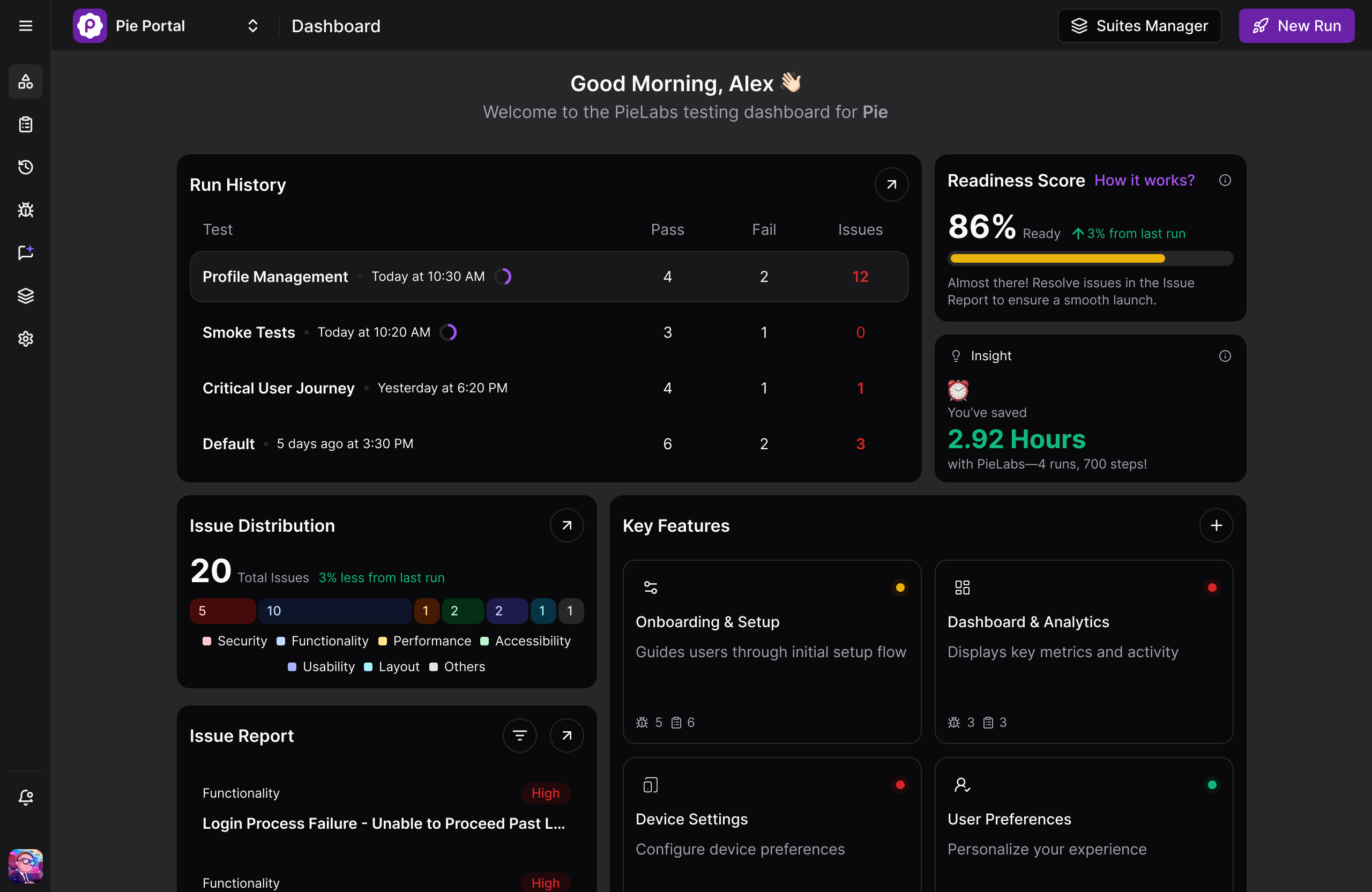
Pie takes a different route to the same problem. Instead of scripting tests against selectors and maintaining them by hand, this autonomous QA platform has agents discover your app, write the end-to-end suite, and adapt it when the UI changes, so critical flows keep passing without anyone re-pointing them. Pie runs across web and native iOS and Android.
Selector-based frameworks still earn their place for low-level control and complex custom logic. But when the bottleneck is keeping a mobile suite green through constant UI change, that is the cost Pie goes after directly.
Pie is not the only tool going after that cost. A growing class of AI testing platforms attacks selector maintenance too, whether through self-healing locators or plain-English authoring like testRigor. Pie’s difference is how early the AI acts. It does not wait to repair a locator you wrote. Its agents discover the flows, generate the suite, and identify elements by sight, so there is no locator to maintain in the first place.
Three things make that work:
- Autonomous discovery explores your app, maps real user flows, prioritizes the high-risk ones like checkout and login, and generates the suite, so nobody hunts for an accessibility ID.
- Self-healing, vision-based execution identifies elements by what the user sees, their label, shape, and position, so a renamed ID or a shifted layout does not turn the suite red. It is the exact failure mode that makes mobile E2E tests flake.
- Plain-English authoring lets you describe the specific flows you care about in natural language and import existing tests, so the cases only you know about still get covered.
Best for: Teams spending real hours on selector maintenance who want mobile coverage that survives redesigns without manual repair.
Not for: Teams that need scripted, low-level control over a specific native API, where a code framework fits better.
Test Without the Selector Tax
Watch Pie discover your critical flows and generate a self-healing iOS and Android suite. No selectors to maintain.
Book a Demo2. Maestro: Fast Setup, Low Maintenance
Maestro is the most popular Appium alternative for teams that want speed and simplicity, using a declarative YAML flow syntax instead of code and handling waits and retries automatically. Built by the team at maestro.dev, it supports Android, iOS, React Native, Flutter, and web from a single tool, and its built-in tolerance for asynchronous UI makes flows far less flaky than a naive Appium script.
The trade is flexibility for ease. You write flows in YAML rather than in a general-purpose language, which is faster to learn but less expressive when you need complex logic or custom integrations. Maestro is open source and free to run locally, while its managed cloud for parallel runs on hosted devices is priced per device (around $250 per device per month for mobile at the time of writing), so scale carries a cost. We compare it directly in Pie vs Maestro vs Mobile Next.
It still asks for upkeep, though. Flows reference UI text and IDs, so a redesign that changes labels or structure still means editing YAML by hand. Lower maintenance than Appium, same category of maintenance.
Best for: Teams that want a reliable cross-platform mobile suite running quickly without a dedicated automation team.
Not for: Teams that need complex custom logic, deep language integrations, or a suite that survives redesigns untouched.
3. Detox: Gray-Box Testing for React Native
Detox is the strongest Appium alternative for pure React Native apps, because it is a gray-box framework that synchronizes with the application’s internal state instead of polling the UI from outside. Originally built and open-sourced by Wix, Detox knows when the app is idle (no pending network requests, animations, or timers) and only then runs the next step, which removes a whole class of timing flakiness that black-box tools like Appium fight constantly.
That synchronization is Detox’s superpower and its boundary at the same time. Because it builds native test code into your app and hooks into the JavaScript runtime, it is centered on React Native rather than the arbitrary native or hybrid stacks Appium drives. It supports both iOS and Android, but the whole experience is organized around the React Native workflow.
The maintenance caveat still applies. Detox tests are code that targets test IDs, so structural UI changes and renamed identifiers still require manual fixes, just fewer flaky ones in between.
Best for: React Native teams whose top priority is a stable suite with less retry tuning than Appium demands.
Not for: Teams on native or hybrid stacks, or React Native teams that also need broad platform reach beyond the RN workflow.
4. Espresso and XCUITest: Native Speed
Espresso and XCUITest belong in one entry because they are a single strategy split across two platforms. Going native means dropping the cross-platform layer and using each vendor’s own framework, Espresso on Android and XCUITest on iOS, so a cross-platform team runs both rather than choosing between them. Espresso is Google’s Android framework and auto-synchronizes test actions with the UI thread. XCUITest is Apple’s iOS framework, built directly into Xcode. Both are the fastest, most reliable way to test their own platform, and Appium drives these very frameworks under the hood through a WebDriver-compatible layer, so going native cuts out that translation entirely.
The two work differently up close. Espresso runs in-process with the app under test, which is how it gets direct UI-thread synchronization. XCUITest runs as a separate test-runner process that drives the app through the accessibility tree. Both are faster and steadier than routing the same actions through Appium’s WebDriver bridge.
The cost is breadth. Each framework covers exactly one platform, so supporting both iOS and Android means maintaining two separate test suites in two language ecosystems (Kotlin or Java for Espresso, Swift or Objective-C for XCUITest). That duplication is the opposite of Appium’s one-suite-many-platforms promise, and it is why cross-platform teams often accept Appium’s overhead in the first place.
The differences between iOS and Android testing explain why sharing logic across the two is harder than it looks. Matchers are still selectors by another name, so the redesign tax is still on the bill, now in duplicate.
Best for: Single-platform teams that want raw speed and reliability, or orgs already organized per platform where mobile engineers own quality in their own language.
Not for: Cross-platform teams that need code reuse across iOS and Android from one definition.
5. Cloud Device Labs: Scale on Real Devices
Cloud device labs are not a replacement for Appium’s scripting model but for the infrastructure around it, giving you thousands of real iOS and Android devices on demand instead of a fragile local device farm. Platforms like BrowserStack, Sauce Labs, and LambdaTest run your existing Appium (or Espresso and XCUITest) tests across a managed grid, which solves the “works on my device” problem and the pain of maintaining physical hardware.
The important nuance is that most cloud labs still execute Appium scripts. They remove the device-management burden, parallelize your runs, and add dashboards and video, but they do not change the fact that your tests are selector-bound and break on UI changes. You are renting reliable infrastructure, not escaping maintenance. For many teams that is exactly the right purchase, especially when device coverage across OS versions is the bottleneck. A cloud lab composes with everything else on this list, including autonomous platforms.
Best for: Teams whose tests are fine but whose device infrastructure is not, or who must certify against a long matrix of real devices.
Not for: Teams whose bottleneck is writing and maintaining tests, since the grid runs your scripts without reducing the upkeep.
5 Appium Alternatives Compared
The table lines up the main alternatives against Appium on the dimensions that decide real cost of ownership. The first three rows show where they differ on setup and reach. The last two show where most of them are identical, and where the cost actually lives.
| Dimension | Appium | Pie | Maestro | Detox | Espresso / XCUITest |
|---|---|---|---|---|---|
| Approach | Black-box, WebDriver | Agent-driven, vision-based | YAML flows | Gray-box, synced | Native frameworks |
| Platforms | iOS, Android, Win, web | iOS, Android, web | iOS, Android, RN, Flutter, web | iOS, Android (RN) | One platform each |
| Setup effort | High | Low (managed) | Low | Medium | Medium |
| Self-heals on UI change | ✗ | ✓ | ✗ | ✗ | ✗ |
| Redesign upkeep | Manual locator fixes | Automatic re-identification | Manual YAML edits | Manual ID fixes | Manual matcher fixes |
The bottom two rows are the honest part of the comparison. Every code-and-selector option still fails when the UI moves, which is the exact cost autonomous testing is built to remove.
How to Choose the Right Appium Alternative
Choose your Appium alternative by matching the tool to your actual bottleneck, not to a feature list. Most teams pick the wrong tool because they optimize for authoring speed when their real pain is maintenance, or for flexibility they never use. Work through these in order:
- Your bottleneck is maintenance and broken selectors: Look at an autonomous platform like Pie. This is the most common real bottleneck on mature mobile teams.
- Setup is the pain, and you want fast multi-platform coverage: Pick Maestro. Lowest barrier to a reliable cross-platform suite.
- You ship a pure React Native app and need reliability: Pick Detox. Its synchronization model removes timing flakiness Appium fights manually.
- You are single-platform and want maximum speed: Pick Espresso or XCUITest. Native frameworks are fastest, at the cost of two suites for two platforms.
- Your tests are fine but your devices are not: Add a cloud device lab. It scales your existing tests across real hardware.
- You need any language, the widest platform reach, and deep native control: Stay on Appium. Its flexibility is still unmatched.
The pattern across the list is simple. Four of the options change how you author and run tests, while only one changes what a test is bound to. If you have already switched frameworks once and your suite still goes red on every redesign, that is your signal. The problem is the selector model, not the framework.
Picking a Tool You Won’t Outgrow
Your best Appium alternative in 2026 is the one that matches your bottleneck. Maestro for simplicity, Detox for React Native, Espresso and XCUITest for native speed, cloud labs for device scale, Pie for maintenance.
Appium stays the most flexible of the group. For teams that genuinely need that flexibility, leaving it would be a downgrade.
What the first four share is the selector tax. Bind your tests to locators, and you repair them every time the UI moves. Those hours drift, quietly, from shipping features to fixing tests.
Switching frameworks changes how you pay that tax. It does not cancel it. The fastest teams stopped asking which Appium alternative to buy and started asking why they were maintaining selectors at all.
Pie’s answer is to stop binding tests to selectors, so the redesign that used to mean a red suite becomes a quieter afternoon.
Stop Maintaining Selectors
Get a self-healing mobile suite that adapts to UI changes instead of breaking on them, across native iOS and Android.
Book a DemoFrequently Asked Questions
Eight years building search and delivery systems at Amazon. The kind of scale where flaky tests block billion-dollar releases. Now CTO at Pie, building AI agents that adapt when your UI changes. LinkedIn →