How to Test Login and Authentication Flows End-to-End
A passing login test checks one state of eight. Test wrong passwords, lockout, session expiry, refresh, and logout end to end, and see what session reuse hides.

In CI, a saved login session is as old as the run. Playwright’s storageState and Cypress’s cy.session() sign in once and hand that session to the tests that follow. In a parallel run, some test is using it nearly all the time. The design buys speed. It also means the suite rarely watches a session expire.
For tests that only need a signed-in user, the trade is right. The login itself ends up resting on one green happy-path check. Here is how to test the states a shared session skips.
What you’ll learn
- Why a passing login test covers one state out of eight
- What to assert in each login state
- Which tests should reuse a saved session, and which must own one
- A Playwright logout test, and the redirect that can fail a correct logout
What a Green Login Test Leaves Out
A green login test proves one transition. Correct credentials go in, and a signed-in page comes out. Of every state an authentication system can be in, that is the one least likely to surprise anyone, because it is the path the team itself walks every day.
The weaknesses that reach production sit in the other states. Three of the failures OWASP lists under A07:2025 Authentication Failures map straight onto states a happy-path test never visits.
- No working lockout: Automated, scripted attacks such as brute force are not quickly blocked.
- Broken logout and expiry: Sessions or single sign-on tokens are not invalidated at logout or after a period of inactivity.
- Session fixation: The session identifier from before login is reused after a successful login.
None of those shows up in a test that types the right password and checks for a dashboard.
What to Assert in Each of the Eight Login States
Write the states down before you write a single assertion. Each one below is its own test case with its own expected result, and a suite with only a happy-path test covers the first row.
| State | How the test gets there | What to assert |
|---|---|---|
| Valid login | Correct credentials | Lands on the intended page, session cookie flagged HttpOnly and Secure, session ID different from any issued before login |
| Wrong password | Real username, wrong password | Same message and status code as an unknown username, and no session cookie |
| Unknown username | A username that does not exist | A response identical to the wrong password, so the form never confirms who has an account |
| Malformed input | Blank, overlong, or badly formatted fields | Client validation fires, and the server rejects the same input sent to it directly |
| Lockout | Repeated failures on one account | Past your documented threshold, even the correct password gets the generic error, and the lock lifts on schedule or through recovery |
| Session expiry | Idle or absolute timeout passes | Next authenticated action asks for a fresh sign-in, and returns to the original page afterward if your app keeps it |
| Token refresh | Access token nears expiry | Refresh happens without a prompt, and with rotation on, a refresh token that was already used is rejected |
| Logout | User signs out | The old session cookie, replayed afterward, gets no authenticated data back |
Treat expiry and refresh as first-class rows. OWASP’s Session Management Cheat Sheet gives common idle timeouts of 2 to 5 minutes for high-value applications and 15 to 30 minutes for low-risk ones, and makes the server responsible for enforcing them. Sessions break there long after login succeeded. The default suite setup in the next section seldom gets that far.
Three more states fail differently and have separate guides:
- Second factor: Our guide to testing 2FA and OTP flows covers generating or fetching the code instead of reading it off a screen.
- Identity provider: The redirect to Google or Okta and back is in our guide to testing OAuth and SSO logins.
- Emailed links: Verification and reset links come from an inbox, which our guide to testing email verification and password reset makes deterministic.
Which Tests Reuse a Session and Which Own One
Reuse should be the default for any test that only needs a signed-in user. Playwright’s authentication guide has you log in once in a setup project and save the browser state with storageState. Cypress’s cy.session() caches cookies, localStorage, and sessionStorage, then restores them between tests. Playwright’s saved state leaves sessionStorage out, and its guide gives a snippet for apps that keep the token there.
Where a Shared Session Hides Expiry
In a parallel run, no test leaves the shared session alone long enough to idle out, and few runs outlast an absolute timeout. The exception is a state file cached between CI runs. It can outlive its session, and Playwright’s guide tells you to delete the stored state when it expires.
Cypress goes a step further. When a restored session fails its validate check, cy.session() runs setup again and recreates it. The suite logs itself back in instead of showing you what a user sees when a session ends.
Why One Shared Account Can Stall a Run
On one app we tested, each account could hold only one live session. The moment a second test signed in with the shared account, the first was logged out. From then on, the run could only go one test at a time.
Playwright’s guide recommends one account per parallel worker for tests that modify server-side state. When the login sits behind a one-time code, that pool is harder to build, because each account has to pass its own code before its session can be saved. Split the suite by what each test is about.
| Test | Where its session comes from | Why |
|---|---|---|
| Needs a signed-in user | The saved state | Login is not what it tests, and reuse keeps the suite fast |
| Happy path and rejections | An empty browser context that drives the form | The form is what the test checks |
| Lockout | A throwaway account nothing else signs in with | A locked account fails every test that shares it |
| Expiry, refresh, and logout | Its own login, never the shared saved state | Ending a shared session signs out every parallel test using it |
Still Scripting the Sign-In Form?
Store one test login. Spend your hours on expiry and logout.
How to Test a Login Flow End-to-End, Step by Step
The steps are framework-neutral and hold in whichever end-to-end testing software runs your suite. The code uses Playwright.
- Seed the accounts: Create the accounts a run needs through an API, and give each state that changes an account its own one. On another app we tested, we cached the session after the first login and shared that one account across the run. It was blocked three or four tests in, apparently because that one account was signed in more than once. Every test after that failed with it. Our guide to setting up a dedicated test identity for each role covers the login limits a parallel run hits.
- Start clean: Run every login-state test from an empty browser context. In Playwright,
test.use({ storageState: { cookies: [], origins: [] } })opts a file out of the saved session. - Assert the happy path three ways: Check the redirect, the session cookie, and one protected API call. The cookie should carry the
HttpOnlyandSecureattributes. Its value should differ from any session ID issued before login, which is the fixation check. - Compare the rejections: Submit a wrong password for a real user and any password for a user that does not exist, then assert both come back with the same message and status code. OWASP’s Authentication Cheat Sheet asks for one generic error whatever the cause, and warns that a different status code or response time can give the answer away. Send malformed input straight to the endpoint as well, since a check that only runs in the browser protects nothing on the server.
- Trip the lockout on purpose: Fail the throwaway account up to your documented threshold, then sign in with the correct password. The form cannot say the account is locked, because the same cheat sheet puts locked accounts under its generic-error rule. On a compliant app, the sign that the lock engaged is the correct password failing with the same message and status code as a wrong one. Then check that it lifts after the lockout duration or through the recovery path.
- Expire the session on demand: Never wait out a 30-minute timeout. Add a test-only endpoint that expires a session or an access token, and keep it out of production builds. Call it mid-test, then assert that the next authenticated action asks for a fresh sign-in, or that a near-expiry token refreshes without a prompt.
- Replay a used refresh token: If you rotate refresh tokens, send one that was already used and assert the server rejects it. RFC 9700 section 4.14.2 has the server revoke the active refresh token when that happens. Assert that the newest one stops working too.
- Prove logout on the server: Save the session cookie, log out, then replay the old cookie against a protected endpoint. A logout that only deletes the cookie in the browser passes every UI assertion and fails this one, which is the test OWASP’s logout testing guide describes.
Step 8 needs no test-only hook, but the replay has one trap. Playwright’s request context follows redirects by default. If your app answers a signed-out call with a redirect to /login, the replay follows it to the login page and reads 200.
We ran this test on 26 October 2026 (Playwright 1.64.1, Node.js 22.21.0, Microsoft Edge 156) against four builds of a small app, pairing a server-side or cookie-only logout with a 401 or a redirect for signed-out calls. Without maxRedirects: 0, the test failed a correct server-side logout with Expected: 401 and Received: 200, the same error a live session gives. The version below passed both correct logouts and failed both cookie-only ones.
// logout.spec.ts: logout has to end the session on the server, not only in the browser.
import { test, expect } from '@playwright/test';

test.use({ storageState: { cookies: [], origins: [] } }); // this file never uses the shared session

test('logout invalidates the session on the server', async ({ page, context, playwright }) => {
  await page.goto('/login');
  await page.getByLabel('Email').fill(process.env.E2E_LOGOUT_EMAIL!);
  await page.getByLabel('Password').fill(process.env.E2E_LOGOUT_PASSWORD!);
  await page.getByRole('button', { name: 'Sign in' }).click();
  await expect(page).toHaveURL(/\/dashboard/);

  const signedIn = await context.storageState(); // the live session cookie

  await page.getByRole('button', { name: 'Log out' }).click();
  await expect(page).toHaveURL(/\/login/);

  // Replay the old cookie from a separate client, the way a stolen cookie would arrive.
  const replay = await playwright.request.newContext({
    baseURL: process.env.BASE_URL,
    storageState: signedIn,
  });
  // maxRedirects: 0 keeps a redirect to /login from reading as a 200.
  const res = await replay.get('/api/me', { maxRedirects: 0 }); // any endpoint that needs a session
  expect([401, 302]).toContain(res.status()); // 302 if signed-out calls redirect to /login
  await replay.dispose();
});
Run the happy path and one rejection on every pull request, and the full set nightly and before a release. Authentication sits on the list of critical paths any end-to-end testing strategy covers first, so a broken login smoke test should block the merge.
Where Pie Fits in a Login Suite
Eight state tests are eight places a login redesign can break. Move the Sign In button or relabel the email field, and the tests that drive that form fail on the same morning. The authentication behind them still works fine.
Pie, our agentic testing platform, executes web tests vision-first. Make the same change, and Pie can still pick out the button or the field by where it sits and the job it does in the form, much as a new teammate would on an unfamiliar screen. A restyled form is not automatically a broken suite. For login testing, three parts matter.
- Sign-in: Pie signs in with a dedicated test credential you store in its Credential Manager, and drives the visible login screen on compatible flows.
- Saved state: For web apps, a configured saved state can carry the session across tests. Tests that only need a user then skip the form.
- Other states: You describe them as plain-English tests, such as entering a wrong password and checking that the message never says which field was wrong. For expiry and refresh, a configured script can call your test-only expiry endpoint during the run. The endpoint has to be reachable from the run and accept the script’s credentials.
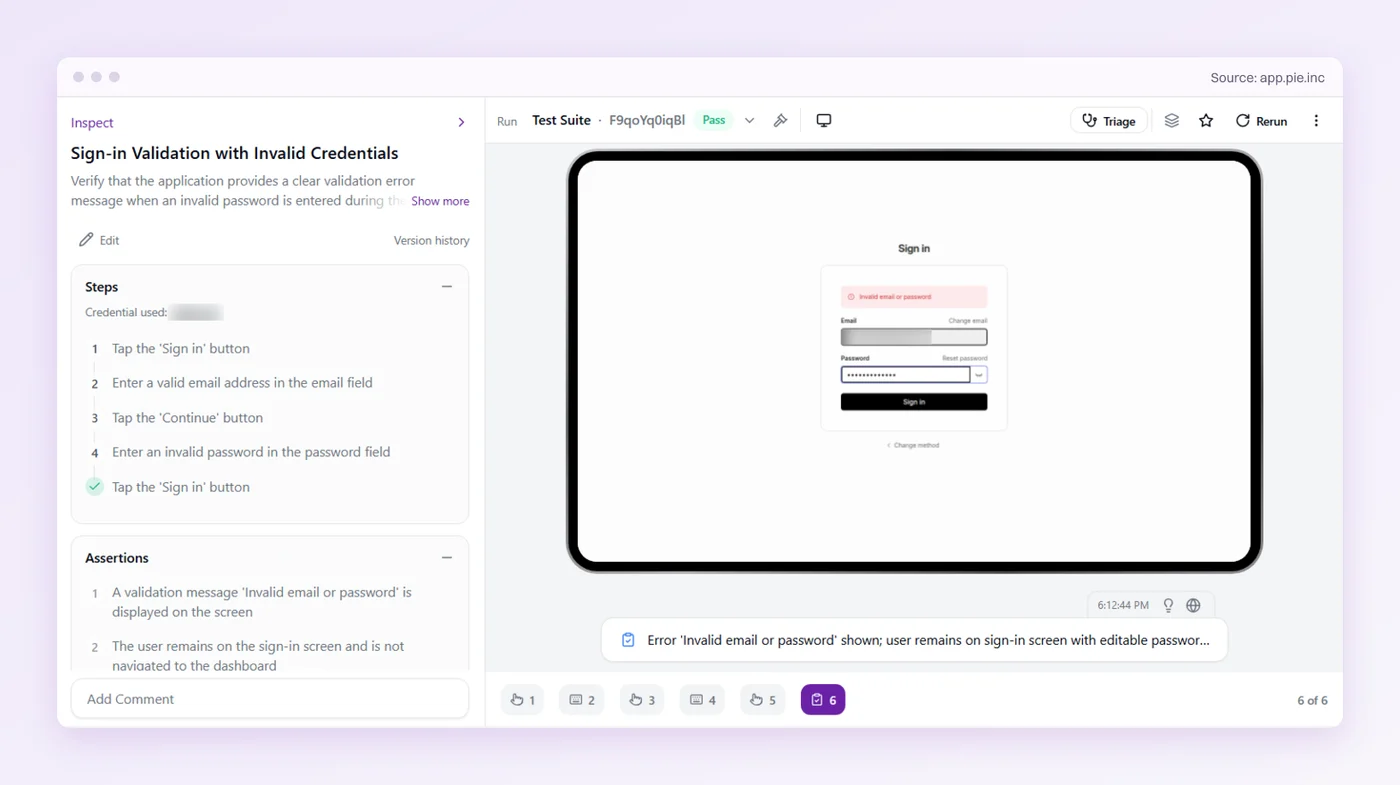
Your team keeps the test accounts and the expiry hook, and writes supported tests without maintaining selectors for a screen the designers keep changing.
Share the Session, Except With the Login Tests
Keep the saved session for most of the suite. It holds runtime down and keeps the login screen out of tests that were never about logging in.
A session shared from the top of the run will not show you its own expiry, or what happens after logout. Those belong to tests that sign in for themselves, on accounts nothing else touches.
Write those tests once, and Pie can pick out the fields again when the login screen is restyled around them. A green login run then covers eight states instead of one.
Eight States. One Login Suite.
You keep the accounts and the expiry hook. Pie runs the tests you write.
Frequently Asked Questions
Treat login as eight states and give each one its own test. A happy-path test reaches only the valid sign-in.
Drive the rejections and the lockout from a clean browser, and prove expiry and logout at the server, so a stale page cannot pass for a live session.
No. storageState is a snapshot of cookies and local storage, plus opt-in extras such as IndexedDB, taken when you saved it. Each new context loads it unchanged, and sessionStorage is never saved.
Any refresh comes from your app's own code. Assert it in a test that owns its session.
Yes. In CI the saved session is created when the run starts and stays in use. The rest of the suite rarely sees it expire, refresh, or end.
Keep a few login tests that start from a clean browser context on their own account and walk those states on purpose.
Do not wait the timeout out. Add a test-only endpoint that expires a session on demand, and keep it out of production builds.
Call it from the test with Playwright's request context, then assert that the next authenticated action lands on the login page.
Save the session cookie, log out, then replay the old cookie from a separate client against an endpoint that needs a session. Turn off redirect following, or a bounce to the login page reads as 200.
A 200 with data means the session is still alive on the server.
Use a throwaway account that no other test signs in with. Fail it up to your documented threshold, then submit the correct password and assert it is refused with the same generic error.
Check that the lock lifts on schedule or through the recovery path.
Because a different answer for an unknown username tells an attacker which accounts exist. OWASP recommends one generic error whatever the cause.
Test it by submitting both failures and asserting the message and the status code match exactly.
Yes, on compatible flows. Pie signs in with a dedicated test credential and drives the visible login screen, and you can describe states like a wrong password or a logout as plain-English tests.
Expiry cases need a test-only hook that a configured script calls during the run.
Eight years building search and delivery systems at Amazon. The kind of scale where flaky tests block billion-dollar releases. Now CTO at Pie, building AI agents that adapt when your UI changes. LinkedIn →