Best End-to-End Testing Tools in 2026
The best end-to-end testing software in 2026, compared on maintenance cost rather than feature count, with sourced ratings, pricing, and trade-offs.

Every end-to-end testing tool passes the demo. You record a login flow, it goes green, and the vendor slide says 90% coverage in an afternoon.
The tool gets decided six months later. Your UI has changed a few hundred times, half the suite is red on a diff nobody thinks touched it, and an engineer is spending Friday afternoon working out which selector moved.
So compare on the maintenance curve, what the suite costs you per sprint as the product changes underneath it. On that axis the tools split cleanly, and most “best of” lists never mention it. Eight tools follow, four free open-source frameworks and four commercial platforms, with what each does well, where it bills you later, and five questions that narrow the field fast.
What you’ll learn
- A five-question framework for picking an end-to-end testing tool
- Strengths, trade-offs, and sourced ratings for eight E2E tools
- Why the maintenance curve, not the feature list, decides the winner
- Who each tool is for, including who Pie is not for
Best End-to-End Testing Software at a Glance
An end-to-end testing tool drives a complete user journey through a real application, from the first click to the final result, the way a person would. The eight below split into two groups that get compared as if they were one market. Open-source frameworks are free to license and put every test and every repair in your engineers’ hands. Commercial platforms charge a subscription and take back some of that work, usually the authoring, sometimes the repair.
Read the table to shortlist, then read the per-tool sections for the trade-offs.
| Tool | Type | Covers | Test creation | Maintenance model | License |
|---|---|---|---|---|---|
| Pie | Autonomous platform | Web, iOS, Android | Auto-generated by AI agents | Self-healing, no selectors | Paid, custom |
| Playwright | Open-source framework | Web, API | Code, plus AI agents and MCP | Manual selectors, no self-healing | Free, Apache 2.0 |
| Cypress | Open-source framework | Web | Code, JS/TS | Manual selectors | Free, MIT (paid cloud) |
| Selenium | Open-source framework | Web | Code, multi-language | Manual selectors | Free, Apache 2.0 |
| WebdriverIO | Open-source framework | Web, mobile | Code, WebDriver + Bidi | Manual selectors | Free, MIT |
| testRigor | AI-native platform | Web, mobile, API | Plain-English statements | Plain-English element references | Free tier, then quote |
| mabl | Low-code platform | Web, API, mobile | Low-code record + GenAI | Auto-healing, selector model | Paid, from ~$500/mo |
| ACCELQ | AI-native platform | Web, API, mobile, desktop | Codeless flow design | AI self-healing, selector model | Paid, quote-based |
Licensing and pricing verified as of August 2026. Commercial plans change often, so confirm with the vendor before you budget.
How to Choose an End-to-End Testing Tool
You choose end-to-end testing software by matching it to your tightest constraint, not by counting features. The tool with the longest feature list is rarely the one that removes your biggest bottleneck. Answer these five questions before you start a single trial. Your answers eliminate most of the list before you open a tab.
- What do you need to cover? Web only, mobile only, or both. This single question rules out half the market. Cypress runs its tests inside the browser and currently does not automate native mobile apps. Its own documentation lists missing native and mobile support as a current trade-off. Know your platform target before you shortlist.
- How often does your UI change? This is the hidden cost driver and the whole point of the maintenance curve. Selector-based tools break when the UI changes, so a high-churn product pays that bill every sprint while a stable product barely notices it.
- What can your team actually write and maintain? A code-first framework is wasted on a team without engineers to own it. A low-code recorder can frustrate a strong dev team that wants version-controlled tests.
- How does it fit CI/CD? The suite has to run on every build, headless, in parallel, fast enough that developers do not learn to ignore it.
- What is the total cost of ownership? “Free” frameworks still cost engineering hours. The real number is license plus maintenance, and maintenance is the line item teams forget to price.
Playwright now leads Cypress on both usage and satisfaction in the State of JS 2025 testing results, taking the Most Adopted spot. Adoption alone should not decide your shortlist though, because the winner still hands you the same locator to repair.
8 Best End-to-End Testing Tools in 2026
Eight end-to-end testing tools worth knowing in 2026, ordered by where they sit on the maintenance curve, not by hype. Each entry names what the tool does well, where it costs you later, and who should not use it. Four are free open-source frameworks and four are commercial platforms, which is the first fork in any real shortlist. Pie leads because it removes the maintenance problem the rest of the list spends engineering hours fighting, then we move through the frameworks and the platforms in turn.
We scored each tool against the five questions above, weighted toward total cost of ownership over feature count. Ratings come from G2, Capterra, and Gartner Peer Insights as of August 2026, and pricing from each vendor’s published plans.
1. Pie: Autonomous, Vision-Based End-to-End Testing
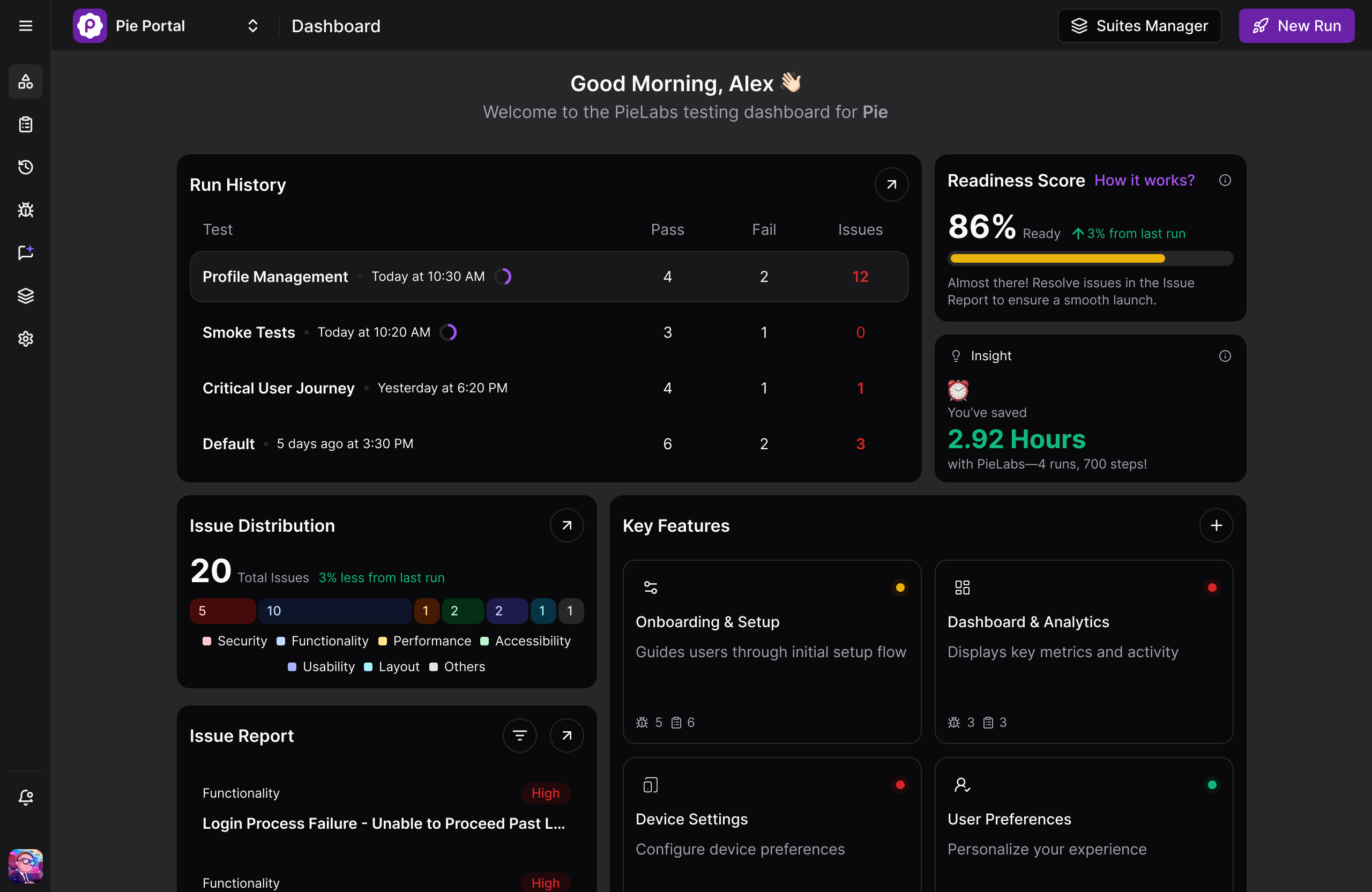
Pie takes a different approach from everything below. Instead of writing tests against selectors, our AI agents explore your app, map the real user journeys, and generate end-to-end coverage automatically, then execute through the rendered screen using vision rather than element IDs. Because nothing is anchored to a selector, a UI change does not turn the suite red, and there is no authoring step to staff.
Our autonomous discovery prioritizes high-risk paths like auth and checkout on its own, and our self-healing, vision-based execution keeps running when a redesign renames classes. The reach is the differentiator. One behavior-based definition runs end-to-end across native iOS, native Android, and the web, the place where Cypress and Playwright both stop.
Ratings: 5.0/5 from 3 reviews on Gartner Peer Insights.
Strengths:
- Autonomous discovery maps real user journeys and generates coverage with no test authored by hand
- Vision-based execution identifies elements by what the user sees, so class renames and DOM refactors do not break the suite
- One definition covers web, native iOS, and native Android, removing the duplicate mobile suite most E2E stacks require
Trade-offs:
- Not a drop-in replacement for a unit-testing framework or a performance harness
- Smaller ecosystem than decade-old projects like Selenium, as with any newer platform
”The time between having a release candidate ready and being fully tested has gone from two to three days to a few hours.”
— Philip Hubert, Director of Mobile Engineering, FiRead the full Fi case study.
Pricing: Platform subscription. Contact us for current pricing.
Best for: Teams whose bottleneck is test maintenance, not test capability, where engineers spend more sprint time repairing broken selectors than catching real bugs.
Not for: Unit testing or performance testing.
Stop Maintaining Selectors
Point Pie at your app and get a self-healing suite in about 30 minutes.
Book a Demo2. Playwright: The Modern Web Default
Playwright, built by Microsoft, is the common default for new end-to-end web projects in 2026. Its defining advantage is built-in auto-waiting. Before it clicks, Playwright waits for the element to be attached, visible, stable, enabled, and ready to receive events, which removes the most common source of timing flake without hand-rolled sleeps.
One API drives Chromium, Firefox, and WebKit across TypeScript, JavaScript, Python, Java, and .NET. Three features carry its debugging story. The trace viewer replays each step with DOM snapshots and network logs, UI mode gives a watch-and-step runner, and codegen records interactions into a starting script.
Authoring is no longer purely manual either. The 1.59 release in April 2026 added an agent-oriented toolchain, with MCP support and accessibility-tree-first execution that lets AI models explore an app and generate real Playwright tests you can commit and run in your existing CI. That closes most of the authoring gap against the commercial platforms below.
The mechanism deserves precision here, because this is the closest a free framework gets to leaving CSS selectors behind. Playwright’s agent tooling reads the accessibility tree, so its locators target roles and accessible names, which hold up better than a brittle XPath.
What it does not close is repair. The accessibility tree is still a structural contract with the DOM. Rename a button’s accessible name or change its role and the locator breaks, and the generated test is still code your team owns and fixes. Auto-waiting retries a locator until it appears, which solves timing, not structural change.
Ratings: 4.8/5 from about a dozen reviews on G2.
Strengths:
- Auto-waiting eliminates the most common source of flaky tests without manual waits
- Multi-browser, multi-language, and multi-origin from one codebase, with Safari covered via WebKit as a first-class target
- Built-in parallelism for free, where large Cypress suites reach for a paid cloud
Trade-offs:
- Agent-generated tests still land as code your engineers review, own, and repair
- A redesign that changes DOM structure still requires manual locator fixes, just fewer than Selenium demands
- Steeper initial learning curve than Cypress for front-end developers new to its out-of-process architecture
Pricing: Free, Apache 2.0 license. No paid tier.
Best for: New web projects, polyglot teams, and suites that need Safari coverage, multi-tab flows, or free parallelism at scale.
Not for: Teams that need native mobile app testing, since Playwright is web and API only.
3. Cypress: The Developer Experience Favorite
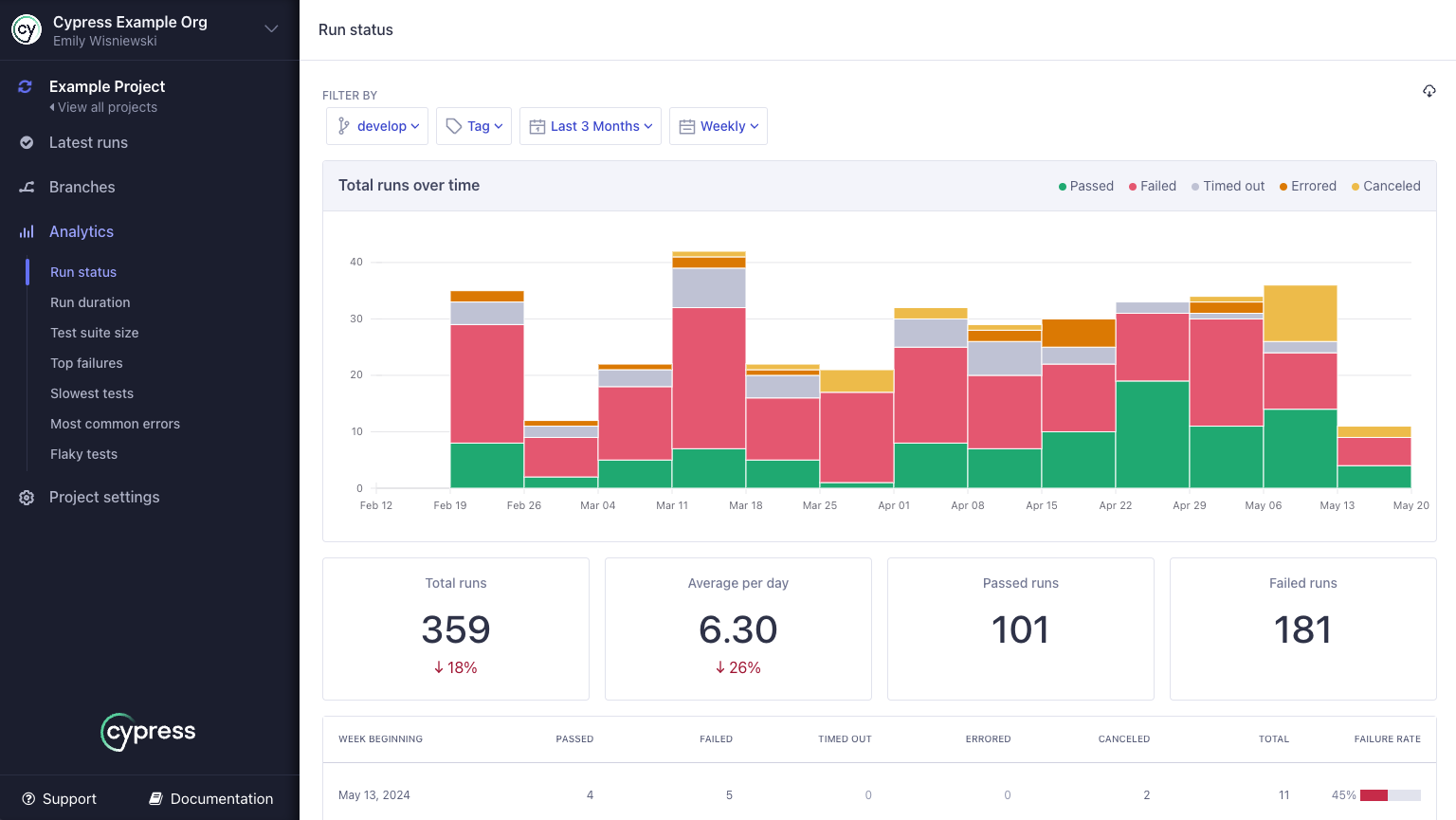
Cypress runs inside the browser alongside your application, which gives it direct access to the DOM, network layer, and window object. The result is a fast feedback loop, time-travel debugging that lets you step back through each command with screenshots, and an interactive runner many front-end developers like working in.
For end-to-end tests on a single-origin web app, Cypress is one of the more comfortable tools to live in day to day. Its boundary is worth stating precisely: Cypress runs its tests in the browser and currently does not automate native mobile apps, per its own documented trade-offs, and cross-origin and multi-tab handling, while improved, still carries caveats compared with Playwright.
Ratings: 4.7/5 from 107 reviews on G2. 4.7/5 on Capterra.
Strengths:
- Time-travel debugger and in-browser runner are a standout for diagnosing failures fast
- All-in-one: runner, assertion library, mocking, and reporting bundled together
- Gentle learning curve for JavaScript developers, with no separate process or external driver to configure
Trade-offs:
- JavaScript and TypeScript only, so a Python or Java team cannot reuse its language expertise
- Cross-origin and multi-tab support has improved but still trails Playwright’s first-class handling
- Parallelization historically leans on Cypress Cloud, which is paid past the free Starter tier. Free local sharding works but is less polished
Pricing: Free, MIT license for the OSS runner. Cypress Cloud adds a free Starter tier, a Team plan reported around $67-75/month, and a Business plan around $267-300/month, with custom Enterprise pricing above that. Verify current Cloud tiers before you buy.
Best for: Front-end JavaScript teams that prioritize debugging speed, single-origin web apps, and teams already standardized on Cypress.
Not for: Mobile testing, polyglot organizations, or large suites that need free parallelism without a paid cloud.
4. Selenium: The Open-Source Standard
Selenium is the longest-standing browser automation framework and the foundation of the W3C WebDriver standard. The current line is Selenium 4.x, which dropped the legacy JSON Wire Protocol in favor of W3C WebDriver and added Selenium Manager for automatic driver management, so teams no longer hand-manage browser driver binaries. Its strength is reach. It supports more languages (Java, Python, C#, JavaScript, Ruby) and more browsers than anything else, and Selenium Grid scales tests across many machines without a paid cloud.
The cost is upkeep. A week of ownership is mostly driver and Grid maintenance plus fixing the selectors that broke on the last DOM change, which G2 reviewers repeatedly name as the top long-term cost of running it.
Ratings: 4.6/5 from 94 reviews on G2 for Selenium WebDriver. The separate Selenium IDE listing runs around 4.2/5.
Strengths:
- Broadest language support of any web automation tool, so a polyglot team needs no retraining
- Selenium Grid enables true parallel execution across machines without a paid cloud
- Massive ecosystem of community plugins, CI integrations, and training resources
Trade-offs:
- No built-in waiting, so every stability mitigation (explicit waits, fluent waits) is hand-rolled
- Setup complexity is steep for small teams: WebDriver binaries, Grid configuration, capability management
- Test brittleness is the top long-term cost, since DOM changes break suites and finding the broken selector eats hours
Pricing: Free, Apache 2.0 license. Infrastructure and maintenance are the real costs.
Best for: Large, long-lived test estates in polyglot organizations that already staff QA infrastructure engineers.
Not for: Small teams without the bandwidth to assemble and maintain the surrounding infrastructure.
5. WebdriverIO: One Framework Across Web and Mobile
WebdriverIO is the pragmatic choice when a single team owns both web and mobile end-to-end tests and wants one framework across them. It speaks the WebDriver protocol and WebDriver Bidi, and it drives mobile through an Appium backend, so the same test runner and reporting cover a browser flow and a native app flow.
It ships an expressive assertion library, a large plugin and service ecosystem, and first-class CI integration. The trade-off is the same selector dependency the rest of the WebDriver family carries, so putting WebdriverIO next to Selenium changes the packaging and not the maintenance bill. Tests anchor to element IDs, so UI churn is still maintenance you pay for, and the mobile path inherits Appium’s setup and driver upkeep.
Ratings: WebdriverIO has no G2 or Capterra listing. As a fully open-source, community-maintained project, its track record lives on GitHub and Stack Overflow, not a review-aggregator score.
Strengths:
- One framework and one reporting model across web and, via Appium, native mobile
- Standards-based (WebDriver and Bidi) with a broad, actively maintained plugin ecosystem
- Strong CI integration and a large community for a fully open-source stack
Trade-offs:
- Selector-anchored, so it sits on the same maintenance curve as Selenium for high-churn UIs
- The mobile path inherits Appium’s multi-day setup and ongoing driver maintenance
- Configuration surface is large, and the initial setup is more involved than Cypress
Pricing: Free, MIT license.
Best for: Teams that want a single open-source framework spanning web and mobile end-to-end tests under one toolchain.
Not for: Teams that want to escape selector maintenance, or a web-only team that would be better served by Playwright’s simpler setup.
6. testRigor: Plain-English Test Authoring
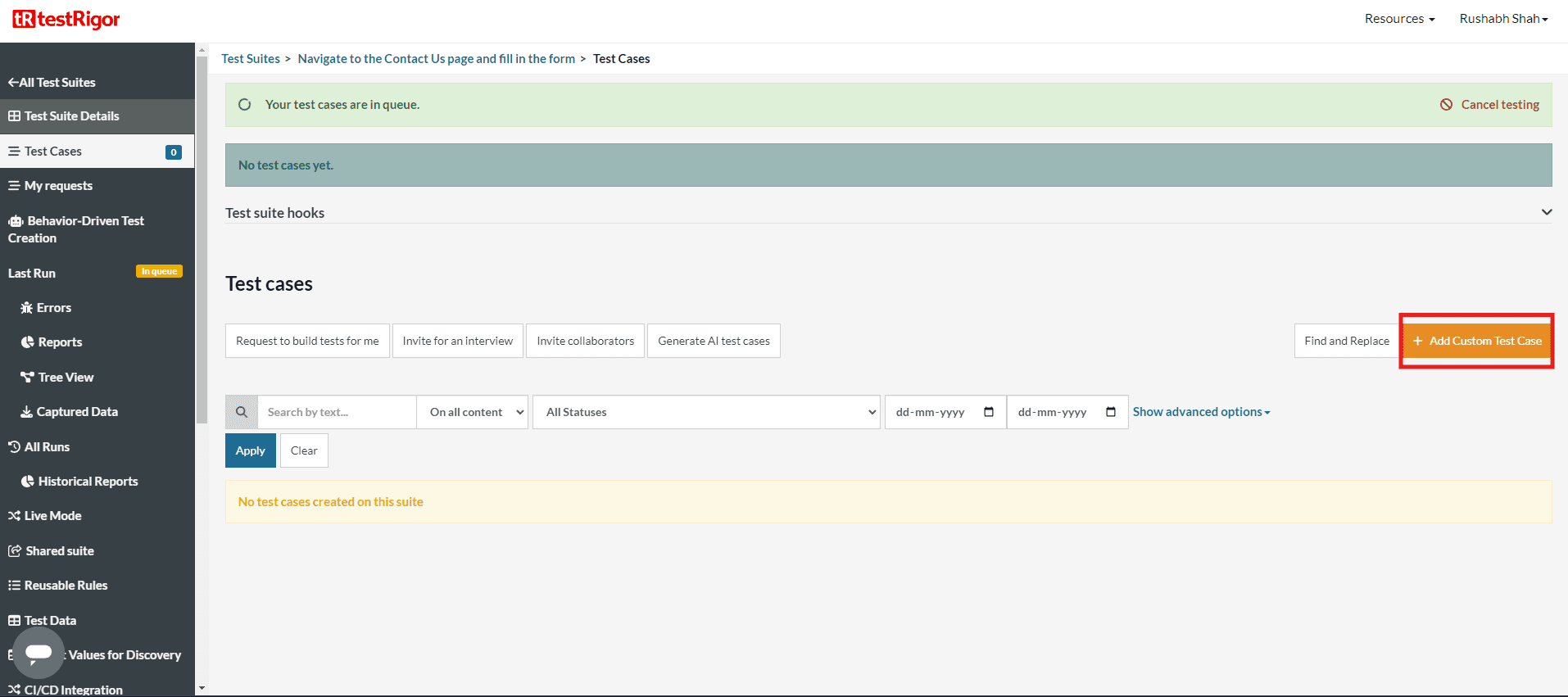
testRigor is where the list crosses from frameworks into platforms. You describe a step the way a person would, “click on ‘Add to Cart’”, and the platform resolves it against the running app instead of binding to a CSS selector or XPath. That drops the authoring skill barrier far enough that non-engineers can build and own regression suites, and it makes tests more durable than selector scripts when the UI shifts.
The distinction against an autonomous platform is worth being precise about, because this is the closest the open field gets to Pie on authoring. In testRigor a human still writes every test, just in English instead of code. Pie generates the suite itself and executes it without a selector layer at all. Both reduce the maintenance bill, at different points in the pipeline.
Ratings: 4.7/5 from 20 reviews on G2.
Strengths:
- Teams with no coding background can build smoke and regression suites within weeks
- Plain-English element references survive minor UI changes that break an XPath
- Reviewers repeatedly call out responsive support and a fast onboarding track
Trade-offs:
- Highly complex or conditional flows can feel constrained, since you work inside the platform’s interpretation layer instead of raw code
- Reviewers report occasional crashes that surface as test failures
- Smaller community than the decade-old frameworks, so there is less public knowledge to draw on
Pricing: Free tier available. Paid plans are priced per parallel infrastructure rather than per test, quoted per team.
Best for: QA teams without strong coding backgrounds, and organizations where non-engineers need to own test authoring.
Not for: Engineering teams that want programmatic control over complex conditional logic, or that lean on a large community knowledge base.
7. mabl: Low-Code End-to-End with Auto-Healing
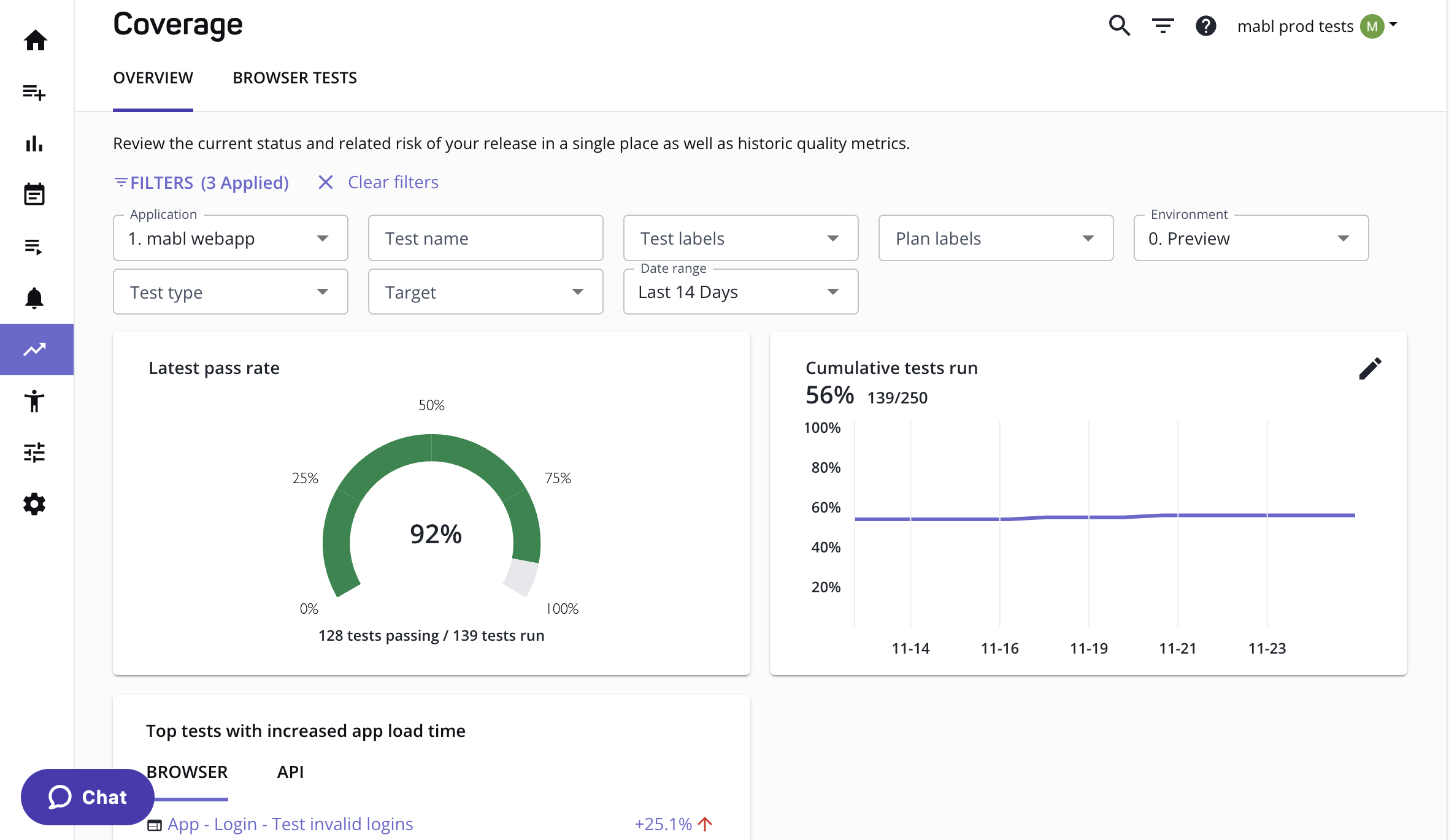
mabl is a low-code end-to-end platform built around recorded tests and auto-healing. When a UI element changes, mabl’s engine finds an equivalent element using alternative attributes and updates the test rather than failing outright. It bundles end-to-end, API, and performance testing with analytics, aimed at teams that want a managed SaaS rather than a framework to assemble.
Auto-healing is consistently its most-praised feature in G2 reviews. Healing operates within the selector model, repairing locators intelligently rather than removing the selector dependency, so it reduces the maintenance bill without eliminating the category.
Ratings: 4.5/5 from about 40 reviews on G2. 4.0/5 from around 67 reviews on Capterra.
Strengths:
- Auto-healing repairs broken locators automatically, cutting the sprint-over-sprint breakage of raw selector tests
- Covers functional, API, and performance testing in one managed subscription
- First-class, well-documented CI/CD integrations
Trade-offs:
- Pricing scales quickly, and cost is the most common drawback cited in reviews
- Mobile is an extension of a web-first platform, not a native mobile tool
- Complex conditional logic often needs JavaScript snippet workarounds, which softens the low-code promise
Pricing: Subscription, credit-based. Plans start around $500/month for the entry tier. mabl doesn’t publish tiers above that, so get a current quote before you budget.
Best for: SaaS product teams that ship frequently, want built-in auto-healing, and prefer a managed platform over assembling a framework.
Not for: Teams with a primary native mobile requirement, or those where a per-seat subscription is the binding constraint.
8. ACCELQ: Codeless Automation With Test Management Built In
ACCELQ is the most direct answer to the question this list keeps circling, which is whether anything else attacks maintenance the way an autonomous platform does. It builds flows in a codeless editor across web, API, mobile, and desktop, and its AI handles element identification and self-healing so locator changes do not break the suite. It also carries the governance layer most tools skip, with planning, traceability, and analytics alongside execution.
Where it stops short of autonomous is the generation and execution model. A person still designs every flow, and a healed locator is still a locator. The improvement lands in the same category as mabl’s auto-healing, executed well, and it genuinely lowers the maintenance bill without ending it.
Ratings: 4.8/5 on G2, and a Momentum Leader in G2’s Winter 2026 reports. It is one of the better-reviewed commercial platforms in the category.
Strengths:
- Codeless authoring across web, API, mobile, and desktop keeps coverage broad while lowering the skill barrier
- AI self-healing cuts the locator maintenance that selector-based tools pay every sprint
- Built-in test management, planning, and traceability suit enterprise QA teams that need governance, not just execution
Trade-offs:
- The codeless abstraction can hit a ceiling on highly complex or custom logic
- Despite the codeless framing, learning the platform’s model still takes ramp time
- Reviewers note desktop automation is the weaker surface relative to web
Pricing: Subscription, quoted per organization and positioned at the enterprise tier.
Best for: Enterprise QA teams that want one codeless platform across web, API, mobile, and desktop, with test management and traceability included.
Not for: Small teams that need a running suite this week, or developers who want code-level control over every test.
Selectors vs the Maintenance Curve
The real divide in 2026 is not tool versus tool. It is whether a test is anchored to a selector at all, because that one design choice sets the maintenance curve.
Playwright, Cypress, Selenium, and WebdriverIO all locate elements by ID, class, or XPath, so every UI change is a potential break they hand back to you. No tool on that list is badly built. It is the shared physics of selector-based testing, and every tool here fights the same tax from a different point in the pipeline. The same split runs through the wider field of alternatives to Selenium, where most replacements inherit the model they were built to escape.
- Selenium and WebdriverIO hand the whole job back to you. Every wait and every fix is hand-rolled.
- Playwright removes the timing slice of flake with auto-waiting, and since 1.59 its agents can write the test for you. The locator still breaks when the DOM changes.
- Cypress shortens the loop for diagnosing a break instead of preventing one.
- testRigor moves the reference from a selector to an English description, which survives small UI shifts. A person still authors every test.
- mabl and ACCELQ repair locators after they break. The repair is real, and it still happens inside the selector model.
- Vision-based autonomous platforms remove the selector, and the authoring step, altogether. The curve goes flat.
The list is not one strong tool against seven weak ones. Authoring is close to solved across the platforms, and Playwright’s agents closed most of that gap for the free frameworks too. What separates them is what happens on the day the UI moves, and whether a human is in the loop for the repair.
Teams shipping daily feel this first, because the UI changes faster than a human can keep locators current, which is why selector-based flakiness compounds sprint over sprint.
So put one question to a shortlist. “When my UI changes 300 times this quarter, who fixes the tests?” If the answer is an engineer on Friday afternoon, you are buying a maintenance curve, not just a tool.
Where Pie Fits Among These Tools
Pie fits the teams whose bottleneck has shifted from writing end-to-end tests to keeping them alive. If your engineers spend more time repairing broken selectors than catching real bugs, that is the signal. Our autonomous QA platform uses vision-based AI agents to explore your app, generate end-to-end coverage without scripting, and adapt when the UI changes, so the maintenance backlog that drowns selector-based suites never forms in the first place.
It is deliberately not an either/or. The teams that get the most from Pie run it alongside the tools above:
- Playwright or Cypress for precise, developer-owned checks on core flows
- WebdriverIO or Selenium where an existing WebDriver investment already runs
- Pie for broad end-to-end regression and autonomous discovery across the frequently-changing flows that break everything else, on web and native mobile from one definition
How to Pick Without Regret
There is no single best end-to-end testing tool in 2026, and any list that crowns one is selling something. The best tool removes your tightest constraint. Find yours below.
- Playwright. A modern web default with auto-waiting and free parallelism.
- Cypress. Debugging speed for a JavaScript team.
- Selenium. A polyglot estate already standardized on WebDriver.
- WebdriverIO. One framework spanning web and mobile.
- testRigor. Non-engineers authoring in plain English.
- mabl. Low-code authoring with auto-healing on a managed SaaS.
- ACCELQ. Codeless coverage plus governance across four surfaces.
- Pie. Coverage that survives a redesign without anyone fixing selectors.
The first seven answers are about what your team prefers. The last one is about what your suite costs you after the UI moves, which is the constraint that compounds.
Shortlist two or three, then trial them against your real app under real UI churn, not the demo. The teams still happy with the choice a year later are the ones who picked for the maintenance curve, not the feature list.
Stop Maintaining End-to-End Tests. Start Shipping.
Run Pie alongside your stack. Get a self-healing suite, no selectors written.
Book a DemoFrequently Asked Questions
There is no single best end-to-end testing tool. The best one removes your tightest constraint, and the eight here solve different constraints.
Playwright is the strongest free default for modern web work. Cypress wins on debugging speed for JavaScript teams. Selenium and WebdriverIO suit polyglot estates. testRigor lets non-engineers author in plain English. mabl and ACCELQ add low-code authoring with auto-healing. Pie generates and maintains coverage across web and native mobile with no selectors to repair.
No, but most selector-based end-to-end suites drift toward flakiness. Tests break when the UI changes, and timing assumptions fail under load.
Auto-waiting frameworks like Playwright remove a large class of timing flake. Self-healing platforms like mabl and ACCELQ repair broken locators, which shrinks the breakage class without removing it. Vision-based execution removes it entirely by never anchoring to an element ID. Flakiness is a design outcome, not a law of end-to-end testing.
Four of the eight tools here are free to license. Playwright, Cypress, Selenium, and WebdriverIO cost engineering time to build and maintain, not a subscription. Commercial platforms charge one, with mabl starting around $500 a month and testRigor, ACCELQ, and Pie quoted per team.
The real comparison is total cost of ownership, license plus maintenance. A free framework with a large maintenance backlog often costs more in engineering hours than a paid platform that removes that upkeep.
Most tools on this list anchor a test to a selector, so a UI change can break it. testRigor swaps the selector for a plain-English description, which is more durable, though a person still writes every test.
Our agents explore the app, generate the coverage themselves, and execute through the rendered screen using vision, not element IDs. Nothing points at a class name or an XPath, so a redesign does not turn the suite red.
No, and most teams should not want it to. Playwright and Cypress are strong for precise, developer-owned checks on core flows, and those suites keep their value.
Pie carries the broad end-to-end regression and the frequently-changing flows where selector maintenance piles up, on web and native mobile from one definition. Most teams run both, with engineers owning a focused framework suite while Pie covers what would otherwise rot.
13 years building mobile infrastructure at Square, Facebook, and Instacart. Now building the QA platform he wished existed the whole time. LinkedIn →