WebdriverIO vs Selenium in 2026: One Protocol, Two Packages
Choosing between WebdriverIO and Selenium feels like picking an engine. Both drive the browser over the same W3C protocol, so the real call is packaging.

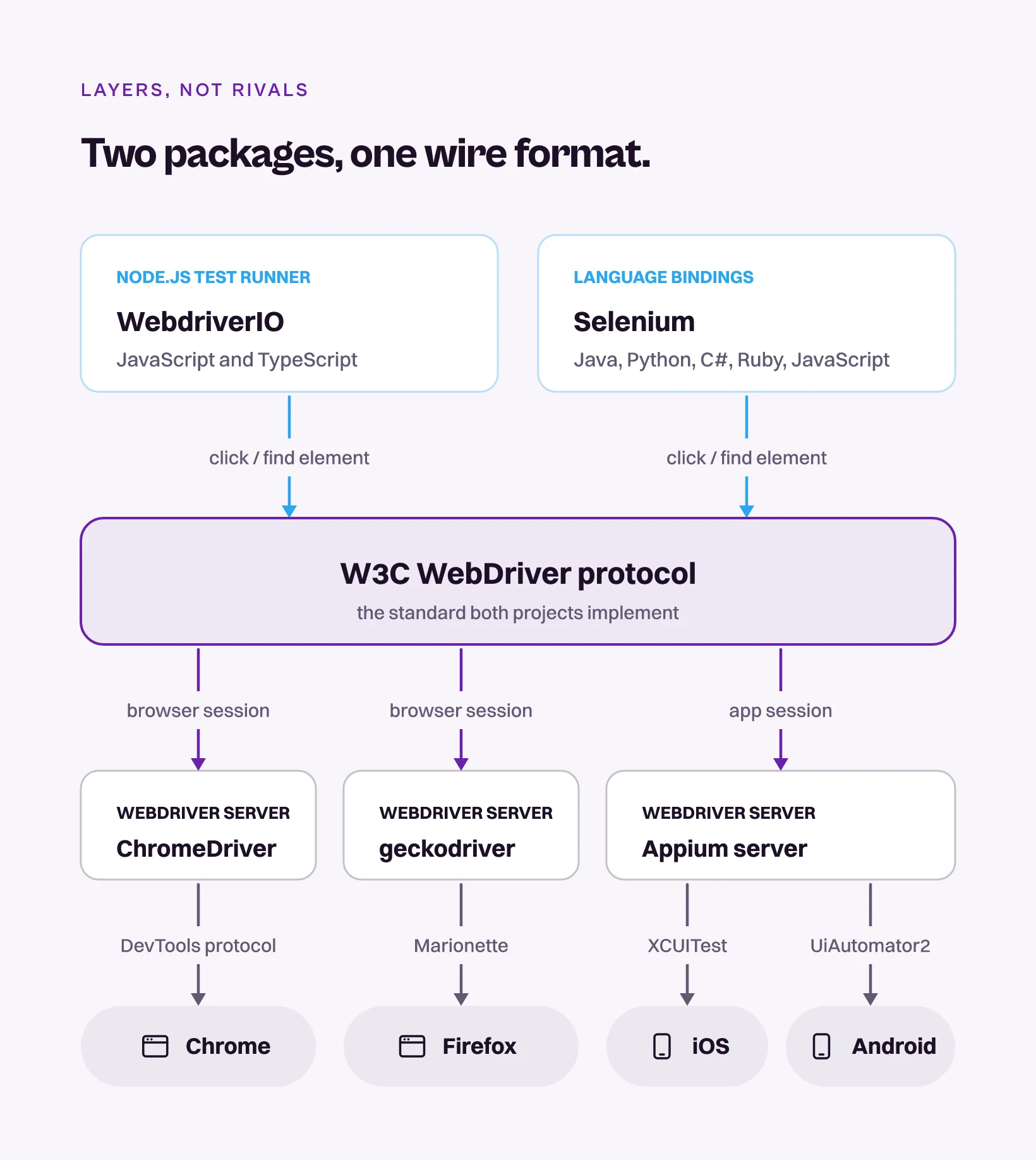
Send a click through WebdriverIO and send the same click through Selenium, and the browser’s driver receives an identical W3C WebDriver command.
That is not a coincidence. WebdriverIO is a Node.js test framework built on the protocol the Selenium project took to the W3C, and both projects still sit in the working group designing its successor. The two are layered, not opposed.
Which makes “WebdriverIO vs Selenium” a smaller question than it looks. You are choosing between language bindings you assemble a harness around and a batteries-included JavaScript runner. Most teams have a clear answer to that, and it is the cheaper half of the decision. Whichever you pick, you are still writing selectors, and the selectors are what keep costing you long after the tests are written.
What you’ll learn
- Why WebdriverIO and Selenium run on the same W3C protocol
- What each one hands you before you write your first test
- Which one to pick in 2026, and the row that decides it
- The selector bill neither package removes
Bindings or a Runner: The 30-Second Answer
WebdriverIO is the better default for a JavaScript or TypeScript team that wants a runner, a config wizard, services and reporters from one install. Selenium is the better default when your test code has to live in Java, Python, C# or Ruby, or when you need a distributed grid you host and control yourself. Neither is a different browser engine from the other.
Selenium started in 2004 at ThoughtWorks, where Jason Huggins built the first version. The project’s WebDriver work later went to the W3C and became a W3C Recommendation in 2018, which is the protocol almost every browser-automation tool outside the Chrome DevTools family now inherits. WebdriverIO is a Node.js automation framework governed under the OpenJS Foundation, and it drives browsers over that same standard plus the newer WebDriver BiDi protocol.
| Dimension | WebdriverIO | Selenium | Pie |
|---|---|---|---|
| What it is | Full JS/TS test framework | Language bindings plus a grid | Autonomous QA platform |
| Browser protocol | W3C WebDriver, BiDi by default in v9 | W3C WebDriver, BiDi opt in | Vision and agent above the driver |
| Languages | JavaScript and TypeScript only | Java, Python, C#, Ruby, JavaScript | Plain English, no code |
| Runner included | ✓ Built in (wdio testrunner) | ✗ Bring your own | ✓ Fully managed |
| Survives a UI redesign | ✗ Selector-bound | ✗ Selector-bound | ✓ Behavior-based |
Four of those rows describe a packaging decision you make once. The last one is a bill you pay every sprint, and on it the two tools land in the same column.
Why Both Tools Speak the Same W3C Protocol
WebdriverIO and Selenium are layers rather than competitors, because they reach the browser through the same standard. The Selenium project’s WebDriver work is what the W3C standardized, and WebdriverIO implements that protocol directly. Send a click through either one and it arrives as a WebDriver command the browser’s own driver already understands.
No, WebdriverIO Does Not Run on Selenium
It is the most common question about the pair, and a lot of the answers online are years out of date. WebdriverIO was never a wrapper around Selenium’s code. When someone asked on the project’s issue tracker, Christian Bromann, who heads the WebdriverIO project, answered it directly: “Nope. WebdriverIO was pushed to NPM before Selenium had a JS binding.”
The confusion has a real root, though. For years WebdriverIO did lean on a Selenium standalone server to manage browser drivers, through the @wdio/selenium-standalone-service package. That dependency ended in v8.14.0, released in July 2023 with automatic driver management built in, and the service was retired rather than carried into v9.
So any guide written before mid-2023 will tell you WebdriverIO needs Selenium installed. It has not for over two years, and the stale answer is still sitting near the top of the results.
Both Projects Sit in the Room Where the Protocol Is Written
The clearest evidence is WebDriver BiDi, the bidirectional successor to classic WebDriver. Work began in 2020 inside the W3C Browser Testing and Tools Working Group, and the spec’s named editors work at Mozilla and Google.
Selenium’s own documentation describes BiDi as “created by the Selenium project together with the browser vendors.” WebdriverIO is in the same room by a different door, with Bromann sitting in that working group as a W3C Invited Expert. Two projects filed as rivals turn out to be stakeholders in one wire format, arguing about the same spec.
That shared foundation has a practical payoff. WebdriverIO can point at any compliant WebDriver endpoint, including a Selenium Grid or a standalone Selenium server. So “we use WebdriverIO” and “we run Selenium Grid” are not contradictory sentences. One is the framework you write in, the other is where the browsers run.
Neither tool is an engine choice. They are two packages over one wire format, and the packaging is the whole comparison.
What Selenium Hands You vs What WebdriverIO Hands You
Selenium hands you language bindings that speak WebDriver, plus Selenium Grid for distributed execution, and leaves the rest of the harness to you. WebdriverIO hands you a complete Node.js test framework on top of the same protocol. That single distinction drives most of the day-to-day experience gap.
With Selenium you choose a test runner, wire up reporting, configure parallelization, and design a page-object structure yourself. The flexibility is a genuine feature for teams that have opinions about every layer and want to hold them. It is overhead for a team that wants to write tests this week.
WebdriverIO collapses the assembly work. The wdio testrunner gives you a CLI and a config wizard, a plugin system of services covering Appium, browser drivers and visual testing, and reporters like Allure, all pulled in through wdio install rather than hand-wired. Its v9 release made WebDriver BiDi the default protocol, so network interception and preload scripts arrive as standard capabilities instead of Chrome DevTools Protocol workarounds.
Selenium exposes the same BiDi APIs through its bindings. The difference is that a Selenium session still speaks classic WebDriver until you reach for them, where a WebdriverIO v9 session is on BiDi unless you turn it off.
Selenium is the protocol plus bindings, with the harness left to you. WebdriverIO is the protocol plus an assembled harness, in one language family, and neither one changes what your tests are bound to.
Language Reach: Five Bindings Against One Runtime
On language reach Selenium wins cleanly, and it is the dimension that most often ends the conversation. Selenium ships five official bindings, for Java, Python, C#, Ruby and JavaScript, with community-maintained bindings covering PHP and Perl. WebdriverIO runs on Node.js and supports JavaScript and TypeScript, and that is the entire list.
Selenium 4, released in 2021, also closed gaps that used to push teams toward newer tools. It adopted the W3C WebDriver protocol fully, added relative locators and Chrome DevTools Protocol access, and a year later Selenium 4.6 introduced Selenium Manager, which resolves driver binaries for you instead of making you version-match them by hand.
WebdriverIO’s ecosystem is narrower but more cohesive, because it is curated around one language and one runner. The practical split is clean:
- Your test code must be Java, Python, C# or Ruby: Selenium is the only option of the two, and the decision is already made for you.
- Your team lives in JavaScript or TypeScript: WebdriverIO gives you a tighter, more opinionated setup, while Selenium’s JS bindings give you the protocol and leave you to build the rest.
On language reach Selenium wins outright, and for a lot of teams that one row settles the comparison before any other row is read.
Appium Underneath Either Way: The Mobile Question
Both tools reach native mobile through Appium, which is itself built on the WebDriver protocol. The shared lineage is why a WebDriver skill set transfers so cleanly from web to mobile. WebdriverIO ships an official Appium service and is one of the most common front ends for Appium automation, and Selenium connects to Appium through the same protocol its bindings already speak.
So on mobile the WebdriverIO-versus-Selenium question dissolves a second time. You are running an Appium session underneath either way, locating elements through accessibility IDs, XPath and platform selectors. The same dynamic plays out in Appium versus Selenium as a standalone choice, and it inherits the exact fragility of web selectors. Mobile makes it worse, because a screen restructured for a smaller form factor breaks locators that were fine on a tablet an hour earlier.
On mobile the two tie, because underneath they are the same Appium session locating the same brittle elements.
Pick Selenium When, Pick WebdriverIO When
The choice is rarely about capability. Both automate essentially any web flow, because both speak the same protocol. It comes down to language, packaging, and how much you want handed to you.
Choose WebdriverIO when:
- Your team writes tests in JavaScript or TypeScript and wants a runner, config, services and reporters in one place.
- You want WebDriver BiDi features like network interception and preload scripts as first-class rather than bolted on.
- You are automating web and Appium-based mobile from one cohesive framework.
- You would rather inherit an opinionated setup than assemble your own harness.
Choose Selenium when:
- Your test code must live in Java, Python, C# or Ruby.
- You need a self-hosted distributed grid, or strict vendor-neutral standards alignment.
- You already run a large Selenium suite, where rewriting buys you packaging rather than capability.
- You want the raw protocol bindings and full control over every layer above them.
| Need | WebdriverIO | Selenium |
|---|---|---|
| Java / Python / C# / Ruby tests | ✗ | ✓ |
| Runner and reporters in one install | ✓ | ✗ |
| WebDriver BiDi by default | ✓ | Opt in |
| Self-hosted distributed grid | Via endpoint | ✓ (Selenium Grid) |
| Native mobile (via Appium) | ✓ | ✓ |
If the shortlist you are actually holding has a third name on it, WebdriverIO versus Playwright is the closer fight and worth its own read. None of these rows, though, touches the cost the next section is about.
Same Protocol, Same Failure Mode: Selector Coupling
Sharing a protocol means sharing its assumptions, and the load-bearing one is that a test knows how to find things.
WebdriverIO and Selenium both locate elements by selector, whether that is a CSS class, an XPath, a test ID, or an accessibility ID on mobile. Every selector is a bet on how the app is built, not on what the user sees. Four ordinary changes settle that bet against you:
- A class renamed during a refactor that touched no behavior.
- A wrapper element added for layout, which shifts every absolute XPath beneath it.
- A component library upgrade that renders the same pixels from different markup.
- On mobile, a missing accessibility ID with an XPath standing in for it.
None of those changed anything a user can perceive. All four fail a suite, and they fail it identically in both tools. Most Selenium alternatives inherit the same exposure, because swapping the framework leaves the selector contract exactly where it was.
There is no clean public number for what share of an automation budget goes to repair rather than to new coverage. Go looking and you find the same few percentages recycled between vendor blogs, each one citing another blog, none of them citing a study you can open.
The direction is not in dispute, though. Authoring a test is a cost you pay once. The selector is a cost you pay again every time the UI moves, for as long as the suite lives.
Practitioners call it the maintenance tax, and it is why a better-packaged framework rarely moves the number that matters. WebdriverIO’s cleaner runner and Selenium’s mature grid both make tests nicer to write and to run. Neither does anything about a button that moved.
Packaging is where these two differ. Selector coupling is where they are identical, and it is the expensive one.
Testing by What the Screen Shows, Not What the DOM Says
So we stopped binding tests to selectors. Pie, an autonomous QA platform, identifies elements the way a person does, by what they look like and do on screen. You describe a test in plain English and Pie writes it and runs it.
Our own mobile side runs on the protocol this article is about. We ship Appium too. We run it as a driver, to control the device and pull screenshots, and nothing above that layer ever sees a locator.
A vision model reads the screenshot and the agent taps a coordinate. Same driver a WebdriverIO or Selenium mobile suite uses, opposite contract sitting on top of it.
Three things follow from that:
- Autonomous discovery: Agents explore the app and generate the suite, so nobody hand-writes the first two hundred selectors. Results land in hours rather than weeks.
- Self-healing: When a redesign moves something, the agent re-identifies the element instead of failing, so a class rename stops turning into a ticket.
- One definition across surfaces: The same plain-English test runs against web and native iOS and Android, which is exactly where an Appium suite driven by either tool spends the most on upkeep.
None of that makes it a drop-in for the WebDriver protocol, and it is not a replacement for Selenium Grid. If what you need is a Firefox and Safari matrix, or a rack of physical handsets, that stays a grid’s job or a device cloud’s. Moving across is a parallel run rather than a rewrite, with your existing suite still going in CI on the same pipelines while coverage builds beside it.
So the two problems sort cleanly. If you want a cleaner JavaScript runner, WebdriverIO solves that. If you spend more time repairing tests than writing them, that is the one we built Pie for.
Pick the Package, Then Ask the Bigger Question
Drop the idea that these are rival engines and the choice gets easy. WebdriverIO gives a JavaScript or TypeScript team a full framework on the WebDriver protocol, and Selenium gives you five language bindings, a grid you host yourself, and twenty-two years of ecosystem on that same protocol. Pick on those terms and you will not be wrong.
You will also have solved the cheaper half. Both tools ask your engineers to write and maintain selector-bound test code, and that upkeep, not the framework choice, is where the QA hours actually go. Better packaging changes how a suite feels to author, not who rewrites it after the next redesign.
If that is your real bottleneck, run the bigger question first. Should anyone on your team still be hand-writing selectors in 2026? We built an autonomous QA platform because we decided the answer was no.
Frequently Asked Questions
For a JavaScript or TypeScript team, WebdriverIO is usually the better starting point, because it bundles a test runner, a config wizard, service plugins and reporters that Selenium leaves you to assemble.
Selenium is better when you need bindings in Java, Python, C# or Ruby, or a self-hosted distributed grid. They are not opposite engines. WebdriverIO speaks the same W3C WebDriver protocol the Selenium project took to the standards body.
Not the Selenium libraries, but the same protocol. WebdriverIO drives browsers over the W3C WebDriver standard, which grew out of the Selenium project's WebDriver work and became a W3C Recommendation in 2018.
The confusion comes from history. WebdriverIO used to rely on a Selenium standalone server to manage browser drivers, and that dependency ended in v8.14.0 in July 2023 when automatic driver management shipped. Current versions talk to drivers directly, and can still point at a Selenium Grid when you want one.
Both drive native iOS and Android apps through Appium, which is itself built on the WebDriver protocol. WebdriverIO ships an official Appium service and is a common front end for mobile automation, and Selenium reaches Appium through the same protocol its bindings already speak.
Either way you are locating elements by accessibility IDs and XPath, and inheriting the same breakage web selectors have.
Eight years building search and delivery systems at Amazon. The kind of scale where flaky tests block billion-dollar releases. Now CTO at Pie, building AI agents that adapt when your UI changes. LinkedIn →