What Is Sanity Testing? How to Choose Between Sanity, Smoke, and Regression Checks
Sanity testing means different things on different teams. Get a definition you can share and a rule for when to run sanity, smoke or regression testing.

Ask around and “sanity testing” turns out to be several different checks. On our own sales calls it has meant a crash check before each release. It has also meant the check that runs last, and a check in production once a release is out, all from people using the same two words.
Written guides disagree too, so one team’s sanity pass can mean something the next person never checked. Here is how to pick the right check for each change, and make a pass mean the same thing to everyone who reads it.
What you’ll learn
- A one-sentence definition of sanity testing your team can share
- The question each of the three checks answers
- Which check to run after a build, a fix, a hotfix or a shared-code change
- How to run a sanity test with pass criteria written first
What Is Sanity Testing?
Sanity testing is a quick, narrow check, run after a change, that the changed part works well enough to justify deeper testing. Its one question is whether this change is worth testing further. A pass sends the build on to the next stage, and a fail sends the change back to the developer before anyone invests in a longer run.
The name comes from the everyday phrase “sanity check”, a common-sense look to confirm something is reasonable before you trust it. The bar is low on purpose. A sanity test asks whether the change is sane enough to deserve a closer look.
Why the Definitions Disagree
Written sources place sanity testing in different spots. Testsigma’s guide calls it a subset of regression testing. GeeksforGeeks describes it as a check on a new build with minor changes or bug fixes, and says a pass moves on to regression testing. In a Ministry of Testing thread, practitioners split on whether sanity and smoke are different checks at all.
Spoken usage is looser, and I am not innocent. Describing our baseline coverage to a prospect, I once called it a “sanity smoke check” and “that kind of regression” in the same breath.
A local definition settles it in practice. Write one sentence your team agrees on, naming what triggers the check and who calls pass or fail. Here is one to start from.
A sanity test runs the changed behavior and its closest neighbors after a narrow change. The person who owns the change calls pass or fail against criteria written before the run.
Sanity vs Smoke vs Regression Testing
The three checks differ in the question each one answers. Smoke testing asks whether the build is stable enough to test at all. Sanity testing asks whether one change works, and regression testing asks whether anything else broke.
Each trades coverage for speed in a different place, so a team that names the question first rarely mixes them up. Picture editing a shared Google Doc. Smoke is confirming the file opens. Sanity is rereading the paragraph you just rewrote, and regression is proofreading everything before it goes out.
| Check | Question it answers | Runs after | Covers | A pass lets you |
|---|---|---|---|---|
| Smoke | Is this build stable enough to test? | Every new build or deploy | Critical paths, shallow | Start testing the build |
| Sanity | Does this change work? | A fix, tweak or hotfix | One area and its neighbors, deep | Spend time on a wider run |
| Regression | Did anything else break? | A change with wide reach, or a release | The existing feature set | Release the build |
The last column matters most. Each check licenses exactly one next step, and a sanity pass never licenses a release.
Which Check Runs After Which Change?
Run the narrowest check that covers everything the change can reach. Smoke fits a build whose stability is unknown. Sanity fits a change whose reach you can name, and regression fits one whose reach you cannot.
| What just happened | Run | Reason |
|---|---|---|
| A new build or deploy lands | Smoke | Nothing is known about it yet, so the first question is stability |
| One bug fix or small tweak | Sanity on the changed flow | The reach is small and nameable, so the question is only whether it works |
| A hotfix for production | Sanity before release, smoke after deploy | There is little time for a full run, and the deployed system has to answer |
| Shared code, a refactor or an upgrade | Regression | The change reaches places you cannot list, and a sanity check only sees the ones you thought of |
| A release candidate | Regression | The question is whether anything else broke, and only the wide run answers it |
The middle rows carry the idea. A change you cannot describe in one sentence has already left sanity territory. Move up to regression testing, where a wider suite covers the places nobody listed.
Test the Change You Can Name
Hand the changed flow to Pie. Your team reviews the result.
How to Run a Sanity Test
A sanity test is quick, but it needs pass criteria set before anyone looks. Five steps keep it from turning into a casual poke at the screen.
- Write the claim. One sentence: after this change, X does Y. A claim that will not fit in one sentence marks a change too wide for a sanity check.
- Set pass criteria first. Name the expected result and the errors that must not appear before you start, so the verdict does not drift toward whatever you saw.
- Replay the case that failed. Use the original steps and data that exposed the bug. A fix that passes on easier data proves little.
- Check the closest neighbors. Run the step before and the step after in the same flow, and any screen that reads what the change writes.
- Record the call. Put the result next to the pull request or ticket. A sanity check that lives only in one person’s head cannot be repeated or audited.
Say a fix changes how a promo code is applied at checkout. Its claim is that a valid code now lowers the total. The run replays the code that was rejected, then checks the cart screen before it and the payment step after it. A pass means the total drops and payment still opens. Tax, shipping and every other discount stay unchecked, which is why a sanity pass hands off to a wider run.
How Sanity Checks Fail Quietly
Informal checks vanish under deadline pressure, and a check nobody wrote down leaves no trace when it gets skipped. Random failures wear a check down too. Once flaky results teach people to rerun instead of read, the verdict stops meaning anything.
A check can also pass in the wrong place. A buyer on one of our calls had a product operations team run sanity checks after a release went out. Staging was not an exact copy of production, and things that worked there sometimes broke once pushed live. They wanted the same subset tested in staging to run again in production. Whatever environment the check runs in is the only one it answers for.
Let Pie Check a Pull Request
A pull request is where a change is one reviewable unit, which makes it the natural home for a change-level check. Our agentic testing platform tests a pull request on its preview, the way your users will see the change, for web, iOS, and Android.
- One comment: Comment
@pie-pr-bot teston GitHub or/pieon GitLab to start pull request testing. A web app needs a preview URL for the pull request, and a mobile app needs an uploaded build. - Five things in place: Pie needs five things to reach the feature, from a preview that runs the change to a way through your WAF. A run that never reached the feature has not tested your change.
- The verdict: Pie Bot posts pass or fail on the pull request, so the call is recorded next to the change it judged.
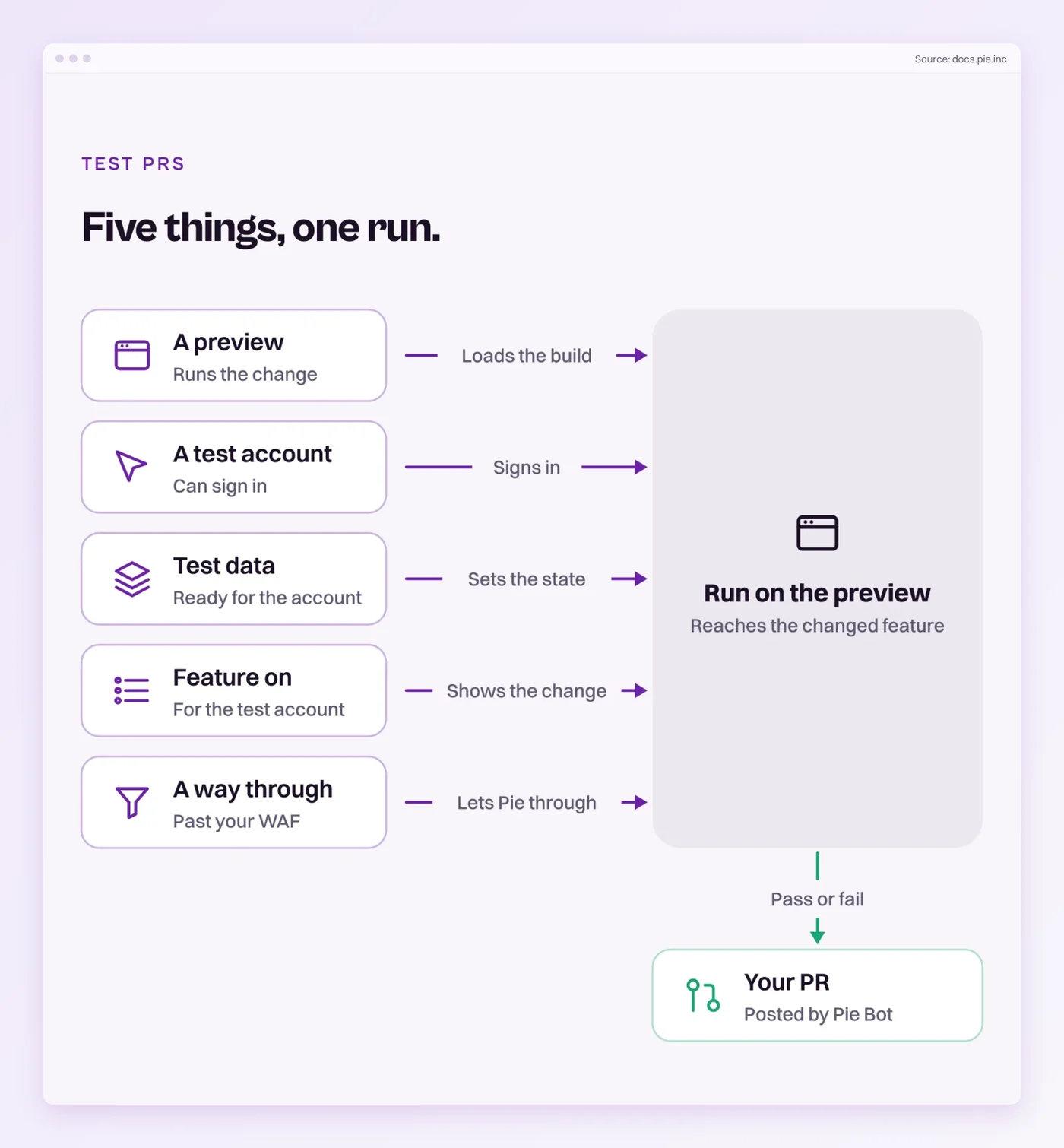
A preview environment that holds the whole change keeps the check honest. Pie adds to your manual checks and unit tests.
Say What You Ran
Sanity testing is a small idea with a loose name. The check itself stays simple, one change and one claim, judged against criteria set before the run.
A pass is worth only what it covers. It tells you the change works and that a wider run is earned, and it tells you nothing about whether the release is safe. The next time someone on your team reports a sanity pass, can they tell you which change it covered and who made the call?
Check a Pull Request
Point Pie at your next pull request. The verdict lands beside the change.
Frequently Asked Questions
Spent a decade in B2B SaaS sales before building Pie. Now obsessed with helping engineering teams ship without the fear of breaking things. LinkedIn →