How to Build a Preview Environment for PR Testing
Set up a preview environment that holds the whole change and proves it is ready, so the first PR test reaches the feature. Scope, deploy, manifest, verify.

A preview deployment builds your frontend from the branch and hands you a URL. The API that page calls is configured somewhere else, and unless someone changed it, it keeps pointing wherever it pointed before. So the URL is new and the system behind it is last week’s.
We found that out running our testing agent across 45 pull requests on Pie’s web frontend and mobile app. It reached the changed feature in roughly a third of them, and one blocker was our own frontend preview, talking to a backend that did not contain the change. Onboarding to PR testing is a preview problem before it is a testing problem. Fix the preview and the first run reaches the feature.
What you’ll learn
- Why a frontend-only preview passes a test that never touched the change
- How to scope a preview to the changed path and deploy it as one group
- How to publish a deployment manifest with a ready gate a machine sets
- The four checks that prove a preview is ready before the first run
Why a Frontend-Only Preview Passes the Wrong Test
The goal of a pull request test is narrow. Run the code in the pull request and find out whether it does what the change claims. Everything else is overhead.
Most frontend hosts give you the URL half of that for free. Vercel creates a preview deployment for any commit on a non-production branch and for any pull request, with a generated URL that shows up in the PR. Netlify, Cloudflare Pages and Render all do the equivalent.
What none of them do is change where that frontend sends its API calls. The base URL comes from an environment variable, set once at the project level, usually to a shared staging API that every branch and every engineer is also hitting.
Almost like a storefront with last week’s warehouse behind it. New signage, doors open, staff on shift. The shelf still holds the old stock.
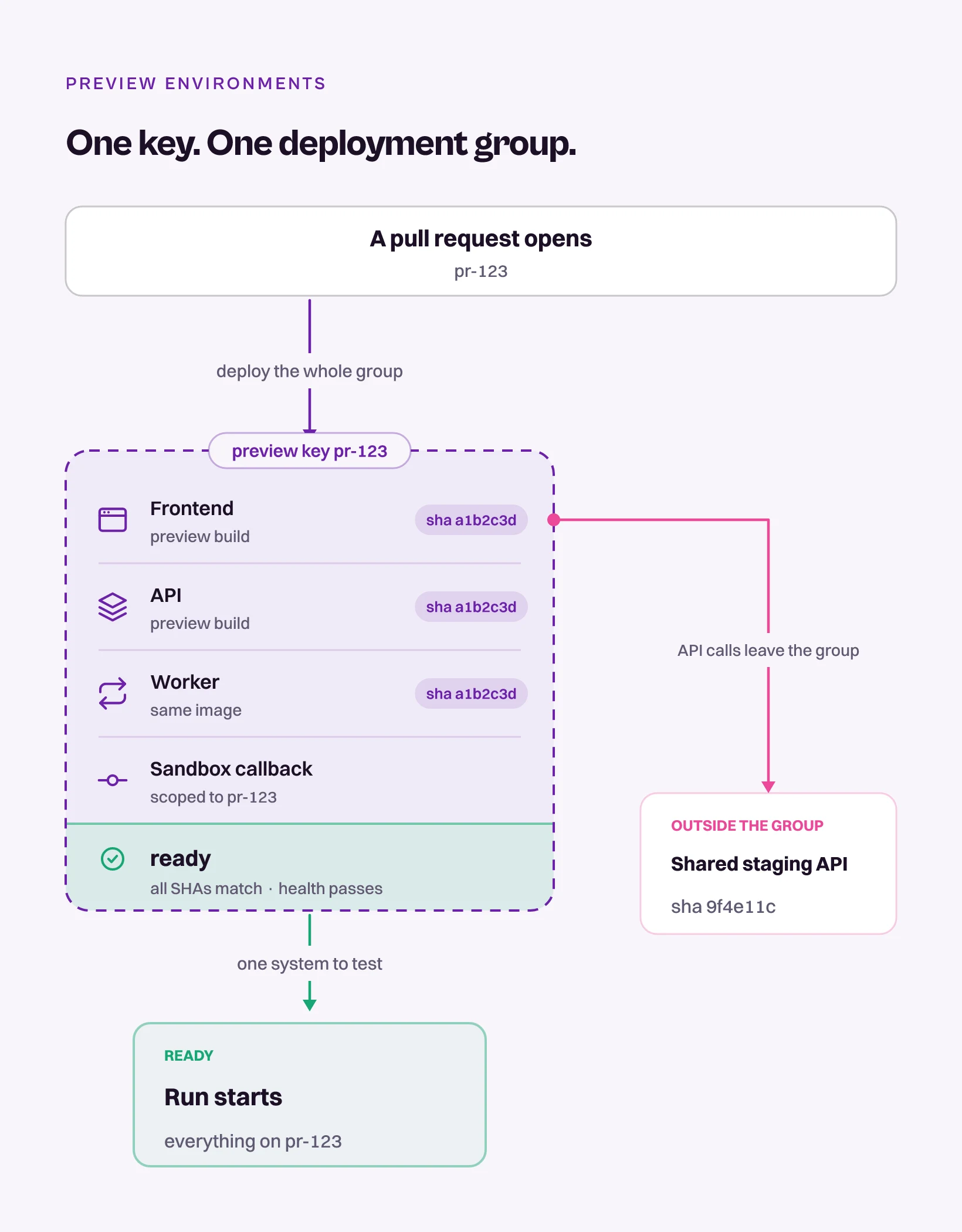
The unit of a pull request test is not a page. It is every service the changed path runs through, deployed at the same commit.
Watch what a stale backend does to a run. The page renders, so the deploy looks healthy. The test signs in and navigates to the screen the pull request touched. It asks for the field the change added, the old API answers without it, and the frontend degrades exactly the way you wrote it to degrade.
The assertion that should have failed never gets a chance to fire, and the run comes back green with nothing in the result saying the backend never got the change.
Scope the Preview to the Changed Path
A preview environment is pre-production testing narrowed to one pull request. Staging carries whatever everyone merged most recently, which is why a staging pass never tells you much about a specific change. A preview carries one change on top of a known base, and that is the reason it is worth building.
Four things make it real:
- Identify the affected services: Trace the changed user path from the browser or the app through APIs, workers, queues, databases, and third-party sandboxes. The changed path is the scope, not the whole system.
- Deploy compatible revisions together: If a frontend change depends on a backend change, both revisions go into the same preview. Across repositories, use one shared preview identifier so the pieces can find each other.
- Route dependencies explicitly: Point the preview frontend at the preview API, and the preview API at the matching workers and sandboxes. Never let the routing come from a developer’s local configuration, because that configuration does not exist anywhere the test runs.
- Keep the URL stable: A new commit can replace what sits behind the URL. The URL itself stays put for the life of the pull request, so a link posted on day one works on day four.
Deploy the Changed Services as One Group
Deploy the frontend revision and every backend revision it depends on under one preview key, so nothing behind the URL is left pointing at staging by default. On our own repo that turned out to be a branch convention. Matching staging/* branches in the frontend and the backend deploy together into one preview, and the frontend is pointed at the backend revision from the same branch. A UI change and the API change it depends on now go up as one system instead of two.
The Preview That Works for One Person
The trap on a first pass is a preview that works for exactly one person. An engineer with the API base URL overridden in a local env file sees the preview backend in their browser while the deployed preview keeps talking to shared staging.
Two different systems wearing the same URL, and the only way to tell them apart is a browser on a machine that has never seen the repo. The agent gets the deployed configuration. The engineer gets their own.
Reachability is now the first thing we check on a failed pull request run, before anyone starts grading the agent. We do not have a number for how much of that missing two thirds was preview coupling on its own. The blockers overlap, and a single pull request can be sitting behind three of them at once.
Publish a Deployment Manifest With a Ready Gate
A coupled deploy fixes the routing. It does not tell anyone downstream that the routing is fixed, so the tester, human or agent, is left guessing whether the URL in front of them carries the pull request’s code or the last build that happened to succeed. Publish the answer instead. Give the preview one identifier and record the exact revision of every component under it.
{
  "deploymentGroup": "pr-123",
  "frontend": {
    "sha": "a1b2c3d",
    "url": "https://pr-123.preview.example.com"
  },
  "services": [
    {
      "name": "api",
      "sha": "a1b2c3d",
      "health": "https://api-pr-123.preview.example.com/health"
    },
    {
      "name": "refund-worker",
      "sha": "a1b2c3d",
      "health": "https://worker-pr-123.preview.example.com/health"
    }
  ],
  "dataProfile": "order-ready-for-refund",
  "flags": { "refund-workflow": true },
  "ready": false
}
The manifest is a packing slip. It says what is in the box and it is checkable without opening it. Each field is doing one job:
- deploymentGroup: The single key every component shares, usually the PR number. It is what makes a cross-repo preview resolvable without guessing at branch names.
- sha: The commit each component deployed. If any of them disagree with the pull request head, the group is incomplete and the run is worthless.
- health: A reachable endpoint per service, so readiness is something a script confirms instead of something a person assumes.
- dataProfile and flags: The seeded state and flag values the changed path needs. A correct deploy over an empty database still fails, and it fails in a way that looks like a product bug.
- ready: The gate. It flips to true only when every component reports the expected SHA and passes its health check.
Keep secrets and internal connection strings out of it. The manifest lives on the pull request, and everyone who can see the PR can read it.
One key, every changed service deployed under it, dependencies routed at the preview rather than on somebody’s laptop, and a ready flag that only a machine gets to set. Anything short of that is a URL with a good name.
Verify Ready Before the First Run
Ready is a claim, so it needs a check that is capable of failing. Four of them, run in order, before any tester is pointed at the URL:
- Deployed SHA matches the pull request head: Read it from the health response or a build stamp rendered in the page. A green deploy log is not the same evidence.
- The changed path loads with no local overrides: Clean browser profile, no VPN, no pre-seeded cookie, no entry in
/etc/hosts. - Browser requests stay inside the preview: Open the network panel and confirm nothing is quietly calling a production host, which is the failure that hides longest.
- A write lands in the preview: Perform one real action through the UI and confirm the resulting state in the preview backend and not in staging. Repeat it after a fresh deploy.
That last check is the only one that catches a preview which looks healthy and routes writes to the wrong service anyway. Reads are forgiving, and a stale API will return something plausible. Writes tell you where the data actually went. Wire all four into the pipeline and readiness becomes another gate in continuous testing instead of a ritual somebody performs from memory at 6pm.
Three Failure Shapes, Three Different Owners
When the preview looks fine and the test fails anyway, do not debug the symptom. It is one of three shapes, and each one has a different owner, so the first move is to work out which one you are in.
- The page loads and the feature fails: Routing. Check the API base URL, the deployed service revision, CORS on the preview host, and any callback URL pointing somewhere else. Owner is whoever owns the preview pipeline, and the fix is configuration, not code.
- It works for one developer and nobody else: Local state. A DNS entry, a VPN route, a cookie, an env var in a file that is gitignored for good reasons. Owner is the engineer who set it up, and the test costs nothing. Open the preview on a machine that has never checked out the repo.
- Old code shows up in the middle of a run: SHA mismatch. A queued deploy replaced the build behind a stable URL, or the run started before the deploy landed. Owner is the readiness gate, which is the entire reason the manifest exists, and it is the same discipline that keeps flaky tests in CI from turning a pipeline into a coin flip.
Feature flags and missing seed data produce a fourth shape that looks a lot like the first one. It belongs to the test data problem and deserves its own treatment.
Four Architectures That Break the Simple Version
One frontend and one API is the easy case. Most stacks are not that, and each variation breaks a different assumption.
- Changes across repositories: Use the same preview key in every repo, and resolve the related revisions through linked pull requests, a committed manifest, or a merge queue. Never infer the relationship from branch names, because two people will name a branch the same thing in the same week and nothing will warn you.
- Monorepos: Build only the affected services. Publish one manifest anyway, listing every deployed component and its SHA. The build is partial by design. The manifest is not.
- Shared services you cannot clone: Isolate by namespace, tenant, or database schema whenever the changed path writes data. Branchable databases make this cheap now, and Neon can cut a fresh branch per preview seeded to a known state. Where isolation is not possible, use unique test identifiers plus a cleanup job, because two previews sharing one order table will each pass alone and fail together on a Tuesday afternoon.
- Third-party sandboxes: Payments, email, identity and messaging all ship sandboxes, and the part that gets missed is the callback direction. A webhook registered against the production host delivers to production, so the preview waits for an event that never arrives.
Not every stack can afford the full version. Cloning a fleet of microservices per pull request costs real money and real platform time, and for plenty of teams the right answer is to deploy the two or three services the changed path touches and leave the rest pointed at staging. Partial is fine, as long as the manifest says exactly which parts.
What Pie Needs From a Web Preview
Pie is an autonomous QA platform that drives web, iOS and Android apps the way a person would, deciding what is on the screen from the pixels instead of from a selector. For pull request testing on a web app it asks your infrastructure for one thing. A stable preview URL for the open pull request, reachable without a VPN or a local override.
- Vercel: The preview URL is generated for you.
- GCP or custom infrastructure: Manual setup, and the time to do it is before the first run.
The trigger is a pull request comment, not an event. An engineer types @pie-pr-bot on the pull request, or /pie on a GitLab merge request, and the run starts against that preview URL. Everything in this post applies unchanged after that, because an agent inherits the same environment a human reviewer does. Give it a frontend with a stale API behind it and it will sign in, navigate, and report carefully on code that is not in your pull request.
One limit belongs in the same breath. We do not build the preview environment for you, and none of the work above gets cheaper because an agent is the one reading the URL. Building it stays with your platform team, and the step-by-step version of everything above, written for the engineer doing the onboarding, is the preview environment runbook in the docs.
Get the First Run to the Feature
A preview URL answers one question honestly, which is whether the frontend builds. That is worth having, and it is not the question a pull request test is asking.
Give the preview one key, deploy every changed service under it, route the dependencies at the preview instead of on a laptop, and publish a manifest with a ready flag that a machine sets. Do that once and onboarding to PR testing is a comment on a pull request, because the first question on a failed run is no longer whether the tester is any good.
Publish the manifest before you point anyone at the URL. Human or agent, the first thing they deserve to know is whether the thing in front of them contains the change.
Wire the Preview Once
Tag Pie on the pull request. It tests the change, not last week's build.
Book a DemoFrequently Asked Questions
A preview environment is a short-lived deployment for one pull request, torn down when it closes.
The useful definition is wider than a URL. It is every service the changed path runs through, deployed at the pull request's commit, routed to each other and not to shared staging.
A preview deployment is one artifact from your branch, usually the frontend. A preview environment is every component that artifact needs to behave like the change.
If your host builds a bundle per pull request but the API points at shared staging, you are testing the old backend.
It needs isolation, not necessarily a separate instance. A branchable database like Neon can cut each preview its own copy, and where that is not practical a dedicated schema, tenant, or namespace works.
Two previews running at once must not read or overwrite each other's rows.
Publish a manifest. Record every component's commit SHA and health endpoint under one group, then set a ready flag that flips only when every SHA matches the PR head and every check passes.
Whoever points a tester at the URL reads the flag, not the deploy log.
Use the vendor sandbox, then check the callback direction. A webhook registered against production delivers to production, so the preview never receives the event that completes the flow.
Point callbacks at the preview host and confirm one real event arrives before you trust a refund test.
It runs, but the result describes the frontend alone. Pie drives the preview URL you give it, so if that API lacks the change, the agent signs in, navigates, and reports on code your pull request never touched.
A human reviewer on that URL has the same limit.
For a web app, one stable preview URL per open pull request, reachable without a VPN, with the changed services behind it. Vercel generates that URL. GCP and custom infrastructure wire it manually.
Pie does not build the preview, so that setup comes before the first run.
Eight years building search and delivery systems at Amazon. The kind of scale where flaky tests block billion-dollar releases. Now CTO at Pie, building AI agents that adapt when your UI changes. LinkedIn →