Katalon vs Selenium: Build the Framework or Buy It in 2026?
Katalon Studio is built on Selenium, so this is a build-versus-buy call, not a rivalry. Real pricing, sourced complaints, and a verdict for each situation.

Katalon Studio is built on Selenium. Katalon’s own documentation calls it an automated testing IDE built upon the Selenium framework, which makes this a strange fight to stage. One contender is wrapped around the other.
So the question is not which engine finds elements more reliably. Underneath, they use the same one. The question is how much of the framework you want to build yourself, and what you will pay to skip that work.
Every comparison currently ranking for this term ends on “evaluate your needs.” This one does not. You get real pricing figures, complaints from named reviewers, the AI features both projects shipped by 2026, and a verdict for each situation.
What you’ll learn
- What Katalon actually adds on top of Selenium, and what it costs per seat
- What named reviewers complain about in each tool
- Which AI features Katalon shipped by 2026, and what Selenium shipped instead
- Why a redesign breaks both of them, and what does not break
Katalon vs Selenium: The Quick Answer
Choose Katalon when your team is mixed or manual-heavy and you want a working suite this week. Choose Selenium when engineers write the tests and you want total control, no license cost, and a standard no vendor owns.
The rest is detail, and the table below is where each one leans.
| If you care most about… | Lean Katalon | Lean Selenium |
|---|---|---|
| Speed to first test | Record a flow and play it back, nothing to assemble | Write code, then wire your own runner and reporting |
| Cost | $70 to $200 per seat per month, plus add-ons | Free under Apache 2.0, no paid tier |
| Language | Groovy or Java in script view | Java, Python, C#, Ruby, JavaScript |
| Scope | Web, mobile, API, and desktop in one tool | Browsers only |
| AI features | Test generation, two-tier self-healing, agentic triage | None in the core project |
| Reporting | Built in | Bring your own, usually JUnit or TestNG |
| Review ratings | 4.4/5 from 706 reviews on Capterra | 4.5/5 from 101 reviews on G2 |
One row is missing from that table because neither tool wins it. Both identify elements by a description of the markup, so both break when the markup moves. The back half of this guide is about that missing row.
How We Compared Katalon and Selenium
The basis for every claim below, so you can check the work.
- Sources: Katalon’s own product, documentation, and pricing pages, Selenium’s documentation and release blog, the W3C WebDriver specification, and current reviews on Capterra, G2, and PeerSpot. Checked August 2026.
- What we weighted: Time to a first running test, twelve-month cost, the AI capability each project actually shipped, and what a UI change costs you afterward.
- What we skipped: Feature counts. Katalon ships far more surface area than Selenium by design, and tallying that proves nothing about which one fits your team.
Katalon and Selenium at a Glance
Katalon
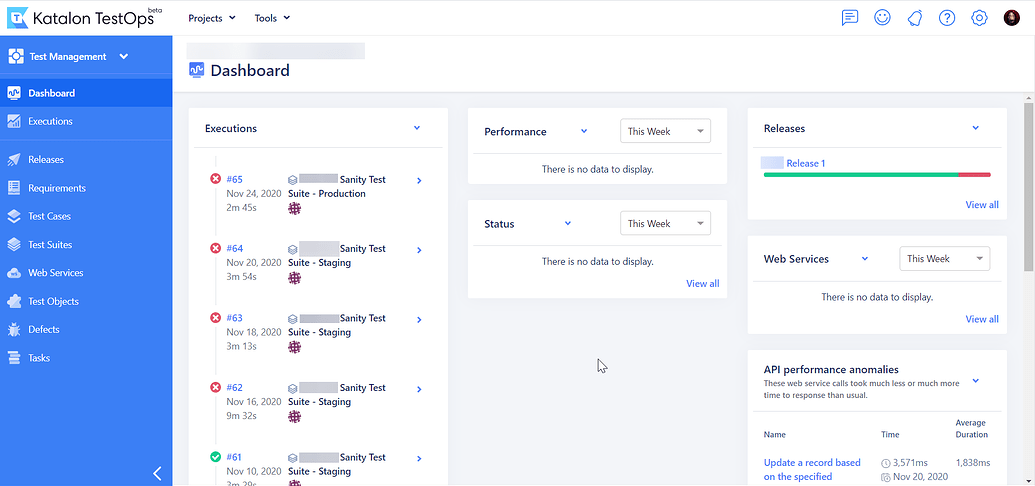
Katalon Studio is a packaged answer to a real complaint about raw Selenium, which is that you have to build and wire up everything yourself. Katalon did that assembly and sells the result. One install gives you an IDE, a recorder, a library of built-in keywords, a manual editor sitting beside a script editor, an object repository, reporting, and CI integrations.
It earns its place in this comparison because it is the most complete commercial wrapper around the engine Selenium provides, and because it now ships an AI layer Selenium has no equivalent to. The current release is Katalon Studio 11.4.0, from July 2026. The open-source version of the same move, keyword files over SeleniumLibrary, is the subject of Robot Framework vs Selenium.
Rating: 4.4/5 from 706 reviews on Capterra.
Key features:
- Record and play back a flow, then edit it in a manual view or drop into Groovy or Java in script view
- Web, native mobile on iOS and Android, REST, SOAP, GraphQL, and desktop testing from one tool
- Two-tier self-healing that tries stored locators first, then hands the problem to an LLM
- AI test generation in Studio, plus regression tests generated from real production user journeys
Pros:
- A tester with no coding background can build and run a real suite on day one
- Reporting, integrations, and four testing types arrive assembled rather than sourced separately
Cons:
- Memory use and slowdowns on large projects come up repeatedly in reviews. One Capterra reviewer describes it consuming “pretty big memory so some times its impact to performance issue (like crash or slow),” and another calls it “very heavy, it consumes a lot of resources.”
- The interface reads as dated to some reviewers. A QA engineer on Capterra puts it bluntly, saying “it feels like interacting with an app built in the early 2000s.”
Pricing:
- Free edition, capped at 40 test suites, with no command-line execution
- Paid seats from $70 to $200 per month, about 16 percent less billed annually
- Runtime Engine, required to run tests in CI, at $1,749 per license per year
- Cloud execution add-ons at $1,899 per session per year
- Custom pricing above that
Best for: Mixed teams of manual and automation testers who want web, mobile, API, and desktop coverage without building a framework first.
Not for: Engineering teams that want to own their stack, or anyone running enough parallel execution that per-seat and per-session fees start to dominate the automation budget.
Selenium
Selenium is a library, not an application. It drives a real browser through a programmatic API, in whichever of its five languages your team already writes. The runner, the assertions, the reporting, and the CI wiring are all yours to supply.
It earns its place here because it is not merely a tool. It is the thing the standard was written from. The W3C WebDriver specification, a Recommendation since June 2018, says in its own opening lines that it is derived from the Selenium WebDriver browser automation framework. The current release is Selenium 4.46, from July 2026.
Rating: 4.5/5 from 101 reviews on G2.
Key features:
- Official bindings for Java, Python, C#, Ruby, and JavaScript
- Eight locator strategies plus relative locators, documented in Selenium’s element locators reference
- Selenium Manager handles driver downloads and versions so you no longer wrangle them by hand
- WebDriver BiDi support, extended to Safari in the 4.46 release
Pros:
- Zero license cost, and a W3C standard that outlives any single vendor’s roadmap
- Total control over language, framework, runner, and infrastructure
Cons:
- No reporting, no test runner, no assertions. Selenium’s own documentation states plainly that it “is not designed to report on the status of test cases run,” and that it “does not help you write well-architected test suites.”
- Browsers only. Native mobile means adding Appium, and API testing means adding something else entirely.
Pricing: Free. Apache 2.0, no seat cost, no runtime fee, no commercial edition. The cost moves from your budget to your calendar.
Best for: Engineering teams that write their own tests, need a specific language binding, and want no vendor between them and the browser.
Not for: Teams without engineers to spare, or anyone who needs reporting, mobile, and API coverage without assembling three more tools around it.
Which One Gets You to a Running Test Faster?
Selenium is code, and there is no way around that. You pick a binding, write your own page objects, and stand up a runner, assertions, and reporting before the first test tells you anything useful. Katalon inverts that. Record a flow, play it back, drag in prebuilt keywords, and drop into Groovy only when you need real logic. For a team where most testers do not write code, that difference is the whole ballgame, and it is the entire reason Katalon exists.
The trade is ownership, and it is more literal than most comparisons admit. A Selenium suite is code in your repository, in a language you chose, running on a W3C standard. A Katalon suite is .tc files whose Groovy calls Katalon’s own keyword library, plus .rs object repository files keyed to Katalon-generated GUIDs, and those run inside a Katalon project and nowhere else. Katalon documents a migration path in and no path out. Buying the assembly means buying the format it comes in, which is a fine trade to make on purpose and an unpleasant one to discover in year three.
Neither choice changes what a test is underneath, which is a sequence of steps bound to a description of the screen.
Katalon gets a mixed team to a working suite in a day. Selenium gets an engineering team to a suite they fully control, in a week or three. Speed to the first test is the one dimension where this is not a close call.
Which One Costs More to Run for a Year?
Selenium costs nothing to license and a great deal to operate. Katalon costs the reverse, and its published numbers are worth doing arithmetic on before you commit.
Katalon’s per-seat plans run $70 to $200 per month depending on tier, or about 16 percent less when billed annually. Five seats on True Automation at the annual rate works out to $10,020 a year. That is a legible number, and for a team without spare engineers it is usually smaller than the months of framework building it replaces.
The figure that surprises teams sits outside the seat price. Katalon’s free edition cannot run tests from the command line at all. CLI, CI server, and Docker execution are gated behind Katalon Runtime Engine at $1,749 per license per year, so the moment your suite needs to run on a pull request rather than on a laptop, the bill changes shape. Cross-Browser Cloud and Native Mobile App Cloud add $1,899 per session per year each. Parallel execution and the scheduler are paid-tier features too.
| Cost line | Katalon | Selenium |
|---|---|---|
| Per seat | $70 to $200 per month | $0 |
| CI execution | $1,749 per Runtime Engine license per year | $0, you run it yourself |
| Parallel cloud sessions | $1,899 per session per year | Your own grid, your own machines |
| Framework build | Included | Weeks of engineering time |
| Ongoing repair | Engineering time | Engineering time |
Cost shows up in reviews too, and the sentiment splits. Plenty of PeerSpot reviewers call Katalon good value, while others are direct about the ceiling. A Senior Quality Specialist there says Katalon Studio “is on the expensive side,” a QA Manager calls it “a costly product,” and a Head of Quality Control says “the prices are very high.” Read the full pricing thread before you assume either verdict.
Selenium’s license bill is zero and its engineering bill is not. Katalon’s license bill is real, legible, and often the cheaper of the two. Model the Runtime Engine and session add-ons before you decide, not just the seat price.
Stop Paying to Repair Tests
See the repair queue disappear. No locators to write, none to re-point.
Book a DemoWhich Has the Stronger AI Layer in 2026?
Most comparisons still describe Katalon’s AI capability as limited or forthcoming. That description went stale during 2025.
Katalon now ships AI test generation inside Studio through its built-in assistant, which turns a natural-language prompt into Groovy, explains existing code, generates API tests from an OpenAPI spec, and analyzes failures. It ships True Production Insights, launched in 2025 under the name TrueTest, which reads real production user journeys and generates regression tests from the flows your users actually take. Its platform assistant adds an agent mode that runs multi-step triage through MCP servers.
Selenium shipped something else entirely. Version 4.46 in July 2026 brought BiDi protocol unification across bindings, Safari BiDi support, Selenium Manager hardening, and Grid fixes. No AI authoring, no self-healing, nothing that writes a test for you. The core project has never claimed that ground, and the self-healing test automation teams bolt onto Selenium comes from third-party projects rather than from Selenium itself.
| Capability | Katalon | Selenium |
|---|---|---|
| Generates a test from a prompt | ✓ | ✗ |
| Generates tests from production user journeys | ✓ | ✗ |
| Repairs a broken locator automatically | ✓ | ✗ |
| Agentic triage and failure analysis | ✓ | ✗ |
| Removes the locator | ✗ | ✗ |
Read the last row against the four above it. Every capability Katalon added makes the locator faster to write and faster to repair. None of them makes the test stop depending on one.
Katalon ships a real AI layer and Selenium ships none. What that layer produces is still Groovy bound to an object repository, and still a suggested replacement locator when the old one fails.
Why a UI Change Breaks Both
Here is the cost neither pricing page shows. Selenium locates elements by ID, name, class name, tag name, link text, partial link text, CSS selector, and XPath. Katalon’s object repository offers XPath, attributes, CSS, and image matching. Different vocabularies, identical premise. Every one of those describes how the app happens to be built right now, and every description is a contract with a markup your product team is paid to keep changing.
Rename a class, restructure a component, ship the redesign marketing has been asking for since March. The tests fail and nothing failed for a user. Your suite is now reporting on the distance between last sprint’s DOM and this one, which is the least interesting question in your CI pipeline. Low-code does not exempt you either, because a recorded Katalon test is a chain of stored locators under the visual layer.
The clearest evidence that this is structural rather than incidental is that Katalon built two layers of machinery to cope with it. Classic self-healing tries the other locators it has stored for that object. When those fail, an LLM reads the page source, the accessibility tree, and screenshots, then proposes a new locator. Good feature. Also an admission, because nobody builds an LLM fallback for a contract that holds.
Selenium leaves the repair to a human. Katalon automates the guess and routes the result back to a human for review. Neither removes the contract, and the gap between those two positions is smaller than the gap between both of them and not having a locator at all. It is also the line separating the Selenium alternatives worth switching for from the ones that just move the work around.
On authoring speed and cost these tools genuinely differ. On what happens the morning after a redesign, they land in the same place. Katalon just gets there with a better guess.
Katalon vs Selenium vs Autonomous Testing
Comparing these two only against each other hides the larger shift. Both are ways to write a test against a locator, one by hand and one through a recorder. A third category, autonomous QA, skips the locator entirely and identifies elements by what they look like and do on screen. The table puts all three side by side.
| Dimension | Katalon | Selenium | Autonomous (Pie) |
|---|---|---|---|
| Category | Low-code platform built on Selenium | Open-source browser automation library | Autonomous QA platform |
| How tests get written | Record and playback, keywords, or Groovy | Code, in five official languages | Agents generate the suite, or you describe it in plain English |
| How elements are found | Object repository of XPath, CSS, attributes, images | Eight locator strategies plus relative locators | What the element looks like and does on screen |
| After a redesign | An LLM proposes a replacement locator | You write the replacement locator | The element is re-identified, nothing to re-point |
| Scope | Web, mobile, API, desktop | Browsers only | Web and native iOS and Android on simulators and emulators |
| Cost | $70 to $200 per seat monthly, plus add-ons | Free | Custom pricing |
The first two rows are where Katalon and Selenium genuinely compete, and a team can argue either side. Rows three and four are where they stop competing and quietly agree with each other.
When Should You Choose Katalon, Selenium, or Neither?
Capability rarely decides this. Both automate almost any web flow, and Katalon reaches mobile, API, and desktop through the same bundled approach. Team shape decides it, and so does what you are willing to keep paying for. If neither name is locked in yet, our test automation tools roundup covers the wider field.
- Pick Katalon if: your testers are mostly manual, you want web, mobile, API, and desktop from one install, and reporting plus AI authoring matter more than owning every layer. The seat and Runtime Engine fees are cheaper than the engineering months they replace.
- Pick Selenium if: engineers write the tests, you need a specific language binding, or you want a W3C standard with no vendor between you and the browser. If your shortlist is really Selenium against a newer framework, our Cypress vs Selenium breakdown covers that fight instead.
- Pick neither if: your bottleneck is not writing tests but repairing them. Both tools optimize authoring. When the queue eating your sprint is failures caused by UI changes rather than by bugs, an autonomous platform like Pie is solving a different problem than either of these.
Separate the two causes before you buy. A better authoring experience fixes how long the first test takes. Only changing what a test is bound to fixes how often it breaks.
How Pie Removes the Locator Instead of Repairing It
Pie is not a better wrapper around Selenium. It sits outside that lineage. Pie identifies elements the way a person does, by what they look like and do on screen, so nobody on your team ever writes or maintains a locator. There is no object repository to keep current and no WebDriver code to own.
We did not start there. Early versions leaned on better selectors, then XPath, then data-testid attributes threaded through the whole app. Each one broke on a different kind of change, and the last needed developers to annotate the product by hand before a single test could run.
So we asked how a human tests. Someone looks at the screen, sees the Sign In button, and taps it. No locator involved.
Three things follow from that:
- Agents build the suite before you author anything: Point Pie at your app and hundreds of agents explore it, map every feature, and generate test cases covering 60 to 80 percent of core flows on day one.
- Elements are re-identified, not re-pointed: When a class renames or a layout shifts, Pie recognizes the element by what it does rather than proposing a new address for it. There is no locator to patch because there was never one to break.
- Your existing work is an input, not a loss: Pie ingests test cases you already have in whatever format they live in, and you describe anything the agents miss in plain English rather than in Groovy or Java.
Pie also runs where your engineers already do. It connects to Claude Code, Cursor, and other MCP clients, so an engineer can trigger a run and ask what failed without leaving the IDE. When a merged pull request breaks a flow, Pie Loop drafts the fix and opens it for a human to review and merge.
You still ship. Pie verifies.
Fi, a Pie customer, measures the difference in release terms rather than in test counts.
”The time between having a release candidate ready and being fully tested has gone from two to three days to a few hours.”
— Philip Hubert, Director of Mobile Engineering, FiPie is not a drop-in for either tool. Katalon covers API and desktop testing Pie does not touch, and Selenium gives you a portable standard plus a codebase you own outright. We put Pie and Selenium side by side on their own page if you want the trade laid out in detail.
But if you are choosing between these two mainly to settle who repairs the locators, the question is worth retiring rather than answering.
Buy the Cockpit or Build It
Selenium is the stronger default for engineering teams that want control, zero license cost, and a standard that outlives any vendor. Katalon is the stronger default for mixed teams that need a working suite this week and can absorb the seat and Runtime Engine fees. Pick on those terms and you will not be wrong.
You will also have settled the smaller question. Katalon is a cockpit built around Selenium’s engine, and a better cockpit does not change what the test is bolted to.
If the repair queue is your actual bottleneck, stop comparing authoring models. We built Pie, an autonomous QA platform, so there is nothing to re-point when the screen moves.
Ship the Feature. Not the Bug.
Hand the regression suite to Pie. Keep shipping while it keeps up.
Book a DemoFrequently Asked Questions
Yes. Katalon's own documentation describes Katalon Studio as an automated testing IDE built upon the Selenium framework, and that has not changed in 2026. Selenium drives the web automation underneath, and Appium handles native mobile.
Everything Katalon adds sits above that engine. The recorder, the keyword library, the object repository, the reporting, and the AI features are all part of that wrapper. Element identification is inherited, which is why both tools break on the same kind of UI change.
For most mixed QA teams, yes. Katalon gets you a running suite in a day, covers web, mobile, API, and desktop in one tool, and ships AI test generation and self-healing that Selenium's core has never offered.
Selenium wins for engineering teams that write their own tests and want zero license cost, five official language bindings, and a W3C standard no vendor controls. The decision turns on team shape, not on tool quality.
Selenium is free with no paid tier at all. The project ships under the Apache 2.0 license, so there is no seat cost, no runtime fee, and no commercial edition to upgrade to.
Katalon is freemium. Its free edition keeps working after the trial with core functionality, capped at 40 test suites, but it cannot run tests from the command line. Paid plans start at $70 per seat per month, and CI execution needs the Katalon Runtime Engine at $1,749 per license per year.
Katalon's script view is Groovy, a JVM language that interoperates with Java, and you can write plain Java there as well. You do not have to touch either one. Recording a flow, dragging in built-in keywords, and editing in the manual view get a tester to a working test with no code.
Selenium has no manual view. You write in Java, Python, C#, Ruby, or JavaScript from the first line.
The traffic runs mostly one way. Katalon documents a migration path in, though for hand-written Selenium code it means copying sources into the project's Groovy include folder, wiring dependencies into Gradle, and building a wrapper test case by hand. Selenium IDE recordings do have a real one-click import.
Coming out is harder. Katalon Studio test cases are Groovy calling Katalon's own keyword library against a Katalon object repository, so they run inside a Katalon project and nowhere else.
Yes, and for the same reason. Selenium finds elements by ID, name, class name, tag name, link text, partial link text, CSS selector, or XPath. Katalon's object repository uses XPath, attributes, CSS, and image matching. Every one of those is a description of the current markup, so a redesign invalidates it.
Katalon softens the landing. When a locator fails it tries other stored locators, then falls back to an LLM that reads the page source, accessibility tree, and screenshots to propose a replacement. Selenium leaves the repair to you.
Katalon and Selenium both ask you to describe where an element lives in the markup. Pie identifies elements by what they look like and do on screen, so nobody on your team writes or maintains a locator.
Agents explore your app and generate the suite before anyone authors a test, covering 60 to 80 percent of core flows on day one. You describe anything they miss in plain English, and Pie can ingest test cases you already have in whatever format they live in.
Not for every job. Pie covers web and native iOS and Android apps on simulators and emulators, so Katalon's API and desktop testing and Selenium's portable WebDriver standard sit outside what Pie does.
Where Pie takes over is the part both tools leave behind. It generates and maintains the functional suite, and Pie Loop opens a reviewed fix as a pull request when a merged change breaks a flow.
13 years building mobile infrastructure at Square, Facebook, and Instacart. Now building the QA platform he wished existed the whole time. LinkedIn →