What Are the Best Test Automation Tools in 2026?
A vendor-honest breakdown of the best test automation tools in 2026: ratings, pricing, honest pros and cons, and a decision framework so you pick right the first time.

There are more test automation tools in 2026 than any team can reasonably evaluate, and most “best tools” lists are thinly disguised affiliate pages. This one is not. The market is flooded with AI tools promising to replace entire teams: developers, designers, marketers, and now testers along with them. QA is no exception, and a wave of AI-native platforms now sits beside the open-source frameworks that have run testing for two decades. The noise makes it genuinely hard to tell which tool fits your team. The mistake teams make is rarely the feature comparison. It is the mismatch between the tool and their actual constraint.
So this guide is organized around that idea. Below is an honest breakdown of the tools that matter, what each one is genuinely good at, where it costs you, and a decision framework so you pick the right one the first time.
What you’ll learn
- A five-question framework for choosing the right tool
- Real pricing, sourced pros and cons, and honest trade-offs for ten tools
- How open-source frameworks and AI-native platforms differ, and when each wins
- Who each tool is genuinely for, including who Pie is NOT for
Test Automation Tools at a Glance
Before diving into each tool, here is a reference table across the dimensions that drive real buying decisions: what each tool covers, how you author tests, how much it heals itself, and who it suits. Pie leads because it is the broadest in platform reach (web, iOS, and Android in one definition), where Cypress and Playwright stop at the browser. Use it to shortlist before you trial, then read the per-tool sections below for pricing, licensing, and the honest trade-offs.
| Tool | Platforms | Test creation | Maintenance | Best for |
|---|---|---|---|---|
| Pie | Web, iOS, Android | Auto-generated by AI agents | Self-healing, vision-based | Maintenance-bound teams |
| Selenium | Web | Code, multi-language | Manual selectors | Polyglot web estates |
| Playwright | Web, API | Code, auto-waiting | Manual, low flakiness | Modern web projects |
| Cypress | Web | Code, JS/TS | Manual, retry-eased | Front-end JS teams |
| Appium | iOS, Android | Code, WebDriver | Manual selectors | Cross-platform mobile |
| testRigor | Web, mobile, desktop | Plain English | Description-based | Non-coders |
| mabl | Web, API, mobile | Record + GenAI | Auto-healing | Managed SaaS teams |
| Katalon | Web, API, mobile, desktop | Low-code studio | AI heal (paid tier) | All-in-one QA |
| AccelQ | Web, API, mobile, desktop | Codeless, AI-assisted | Self-healing | Enterprise QA |
| BrowserStack | Web, mobile (infra) | Runs your framework | N/A (infrastructure) | Real-device coverage |
Pricing and licensing for each tool are covered in the sections below, verified as of June 2026.
How to Choose the Right Test Automation Tool
You choose the right test automation tool by matching it to your tightest constraint, not by counting features. The tool with the longest feature list is rarely the one that removes your biggest bottleneck. Before comparing products, answer five questions honestly. Your answers eliminate most of the list before you ever start a trial.
- What do you need to cover? Web only, mobile only, or both? This single question rules out half the tools. Pie runs one behavior-based definition across web, iOS, and Android, while a tool like Cypress runs its tests inside the browser and does not automate native mobile apps (its docs list missing native and mobile events as a current trade-off). Know your platform target before you shortlist.
- How often does your UI change? This is the hidden cost driver. Selector-based tools break when the UI changes, and high-churn products pay that bill every sprint. It is also the question that ranks the best Selenium alternatives against each other, because most of them swap the syntax and keep the selector. In the Capgemini World Quality Report 2025-26, teams rank maintenance burden and flaky scripts among their top test-automation challenges, and that cost compounds on every sprint where UI changes break selectors.
- What can your team actually write? A code-first framework is wasted on a team without engineers to maintain it; a plain-English tool may frustrate a strong dev team that wants control.
- How does it fit CI/CD? The tool has to run on every build, headless, fast, in your existing pipeline.
- What is the total cost of ownership? “Free” frameworks still cost engineering hours. The honest number is license plus maintenance, not license alone. What test automation actually is explains where that maintenance hides.
The Stack Overflow Developer Survey 2024 found Playwright at 33% adoption among professional developers, up from 24% in 2023. Cypress sits at 19% (flat year-over-year) and Selenium at 17% (declining). The State of JS 2025 survey showed Playwright satisfaction at 91% vs Cypress at 72%, the widest gap recorded. Selenium is not dead, but the momentum for new projects has shifted.
10 Best Test Automation Tools in 2026
Ten tools worth knowing in 2026, grouped by what they are for. Each entry names what the tool genuinely excels at, where it costs you, and who should not use it. We list Pie first because it solves the maintenance problem the rest of this list spends engineering hours fighting, then move through the open-source frameworks and commercial platforms in turn.
1. Pie: Autonomous, Vision-Based Testing
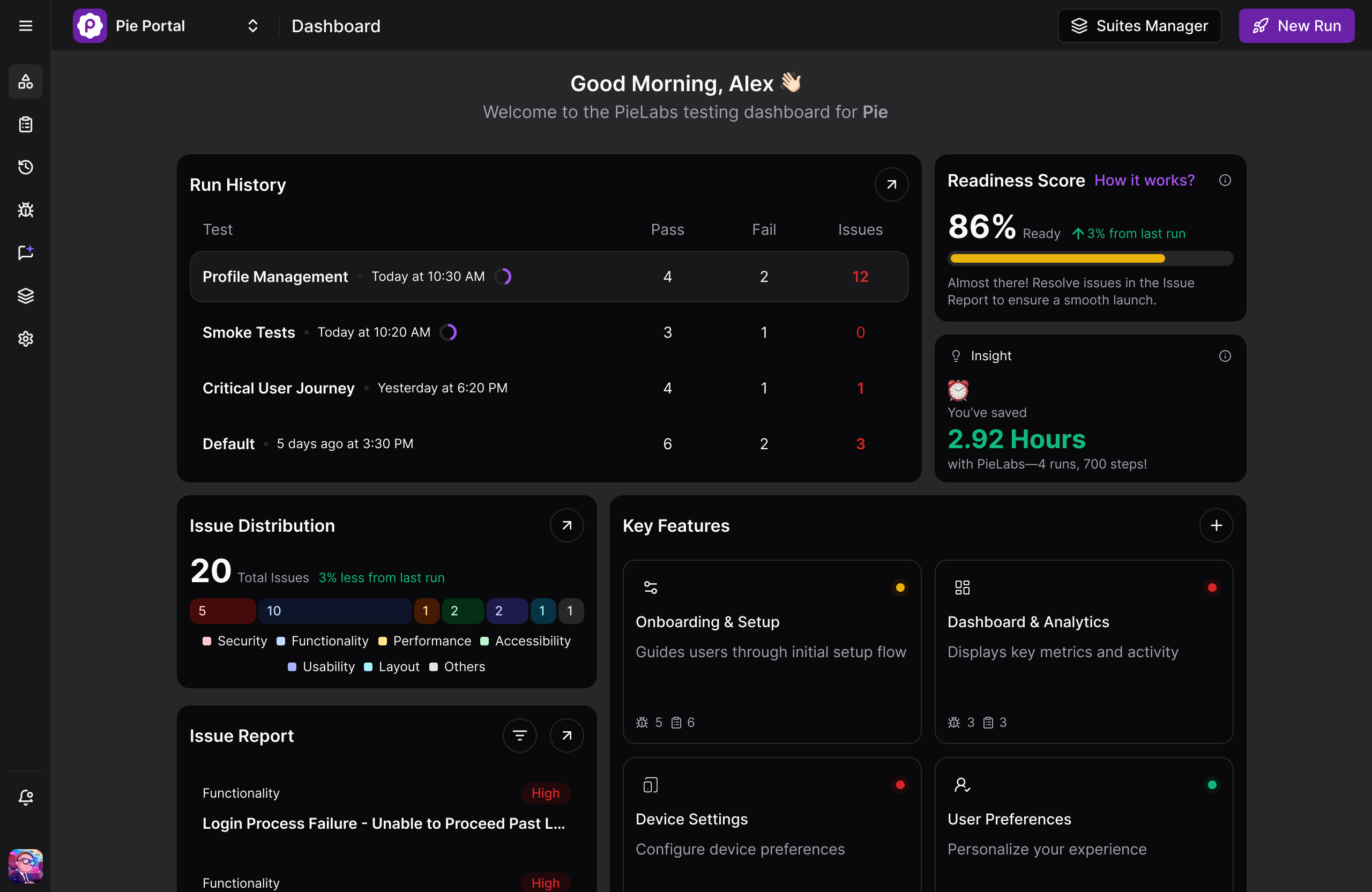
Pie takes a different approach from everything below. Instead of writing tests against selectors, Pie’s AI agents explore your app, map the user flows, and generate coverage automatically, then execute tests through the rendered screen using vision rather than element IDs. Because nothing is anchored to a selector, UI changes do not break tests, and there is no authoring step to staff.
Its autonomous discovery prioritizes high-risk paths (auth, checkout, anything revenue-tied) on its own, and its self-healing, vision-based execution keeps running when a redesign renames classes. The reach is the differentiator: one behavior-based definition runs across web and native iOS and Android, the place where Playwright and Cypress both stop at the browser.
✅ What makes the difference in practice:
- Autonomous discovery maps real user flows and generates coverage with no test authored by hand
- Vision-based execution identifies elements by what the user sees (shape, label, position), so class renames and DOM refactors do not turn the suite red
- One definition covers web, native iOS, and native Android, removing the duplicate mobile suite that Appium-plus-framework stacks require
❌ Honest trade-offs:
- Not a drop-in replacement for a unit-testing framework or a performance harness
- Smaller ecosystem than decade-old projects like Selenium, as with any newer platform
“The time between having a release candidate ready and being fully tested has gone from two to three days to a few hours.”
— Philip Hubert, Director of Mobile Engineering, Fi (the Fitbit for pets)
Pricing: Platform subscription. Contact Pie for current pricing.
Best for: Teams whose bottleneck is test maintenance rather than test capability, where engineers spend more sprint time repairing broken selectors than catching real bugs.
Not for: Unit testing or performance testing.
See Autonomous Testing on Your App
Watch Pie discover your critical flows and generate a self-healing end-to-end suite in about 30 minutes, no selectors to maintain.
Book a Demo2. Selenium: The Open-Source Standard
Selenium is the longest-standing browser automation framework and the foundation of the W3C WebDriver 2 standard. The latest release line is Selenium 4.x (4.44.0 as of May 2026), which dropped the legacy JSON Wire Protocol entirely in favor of W3C WebDriver and added Selenium Manager for automatic driver management, so teams no longer hand-manage browser driver binaries. Selenium 4 also exposes a BiDi and CDP bridge for network interception and console-log capture. Its strength is reach: it supports more languages (Java, Python, C#, JavaScript, Ruby) and more browsers than anything else, and Selenium Grid scales tests across many machines. A week of ownership is mostly driver and Grid upkeep plus fixing selectors that broke on the last DOM change.
G2 rating (as of June 2026): Selenium is an open-source project, so its G2 presence is community-driven and the profiles are unclaimed by any vendor. Ratings span 4.6/5 from 94 reviews for Selenium WebDriver down to 4.2/5 for Selenium IDE; treat them as directional rather than a single authoritative score.
✅ Recurring strengths (G2 reviewers):
- Broadest language support of any web automation tool, so there is no need to retrain a polyglot team
- Selenium Grid enables true parallel execution across machines without a paid cloud
- Massive ecosystem of community plugins, CI integrations, and training resources
❌ Recurring complaints (G2 and r/QualityAssurance):
- No built-in waiting, so every stability mitigation (explicit waits, fluent waits) is hand-rolled
- Setup complexity is overwhelming for small teams: WebDriver binaries, Grid configuration, capability management
- G2 reviewers repeatedly cite test brittleness as the top long-term cost: DOM changes break suites, and debugging which selector broke takes hours
Pricing: Free, Apache 2.0 license. Infrastructure and maintenance are the real costs.
Best for: Large, long-lived test estates in polyglot engineering organizations that already have dedicated QA infrastructure engineers.
Not for: Small teams without the engineering bandwidth to assemble and maintain the surrounding infrastructure.
3. Playwright: The Modern Web Default
Playwright, built by Microsoft, is a common default for new web projects in 2026. Its main advantage is built-in auto-waiting: before clicking, Playwright waits for an element to be attached, visible, stable, enabled, and ready to receive events. The current release is v1.60 (May 2026). One API drives Chromium, Firefox, and WebKit across TypeScript, JavaScript, Python, Java, and .NET. Three features carry the debugging story: the trace viewer replays each step with DOM snapshots and network logs, UI mode gives a watch-and-step runner, and codegen records interactions into a starting script. A week of ownership is lighter than Selenium’s because auto-waiting removes most timing flakiness, but DOM-changing redesigns still mean hand-fixing locators. Our Cypress vs Selenium vs Playwright comparison sets it against the other two on architecture, speed, and flakiness.
G2 rating (as of June 2026): Like Selenium, Playwright is an open-source project with an unclaimed, community-driven G2 profile: 4.8/5, but from only 12 reviews, so treat the score as directional rather than definitive.
✅ Recurring strengths:
- Auto-waiting eliminates the most common source of flaky tests without hand-rolled sleeps
- Multi-browser, multi-language, and multi-origin from one codebase, covering Safari via WebKit as a first-class target
- Built-in parallelism (free) vs. Cypress’s paid cloud option for large suites
❌ Recurring complaints:
- Still code-first: engineers must write, review, and fix tests, with no authoring shortcut for non-developers
- A UI redesign that changes DOM structure still requires manual locator fixes, just fewer than Selenium demands
- Steeper initial learning curve than Cypress for front-end developers new to out-of-process architecture
Pricing: Free, Apache 2.0 license. No paid tier.
Best for: New web projects in 2026, polyglot teams, and suites that need Safari coverage, multi-tab flows, or free parallelism at scale.
Not for: Teams that need native mobile app testing (Playwright is web and API only) or whose primary blocker is test authoring speed rather than test capability.
4. Cypress: The Developer Experience Favorite
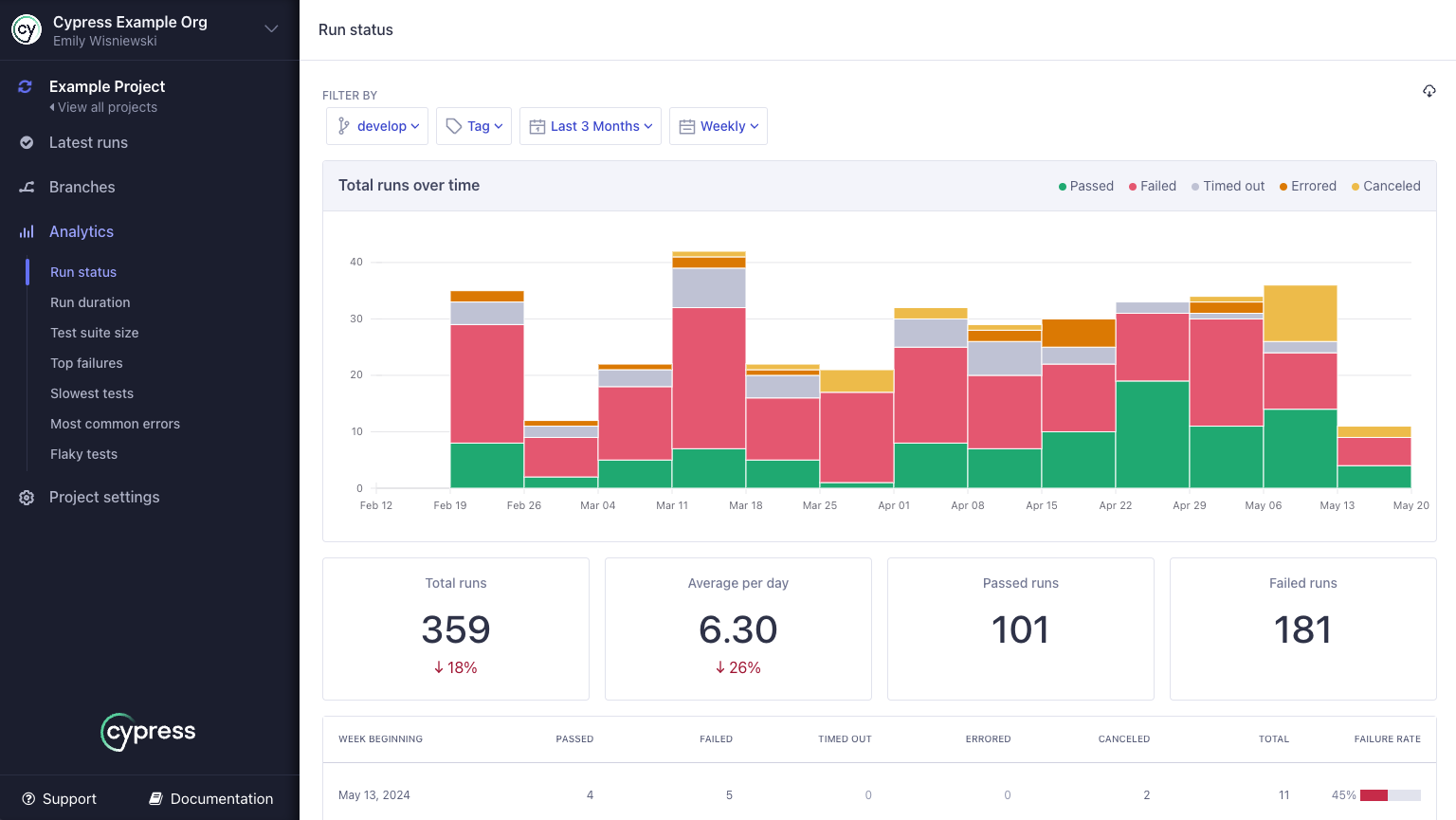
Cypress runs inside the browser alongside your application, which gives it direct access to the DOM, network layer, and window object. The result is a fast feedback loop, time-travel debugging (step back through each command with screenshots), and an interactive test runner many front-end developers like working in. Beyond end-to-end tests, Cypress ships component testing that mounts React, Vue, Angular, or Svelte components in a real browser, so the same tool covers both layers.
One boundary is worth stating precisely: Cypress runs its tests inside the browser and does not automate native mobile apps; its docs list missing native and mobile events under current trade-offs. For front-end JavaScript and TypeScript teams testing web apps, Cypress is one of the more comfortable tools to work in day to day.
G2 rating (as of June 2026): 4.7/5 from 107 reviews on G2; 4.7/5 on Capterra
✅ Recurring strengths:
- Time-travel debugger and in-browser runner are a standout for debugging test failures fast
- All-in-one: test runner, assertion library, mocking, and reporting bundled together
- Gentle learning curve for JavaScript developers, with no separate process or external driver to configure
❌ Recurring complaints:
- JavaScript and TypeScript only, so a Python or Java team cannot reuse its existing language expertise
- Cross-origin and multi-tab support has improved but still carries caveats compared to Playwright’s first-class handling
- Parallelization historically requires Cypress Cloud (paid); free local sharding works but is less polished
Pricing: Free, MIT license for the OSS runner. Cypress Cloud (parallel CI, analytics, test replay) has a free Starter tier, with paid plans reported in the roughly $67 to $267 per month range and custom Enterprise pricing above that. Verify current Cloud tiers as of June 2026.
Best for: Front-end JavaScript teams that prioritize debugging speed, single-origin web apps, and teams already standardized on Cypress.
Not for: Mobile testing, polyglot organizations, or large suites that need free parallelism without a paid cloud.
5. Appium: The Mobile Cross-Platform Workhorse
Appium is the default for cross-platform mobile automation. The project hit a major architectural milestone with Appium 2.0, which turned drivers and plugins into independently installed, independently versioned components, and the current release line is Appium 3.x (2026). That driver ecosystem (the XCUITest driver for iOS, UiAutomator2 for Android, plus community drivers) is the project’s real strength and its real upkeep cost. It uses the WebDriver protocol, so one test suite can target Android and iOS by swapping capabilities, and it integrates with every major device cloud. A week of ownership tends to involve a driver or OS-version bump and the locator churn that follows it. If you are testing native or hybrid mobile apps and want one open-source framework across both platforms, Appium is the established answer.
G2 rating (as of June 2026): 4.4/5 from 61 reviews; 4.3/5 on Capterra
✅ Recurring strengths:
- Cross-platform: one WebDriver-based API targets both iOS and Android, reducing the language split between mobile teams
- Works on real devices without modifying the app binary, so no instrumentation is required
- Integrates with every major device cloud (BrowserStack, AWS Device Farm, Sauce Labs) for parallel real-device runs
❌ Recurring complaints (Capterra and G2):
- Initial setup is consistently cited as overwhelming: configuring drivers, desired capabilities, and environment dependencies is often a multi-day lift
- Execution speed is noticeably slower than native frameworks like Espresso (Android) or XCUITest (iOS), making large regression suites painful
- Locator instability across device and OS variants is the leading maintenance complaint, covered in depth in our mobile app regression testing guide
Pricing: Free, Apache 2.0 license.
Best for: Teams that need one open-source framework across iOS and Android, with strong language flexibility and device cloud integration.
Not for: Teams without the engineering bandwidth to absorb a multi-day setup and ongoing driver maintenance across OS upgrades.
6. testRigor: Plain-English Authoring
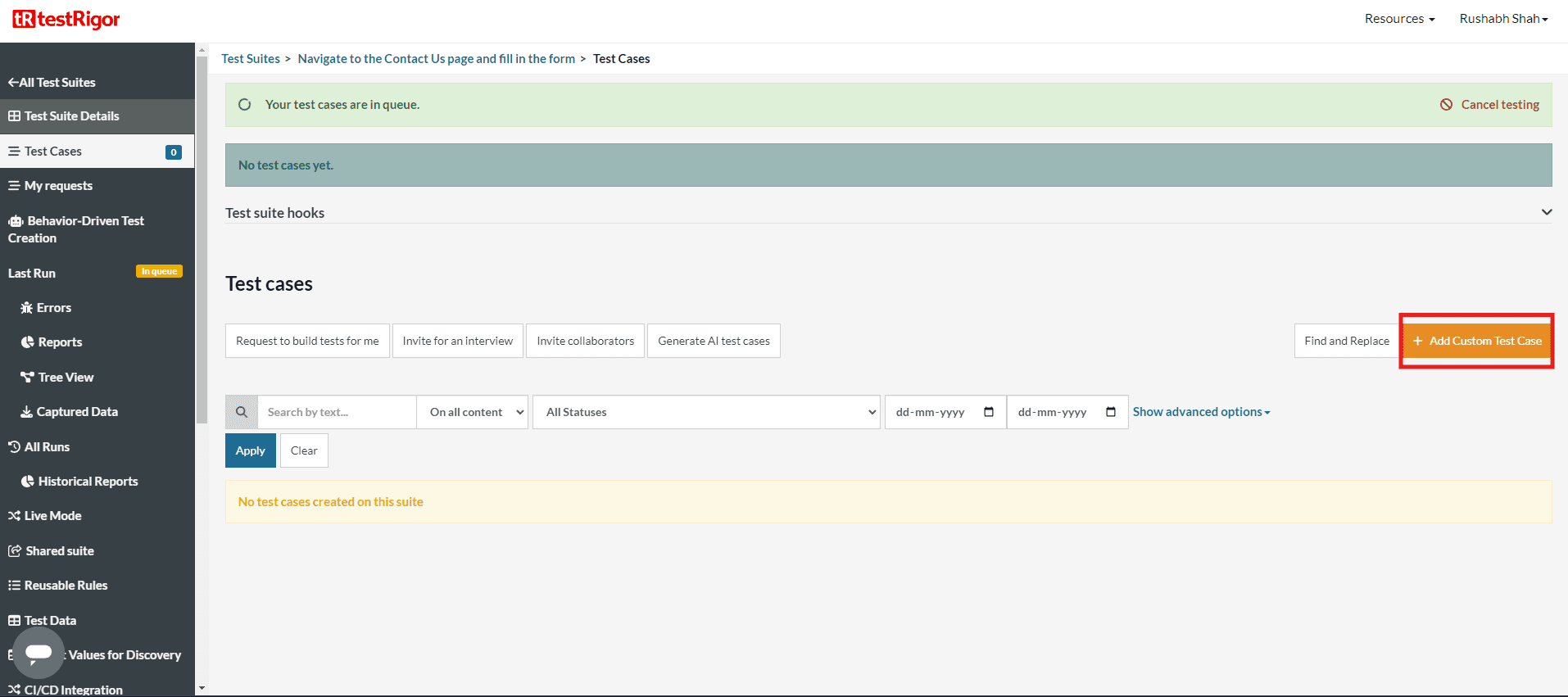
testRigor lets you write tests in plain English sentences rather than code. A test step like “click on ‘Add to Cart’” is how users describe the flow, not a CSS selector or XPath. This lowers the authoring skill barrier and lets non-engineers contribute tests. It targets the maintenance problem directly: because tests reference elements the way a user would describe them, they are more durable than selector-based scripts when the UI shifts. Whether that beats a recorder comes down to picking an authoring style, not escaping maintenance.
G2 rating (as of June 2026): 4.7/5 from 20 reviews (small pool, directional)
✅ Recurring strengths:
- Teams with no coding background can build smoke and regression suites within weeks
- Plain-English description of elements is more resilient to minor UI changes than XPath
- G2 reviewers cite responsive 24/7 support and a fast onboarding track
❌ Recurring complaints:
- Highly complex or conditional flows can feel constrained, since you are working within the platform’s interpretation layer rather than raw code
- Pricing is not publicly listed; custom quotes required, which makes budget planning difficult for smaller teams
- Smaller review pool than established tools means less community knowledge to draw on
Pricing: Free tier available; paid plans priced per infrastructure (parallel servers), not per test. Contact testRigor for current rates. Verify with vendor as of June 2026.
Best for: QA teams without strong coding backgrounds, companies where non-engineers need to own test authoring, and teams whose bottleneck is writing tests rather than executing them.
Not for: Engineering teams that want programmatic control over complex test logic or need a large community knowledge base.
7. mabl: Low-Code with Auto-Healing
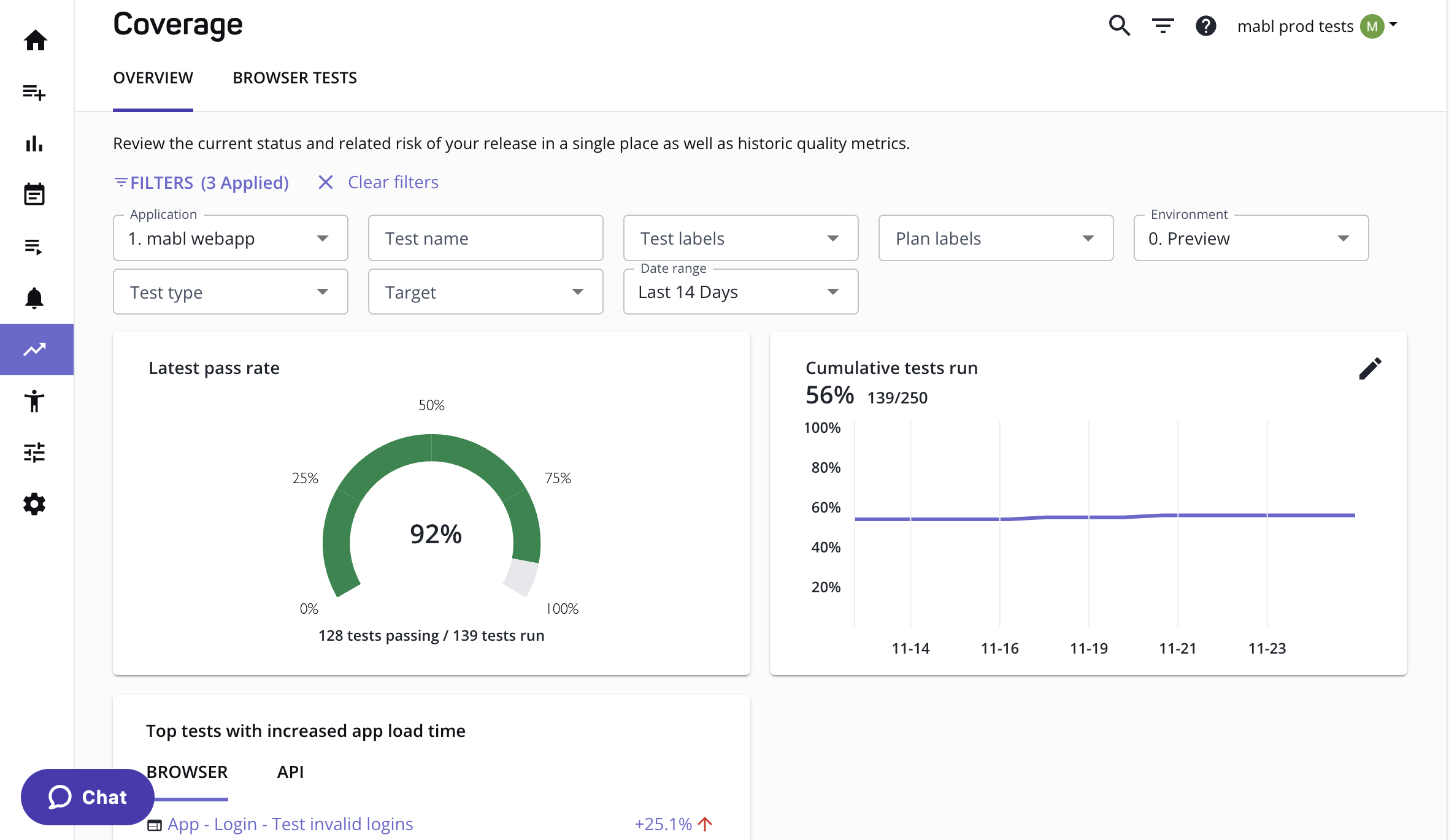
mabl is a low-code platform built around recorded tests and auto-healing: when a UI element changes, mabl’s engine finds an equivalent element using alternative attributes and updates the test automatically rather than failing outright. The company positions its multi-model (ML plus GenAI) auto-healing as the headline maintenance reducer, and has added GenAI intent-based authoring that plans tests from a described user story. It bundles end-to-end, API, performance, and accessibility testing with analytics, aimed at teams that want a managed, integrated SaaS rather than a framework to assemble.
G2 rating (as of June 2026): 4.5/5 from 40 reviews on G2; 4.0/5 on Capterra. Auto-healing is consistently the most-praised feature in G2 reviews.
✅ Recurring strengths (G2 and Capterra):
- Auto-healing locators are the most-praised feature: G2 reviewers report fewer broken tests after UI changes (the engine repairs locators within the selector model rather than removing selectors)
- Covers functional, visual regression, API, accessibility, and performance testing in one subscription
- CI/CD integrations are first-class and well-documented
❌ Recurring complaints (G2 and Capterra):
- Pricing scales fast: one G2 reviewer described it as “a highly priced, overly complicated solution”; multiple reviews cite cost as the primary drawback
- Mobile testing is an extension of a web-first platform, not a native mobile tool, and reviewers with serious mobile needs consistently flag this limitation
- Complex conditional logic and multi-step authentication flows often require JavaScript snippet workarounds, which partially undermines the low-code promise
Pricing: Starts around $450/month for the entry plan (credit-based model). Verify current pricing with mabl as of June 2026.
Best for: SaaS product teams that ship frequently, want built-in auto-healing, and prefer a managed platform over assembling a framework.
Not for: Teams with a primary mobile testing requirement or those on tight budgets where subscription cost is the binding constraint.
8. Katalon: The All-in-One Suite
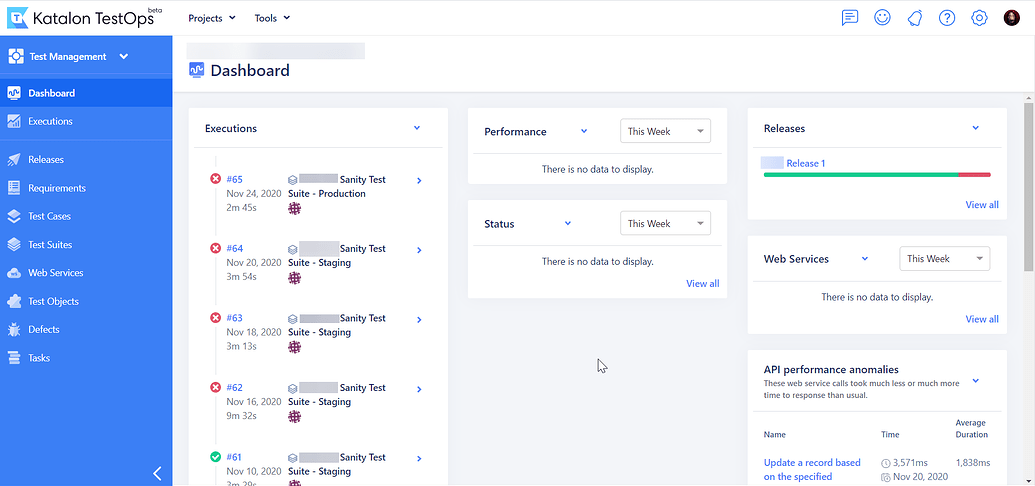
Katalon packages web, API, mobile, and desktop testing into a single low-code studio built on top of Selenium and Appium. It is popular with QA teams that want a recordable, all-in-one tool without stitching frameworks together. The free tier covers a meaningful feature set; the paid tier adds AI self-healing, advanced analytics, and enterprise integrations.
G2 rating (as of June 2026): 4.4/5 from 218 reviews on G2; 4.4/5 on Capterra
✅ Recurring strengths (G2 reviewers):
- Genuinely all-in-one: web, mobile, desktop, and API from one tool reduces tooling overhead for QA teams
- Free tier is substantive enough to evaluate fully before committing to paid plans
- AI self-healing on paid tier reduces the selector-breakage that its underlying Selenium/Appium layer inherits
❌ Recurring complaints (G2):
- Built on top of Selenium and Appium, Katalon inherits their selector fragility, and the abstraction reduces but does not eliminate that maintenance cost
- The jump from free to paid plans is steep for individuals or small startups; advanced features sit behind the paid wall
- Advanced users sometimes hit the ceiling of the low-code abstraction, requiring workarounds in Groovy scripts
Pricing: Free tier available. Paid plans from approximately $1,000 per user per year for annual subscription (promotional pricing observed). Verify current plans with Katalon as of June 2026.
Best for: QA teams transitioning from manual testing who want a single unified tool covering all surfaces, without the complexity of assembling Selenium and Appium separately.
Not for: Engineering teams that prefer best-of-breed components or need the deepest programmatic control over individual layers.
9. AccelQ: Codeless Automation on a Unified Platform
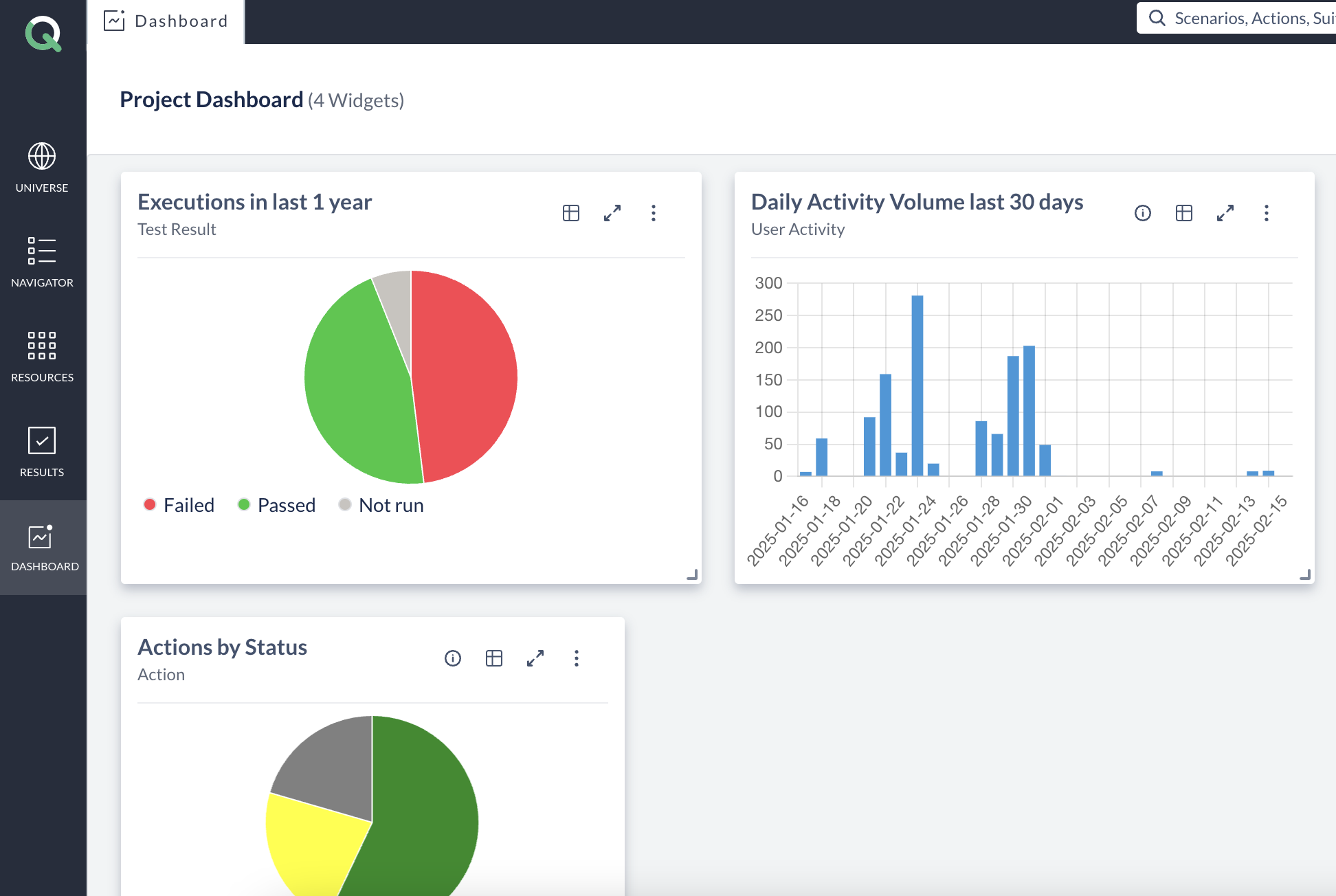
AccelQ is a cloud-native, codeless platform that aims to put web, API, mobile, and desktop testing (plus the test management around it) under one roof. Instead of writing scripts, you build flows in a natural-language, codeless editor, and the platform’s AI handles element identification and self-healing so locator changes do not break the suite. Where most tools on this list cover execution or authoring, AccelQ leans into the full QA lifecycle: planning, traceability, and analytics alongside the tests themselves. That breadth is its pitch to enterprise QA organizations that want one managed platform rather than a stack they assemble and maintain.
G2 rating (as of June 2026): 4.8/5 from 102 reviews, and a named Leader in G2’s Winter 2026 automation-testing reports. It is one of the better-reviewed commercial platforms in the category.
✅ Recurring strengths:
- Genuinely codeless authoring across web, API, mobile, and desktop reduces the skill barrier while keeping coverage broad
- AI-based self-healing cuts the locator maintenance that selector-based tools pay every sprint
- Built-in test management, planning, and traceability appeal to enterprise QA teams that need governance, not just execution
❌ Recurring complaints:
- Pricing sits at the enterprise end and is quote-based, which makes it a hard fit for small teams or tight budgets
- The codeless abstraction can hit a ceiling on highly complex or custom logic
- Despite the “codeless” framing, learning the platform’s model still takes ramp time
Pricing: Subscription, quote-based with no public price list; positioned at the enterprise tier. Verify current plans with AccelQ as of June 2026.
Best for: Enterprise QA teams that want a single codeless platform across web, API, mobile, and desktop, with test management and traceability built in.
Not for: Small teams on tight budgets, or developers who want raw code-level control over every test.
10. BrowserStack: The Device and Browser Cloud
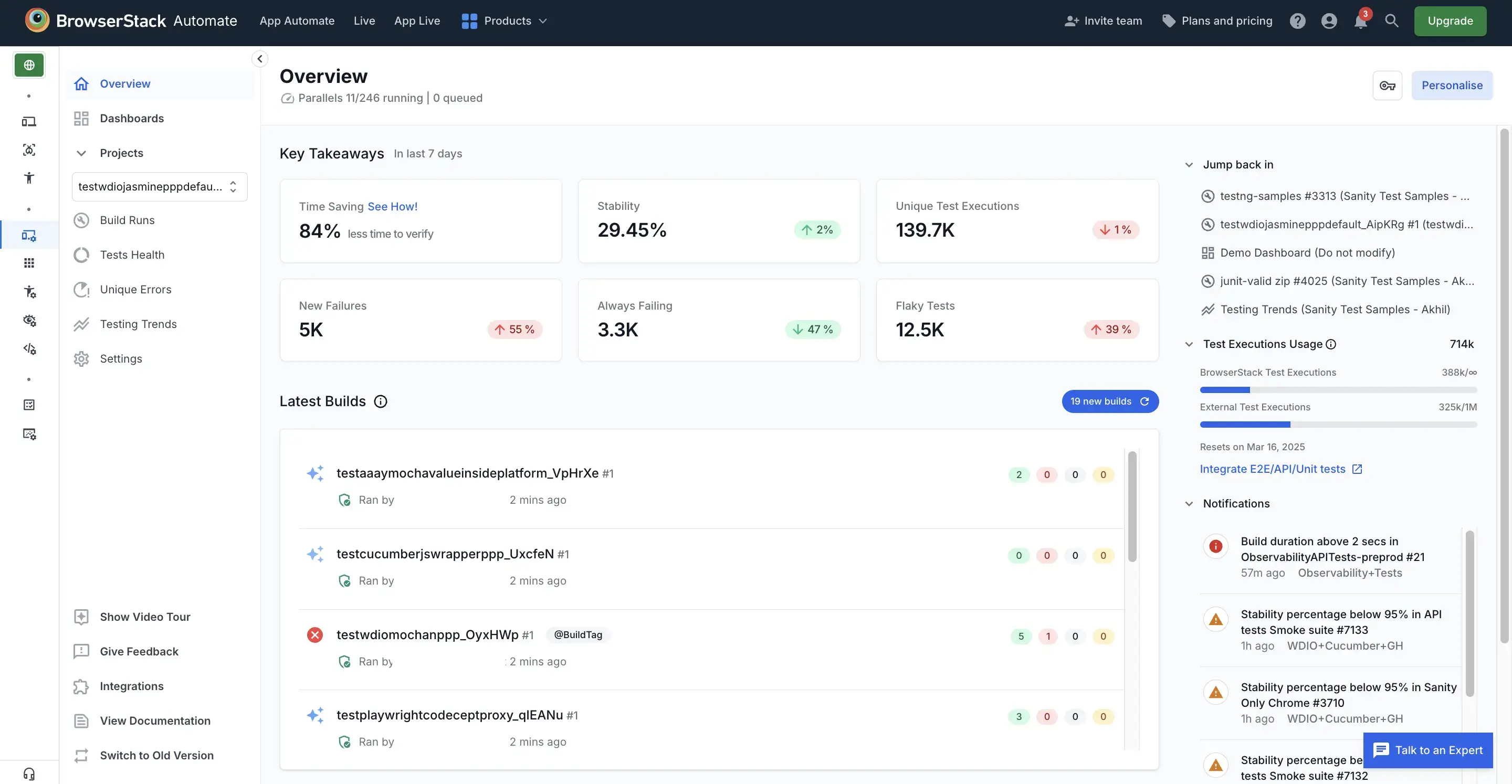
BrowserStack is infrastructure, not a test framework. It provides real browsers and physical devices in the cloud (the vendor cites a fleet in the tens of thousands of real devices, and Gartner Peer Insights lists it in the 20,000-plus device range) so you can run Selenium, Playwright, Cypress, or Appium tests across real environments without maintaining a device lab. For coverage across the messy reality of real-world devices and OS versions, it is the category leader by review volume, and the benchmark any list of BrowserStack alternatives starts from.
G2 rating (as of June 2026): 4.5/5 from 2,613 reviews on G2; 4.6/5 from 774 reviews on Capterra. It is one of the most-reviewed tools in the category.
✅ Recurring strengths:
- Real devices (not emulators): eliminates a category of false-green results that emulator-based testing misses
- Runs any framework that supports WebDriver or CDP, with no vendor lock-in on authoring
- Broad OS and browser version coverage eliminates the device lab maintenance burden entirely
❌ Recurring complaints (G2 and Capterra):
- G2 reviewers consistently flag cost as the primary drawback, since per-parallel pricing compounds at scale
- Performance during peak usage can be slower than running locally, adding minutes to CI feedback loops
- BrowserStack solves the “where do tests run” problem only. It does not author, maintain, or heal tests
Pricing: Automate (Selenium/Playwright/Cypress) from $169/month per parallel session. App Automate (Appium) similarly priced. Verify current tiers with BrowserStack as of June 2026.
Best for: Any team that needs real-device and real-browser coverage without maintaining a physical device lab. Most teams pair it with a framework from the list above.
Not for: Replacing a test framework or authoring tool. It solves execution infrastructure, not test creation or maintenance.
Open-Source Frameworks vs AI Platforms: Which Wins?
The real divide in 2026 is not tool versus tool; it is open-source frameworks versus AI-native platforms, and which wins depends entirely on where your cost lands. Open-source frameworks like Selenium, Playwright, and Cypress give you total control and zero license fee, but every test is code you write and every UI change is maintenance you pay for. AI platforms charge a subscription and trade that fee for dramatically lower upkeep. We rank that category on its own in our guide to the best AI test automation tools.
The deciding variable is UI churn. If your product is stable and your team is strong on engineering, a free framework’s maintenance bill stays manageable and the control is worth it. If you ship daily and your UI changes constantly, that maintenance bill compounds. The JetBrains Developer Ecosystem Survey 2024 found that while 95% of developers now run automated tests (up from 85% the year before), only 18% use AI in the testing tools they use, a gap that represents both early-adopter advantage and genuine untapped leverage.
The frameworks themselves have been moving toward AI to address this: Playwright’s auto-waiting and mabl’s auto-healing are both attempts to reduce the same maintenance tax from inside the selector model. Autonomous platforms like Pie push the idea to its conclusion by removing the selector, and the authoring step, altogether. The question to ask is not “which is better in the abstract.” It is “is my bottleneck control or maintenance?”
Where Pie Fits Among These Tools
Pie fits the teams whose bottleneck has shifted from writing tests to keeping them alive. If your engineers spend more time repairing broken selectors than catching real bugs, that is the signal. Pie’s autonomous QA platform uses vision-based AI agents to explore your app, generate coverage without scripting, and adapt when the UI changes, so the maintenance backlog that drowns selector-based suites never forms.
It is deliberately not an either/or. The teams that get the most from Pie run it alongside the tools above:
- Playwright or Cypress for precise, developer-owned checks
- BrowserStack for real-device breadth
- Pie for broad regression and autonomous discovery across the frequently-changing flows that break everything else
How to Pick, Without Regret
There is no single best test automation tool in 2026, and any list that crowns one is selling something. The best tool is the one that removes your tightest constraint. Need cross-browser web depth with free parallelism? Playwright. The best developer experience for a JavaScript team? Cypress. Cross-platform mobile on a budget? Appium. Plain-English authoring without coding? testRigor or mabl. Real-device infrastructure without a device lab? BrowserStack. All-in-one low-code for a QA team moving from manual? Katalon. Enterprise codeless coverage across web, API, mobile, and desktop? AccelQ.
And when test creation and maintenance have become the bottleneck rather than framework capability, when your engineers are spending their sprints fixing selectors instead of shipping features, an autonomous, vision-based testing platform is the right category to evaluate.
Run the five-question framework, shortlist the two or three tools that fit, and trial them against your real app. The teams that do not regret their choice a year later are the ones who picked for their constraint instead of the feature list.
Stop Maintaining Tests. Start Shipping.
See how Pie's autonomous, vision-based testing works alongside your existing stack. Book a 20-minute walkthrough.
Book a DemoFrequently Asked Questions
Spent a decade in B2B SaaS sales before building Pie. Now obsessed with helping engineering teams ship without the fear of breaking things. LinkedIn →