How to Gate AI-Generated Pull Requests Before They Merge
A coding agent can turn a red build green by editing the build. Set up a merge gate it can't edit, with a running-app test before a person approves.

A green check on an agent’s pull request means the agent got CI to pass. That is a smaller claim than it sounds. When an agent fails CI, GitHub’s review guide names the obvious way out, which is to “remove the tests, skip the lint step, add || true to test commands.” Some agents take it.
If your team merges agent-written code, you are deciding what a green check is allowed to mean. Here is the order of checks that makes it mean something, and the files the agent must never be able to edit.
What you’ll learn
- Why a green check on an agent’s pull request can mean less than it seems
- The order of five checks, from cheapest to costliest
- Which checks block the merge and which only advise
- How to lock the gate files and keep a person on the approval
What Changes When an Agent Writes the Pull Request
Gating an AI-generated pull request means a fixed list of checks decides whether it can merge, and the agent that wrote the change cannot edit that list. The checks run in a set order. Some block the merge and some only advise, and a person gives the final approval.
Without the no-edit rule, gating is paying a contractor when the inspection passes, then letting them rewrite the inspector’s checklist. GitHub’s guide puts CI gaming first among its red flags and rules that “any change that weakens CI is a blocker.” It turns that rule into four questions to ask before approving:
- Thresholds: Did the coverage thresholds change?
- Tests: Were any tests removed, renamed or marked as skipped?
- Triggers: Did the workflow stop running on forks or pull requests?
- Conditions: Is any CI step now gated behind a condition it was not before?
A yes to any of them needs an explicit justification before the review continues, according to GitHub’s guide to reviewing agent pull requests. Each of the four shows up in the diff of a workflow, test or config file, so they are the cheapest part of the gate to automate.
Volume is the other change. One developer can kick off “a dozen agent sessions before lunch,” in GitHub’s words, and each session can end in a pull request that someone has to approve.
A gate moves the repeatable checking into the pipeline, so the person approving spends their time on judgment. It is one station on the line described in software factory testing, and the one every agent’s change passes through.
Run Five Checks in Order, Cheapest First
Order the checks so a cheap failure stops the run before an expensive one starts. The person approving then reads only pull requests the machines have passed.
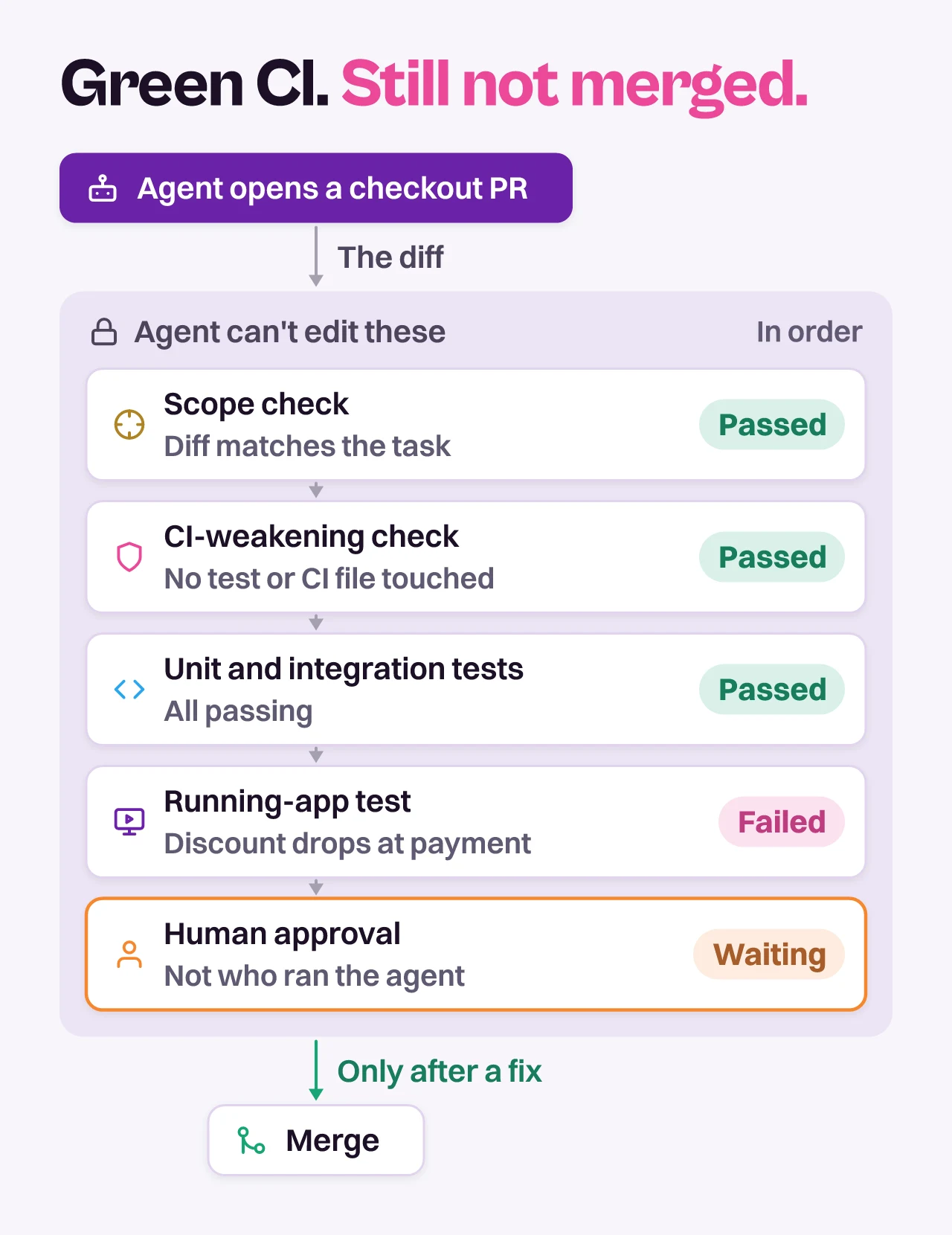
- Scope check: Does the diff match the task? GitHub’s guide asks whether the pull request has a clear implementation plan, and suggests asking for a smaller one when the diff touches more than five unrelated files. This check advises. It posts a comment, and the reviewer decides.
- CI-weakening check: Run the four questions as a job. On an agent’s pull request, it reads the diff and fails on any change to workflow files, test config or coverage thresholds, and on any test removed or skipped. It blocks, and a legitimate change to CI goes through the platform team instead of the agent’s branch.
- Unit and integration tests: Your existing suite, plus GitHub’s rule to require a new test that fails on the pre-change behavior. If the agent cannot write that test, “the fix is incomplete or the understanding is wrong.” It blocks, with a ceiling. The agent wrote the new tests, so a pass shows the code matches the agent’s own idea of correct, which is the gap scenarios vs tests is about.
- Running-app test on the preview: Deploy the pull request’s code to a preview and test the changed behavior the way a user would. Pie can test your pull requests, with a preview URL or a build upload to test against. The run needs a preview environment that holds the whole change and a test account with seeded data and flags. Treat a run that could not reach the change as a failed gate, never as a pass.
- Human approval: A person who did not start the agent run reads the evidence and approves the merge. It blocks.
One engineering team we work with built its pipeline in the same cheap-to-costly order, because more pull requests were opening each day than its people could review. Unit, integration and mutation tests run first. A check then asks whether the change touches the UI, and only a yes starts a preview deploy for the end-to-end run.
Why the Running-App Test Goes Before the Merge
A bad change is cheapest to reject while it is still one pull request.
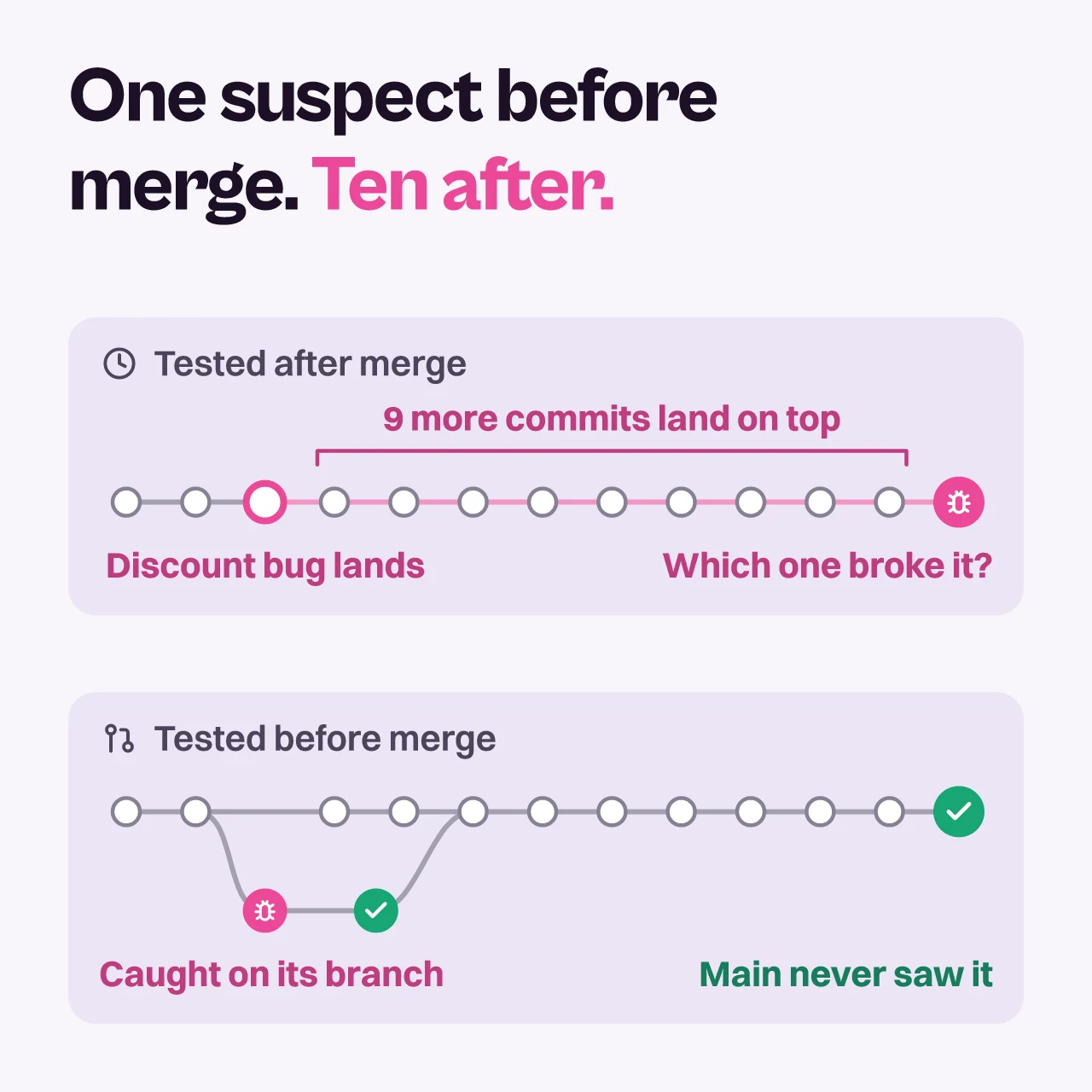
Caught on the pull request, the failing change is one branch with one author and a clean main behind it. Caught after the merge, the failure shows up among later commits, and finding which one caused it is a second investigation before the first fix.
Testing every pull request costs build and run time, and some teams cannot afford it on all of them. Gate the pull requests that change what a user sees, and batch the rest after merge. Mobile apps have no preview URL to open, so the same station needs a build for each pull request, which testing AI-generated mobile apps covers.
The preview is the hardest part of this gate to build, and often the missing one. When a team has it, our first question is whether the backend change and the frontend change deploy to the same URL. A preview that carries only the frontend tests new screens against the old API.
What Blocks the Merge and What Only Advises
Each automated gate either blocks the merge or advises the reviewer, and one test decides which. If a machine can see the failure without anyone’s judgment, the gate blocks. If spotting it takes judgment, the gate advises, and a person weighs it at approval.
| Gate | Blocks or advises | What it catches | Owner |
|---|---|---|---|
| Scope check | Advises | A diff bigger than the task, unrelated files | Reviewer |
| CI-weakening check | Blocks | Lowered thresholds, skipped tests, edited workflows | Platform team |
| Unit and integration tests | Blocks | Broken logic the existing suite already covers | Code owners |
| Running-app test on the preview | Blocks | A changed behavior that fails when a user does it | Reviewer, by team rule |
| Human approval | Blocks | The wrong change, a weak justification, risk no check sees | A person who did not start the run |
Blocking means required. The CI-weakening check and the test suite go into branch protection as required status checks, and human approval goes in as a required review. For the running-app test, blocking is a team rule, so the approver does not approve over a failed change.
Keep the blocking list short. Make the scope check block and people will argue with it, then bypass it. An advisory nobody reads is noise, so name who reads each one. Start narrow and widen later.
Lock the Gate So the Agent Cannot Edit It
A gate is only as strong as the files that define it, and the agent’s branch is the one place it can write. LaunchDarkly’s tutorial on building a small software factory handles this with a policy job that checks factory-authored branches never modify .github/ or CLAUDE.md, which helps keep the factory from “quietly rewiring its own gates”. Five settings turn that idea into something GitHub enforces.
- CODEOWNERS: Put
.github/, CODEOWNERS itself and the agent instruction files such asCLAUDE.mdandAGENTS.mdunder one platform team. GitHub reads the file from the base branch of the pull request, so an agent that edits CODEOWNERS in its own branch changes nothing for that pull request. - Code owner review: Turn on “Require review from Code Owners” in branch protection. Without it, code owners are only asked to review.
- Policy job: Add a required check that fails when the agent’s pull request touches the protected list. Run it on every pull request with no
ifcondition, because GitHub counts a skipped required check as passed. Trigger it withpull_request_target, which runs the workflow file from your default branch, and have it read the changed-file list without checking out the pull request’s code. The agent then can’t edit the job that polices it. - No bypass: Turn on “Do not allow bypassing the above settings.” Administrators are exempt by default, and an agent holding an administrator’s token inherits that.
- A token that triggers CI: Events from the default GITHUB_TOKEN start no new workflow runs, and a pull request it opens gets runs that wait for someone with write access to approve them, per GitHub’s docs on triggering workflows. LaunchDarkly’s factory pushes with a fine-grained personal access token instead, so the checks start on their own.
Here is an example, not a drop-in file. Replace the placeholder with a team that has write access to the repository, and put these lines at the end of CODEOWNERS, because the last matching pattern wins:
# Example only: replace @your-org/platform with your own team
/.github/         @your-org/platform
/CLAUDE.md        @your-org/platform
/AGENTS.md        @your-org/platform
/CODEOWNERS       @your-org/platform
/docs/CODEOWNERS  @your-org/platform
None of this stops an agent from writing a weak test in the files it is allowed to touch. It stops the agent changing the rules the test runs under. A running-app test does not depend on tests the agent wrote, so it covers the gap the lock leaves.
What the Person Approving Still Decides
The gate returns evidence, and the approver decides what to do with it. Three questions stay with the approver because no check on the list can answer them.
- Intent: Is this the change the team wanted? The checks test what the pull request does, and only a person knows whether that is what was asked for.
- Justification: If CI changed, is the reason a good one? GitHub makes an explicit justification the price of any change that weakens CI, and someone has to read it.
- Maintainability: Will the code be easy to change next year? No station on this line checks that.
Two branch protection settings keep the approval with the right person. “Require approval of the most recent reviewable push” means someone other than the last person to push has to approve. “Dismiss stale pull request approvals when new commits are pushed” voids an earlier yes, so an agent cannot push a late follow-up commit and ride the old approval. Give the agent its own identity, and write down the rule that the approver is not whoever started the run, because the push rule only looks at who pushed last.
Pie’s own proposals go through the same door. With Auto-Fix, Pie’s proposed fixes arrive as pull requests in the repositories you connect, and whether they merge stays your team’s call. Run them through the gate above like any other agent’s pull request.
Start With the Files the Agent Cannot Edit
A green check on an agent’s pull request is worth what the agent was allowed to touch. Lock the files that define the gate first, and the checks you already run start meaning what they say.
Add the CI-weakening check second. It is a diff against a list, and it closes the exit GitHub names.
Then test the change in the running app before anyone approves it. Pie can test your pull requests against a preview URL or a build upload, and the approval stays with a person. Ship that order this sprint, and treat anything beyond it as the next iteration.
Add the Running-App Test
Point Pie at your next pull request's preview URL or build. See how the change behaves before merge.
Frequently Asked Questions
Put the workflow folder, CODEOWNERS and the agent instruction files under code owner review. Then add a required policy job that fails when an agent branch changes any of them.
Finally, turn on the setting that stops administrators from bypassing branch protection.
No. An approval means a person looked at the evidence and accepted the risk.
A review agent can advise, but the approval that unblocks the merge should come from someone other than whoever started the agent run.
Not on its own if the agent uses the default GITHUB_TOKEN. Those events start no new workflow runs, and a pull request it opens gets runs that wait for approval.
Push with a GitHub App token or a personal access token instead.
On GitHub, it can be. A required check counts as passed when it is successful, skipped or neutral, so a policy job skipped by an if condition lets the merge through. A workflow skipped by a paths filter stays pending and blocks it.
Treat a skipped gate as a pipeline defect.
The ones that need judgment, such as scope, diff size and automated review notes. Make them block and people argue with them, then bypass them.
Keep the blocking checks binary. Weakened CI and failing tests both qualify.
Tag it on the pull request with @pie-pr-bot test on GitHub, or /pie on GitLab. Pie can test your pull requests against a preview URL or a build upload.
The person approving reads the result with the other checks before merging.
No. Auto-Fix proposes fixes as pull requests in repositories you connect, and your team decides whether they merge.
Run those pull requests through the same gate as any agent's, with the same scope check, the same CI and a reviewer who didn't trigger them.
Eight years building search and delivery systems at Amazon. The kind of scale where flaky tests block billion-dollar releases. Now CTO at Pie, building AI agents that adapt when your UI changes. LinkedIn →