How to Prepare Test Data and Feature Flags for PR Testing
Correct code fails a PR test when the preview has no data or the flag never reached the test identity. Seed a profile, turn on the flag, gate the run, tag Pie.

A checkout test needs a product in the database. Not a mock, and not a factory the code could call if someone asked it to, but an actual row the signed-in test identity can find, add to a cart, and pay for. Take the row away and the run still completes, still reports, and proves nothing about the change under review.
The state a run starts from is part of the deployment, not something a person tops up before each run. Something to act on, someone the feature is visible to, and a way back to the starting state. Get those three in place before the first step, and a failed run is finally about the code.
What you’ll learn
- How to seed a data profile with one command that hands the run its target records and its reset
- How to turn a flag on for one test identity and verify the value it actually resolves
- How to expose a readiness response that blocks a vacuous run before it starts
- What to store in Pie so the run signs in, seeds, and finds the records the manifest promised
Why a Correct PR Fails on an Empty Database or a Hidden Flag
Because the run needs three things the code cannot supply for itself. A record to act on, a test identity the flag is on for, and a reset that puts both back. Take one away and nothing stops the run. It completes against the wrong state, reports on what it found there, and the report reads like the tester made a screen up.
We learned the shape of this on our own repositories. We pointed our testing agent at 45 pull requests across Pie’s web frontend and mobile app, and it reached the changed feature in roughly a third of them. Some of the misses were ours to fix, on the agent and infrastructure side. The rest were five environment blockers on the app side. One of them was a preview environment that holds the whole change, and two more were the same failure wearing different clothes.
The plainest version is a checkout with no product in the database. Nothing in the code is broken, the preview is healthy, the agent is signed in, and there is nothing to buy. Sending a tester into an unseeded preview is asking a mystery shopper to buy something from an empty store, then marking them down for coming back without a receipt.
We hit the second version on our own repository. A feature shipped behind a flag, the code was in the preview, and the flag had never been rolled out to the credential the agent signed in with. From that account there was no path to the screen. The door was built and hung. The key we handed the tester did not open it.
Neither of those is a bug in the app, and neither is the tester getting it wrong.
The engineer behind those 45 runs has a word for grading an agent before it reaches the feature. Premature. Sent after data that was not there, our own agent tested the navigation it could reach, called that done, and passed. A pass that proves nothing is worse than a failure, because nobody goes looking for it.
Three Symptoms That Look Alike in a Report
Split the symptom before you touch anything. These three look similar in a report, have nothing in common underneath, and each one is closed by a step below.
| What you see | What it is underneath | Where the fix lives |
|---|---|---|
| First run passes, later runs fail | Data was consumed or mutated and never restored | A reset that ships with the profile (Step 1) |
| Sign-in works, feature is not on screen | Flag targeting or role propagation for that identity | The value that resolves for that identity, not the global default (Step 2) |
| Runs interfere with each other | Concurrent pull requests writing to the same records | A namespace or record prefix per run (Step 1) |
Different owners, different fixes, and not one of the three is a failure of the tester. The first is the classic reason a suite looks unstable while nothing in the code changed, which puts it alongside the other causes of flaky tests rather than in a category of its own. The third is a test isolation problem that happens to live in your data layer instead of your test runner. The namespace in Step 1 prevents the third, and the readiness response in Step 3 catches the other two before a run starts.
Step 1: Seed a Data Profile That Returns a Manifest
Build one small named fixture for each user path in scope, seed it with a single idempotent command that returns a manifest naming the target records, and stamp every record with the run’s namespace. The runbook calls the fixture a data profile. It is the thing you hand to the run instead of a database to search.
A checkout profile is an active customer, an in-stock product, a saved address, and a sandbox payment method. Four records, deliberately boring. Each profile carries five properties. Give it a stable identifier, a documented owner, a seed command or setup workflow, a reset procedure, and an expiry policy.
Then prefer one command that does the seeding and prints what it made. The runbook’s worked example is a refund profile, and a checkout profile takes the same shape:
./scripts/test-data seed \
  --profile order-ready-for-refund \
  --namespace pie-pr-123-run-456 \
  --output manifest.json
The output is where the value is. The manifest names the target records, and a run that knows its target has nothing to search for. A search that comes back empty and a feature that is genuinely broken produce the same screenshot.
{
  "profile": "order-ready-for-refund",
  "namespace": "pie-pr-123-run-456",
  "tenant": "pie-e2e",
  "requiredRoles": ["support-agent"],
  "requiredFlags": ["refund-workflow"],
  "records": { "order": "ORDER-REFUNDABLE-001" },
  "resetCommand": "./scripts/test-data reset --namespace pie-pr-123-run-456",
  "expiresAt": "<RUN_EXPIRY_ISO8601>"
}
Each field is doing a specific job:
namespace: Every record the run creates carries the same prefix, and two concurrent pull requests can never touch one order.requiredRolesandrequiredFlags: The profile declares its own preconditions, so something automated can verify them without a human remembering what this profile needs.records: The run gets the identifier directly, with no search and no ambiguity about which of four test orders was the right one.resetCommand: Teardown ships with the profile instead of living in one engineer’s shell history.expiresAt: A real timestamp far enough out to cover the run and its retries, after which the cleanup job deletes the namespace. Preview data that outlives its preview becomes production data nobody owns.
Seed twice before you trust the command. If the second manifest lists different record identifiers, the seed is not idempotent, and every retry will leave a duplicate behind for the next run to trip over. Where generated values vary, use a fixed random seed and store that seed in the manifest so a failing run can be rebuilt exactly. The step-by-step, with the identity contract the profile hangs off, is the runbook on identity, access, and test data.
Real personal data, live credentials, payment details, and production tokens stay out. A preview database is not a safe place for any of them.
Ship the Reset With the Profile
Pick one reset strategy, make it explicit, and put it in the manifest as resetCommand. Recreate the tenant from the profile, delete every record carrying the run prefix, restore a snapshot inside the preview namespace, or call idempotent cleanup APIs for the resources the test touched. All four work. What matters is that running the reset twice is harmless and that it can never delete anything outside the preview tenant.
A fixture is the fixed floor an end-to-end testing run stands on. If the reset leaves a second order behind, the floor moved, and the next run is standing on the last run’s leftovers.
The manifest now names the record, the reset, and the flag the profile expects. Nothing in it yet makes that flag true for the account that will sign in.
Step 2: Turn the Flag On for the Test Identity
Target a test cohort your flag provider can evaluate for the test identity, write the expected values into the preview manifest, apply them before the deployment reports ready, and verify the value that resolves for the signed-in identity rather than the global default. Pie tests what it can see, and a test credential without the feature flagged on cannot reach it, however good the agent is.
A seeded row only helps if the account can see the screen that uses it. Flags resolve per identity at the moment of evaluation. The only question that matters is what the flag resolves to for the account your tester signs in with, and the global view on the dashboard will never answer it. Outside a pull-request preview the same rule applies, and pinning the flag in each test keeps the flow reproducible.
Define the cohort on an attribute the provider can evaluate, such as a stable tenant, an account list, or a trusted test attribute:
{
  "tenant": "pie-e2e",
  "emailDomain": "example.test",
  "testAutomation": true
}
Target the cohort and leave the rest of the population alone. None of this requires enabling the feature for everyone, or an engineer remembering to change an admin setting before every run. Record the values in the preview manifest alongside the deployed revisions, and the manifest becomes the single answer to what the tester should see:
{
  "flags": {
    "refund-workflow": true,
    "new-order-details": "treatment"
  }
}
Apply those to the cohort before the deployment reports itself ready. Then verify what resolved for the signed-in test identity, through an authenticated diagnostics page, a non-secret readiness response, or the flag provider’s evaluation log.
OpenFeature, the CNCF project that standardizes flag evaluation across providers, defines the identifier the rules match on as the targeting key in requirement 3.1.1, and the specification is blunt that providers may behave unpredictably when one is not supplied. A global default of true tells you nothing about what a specific targeting key gets back.
For a per-PR override, scope the value to the preview identifier and the test tenant, and remove it when the pull request closes. Give it a TTL as well, because close hooks fail and a stale override on a shared cohort is a slow, quiet way to make later runs lie. The feature flags runbook covers the cohort and override mechanics step by step.
Three Ways the Resolved Value Lies
- The provider log shows the default value: The SDK evaluated the flag before it knew who was signed in, and the run got the anonymous answer. Bootstrap the SDK after sign-in, or hold the route until the context resolves.
- The frontend shows the feature and the API rejects the request: Two evaluations, two answers. The backend resolves its own flag, so the cohort has to be applied on both sides and both values belong in the manifest.
- The feature appears for a developer and not for the test identity: Something is pinning an older value for one of the two, usually a cached session, a sticky bucketing key, or a local override. Start the test identity from a clean session and check that the cohort attribute is on it.
Step 3: Gate Every Run on a Readiness Response
Expose a non-secret readiness response from the preview deployment that reports whether the user, the role, the flag, the target record, and the external services all check out, and hold the run when any one of them comes back false. The profile from Step 1 declares what it needs and the cohort from Step 2 makes the flag true. The readiness response has the deployment check both and say so, which is the part that changes who owns a failure.
The deployment already knows its own SHAs, its own flag values, and whether its dependencies are pointing at test mode. QA is usually the last party to find out. Put the answer where the deployment can give it:
{
  "ready": true,
  "profile": "order-ready-for-refund",
  "checks": {
    "userExists": true,
    "roleAssigned": true,
    "flagEnabled": true,
    "targetRecordExists": true,
    "externalServicesAreTestMode": true
  }
}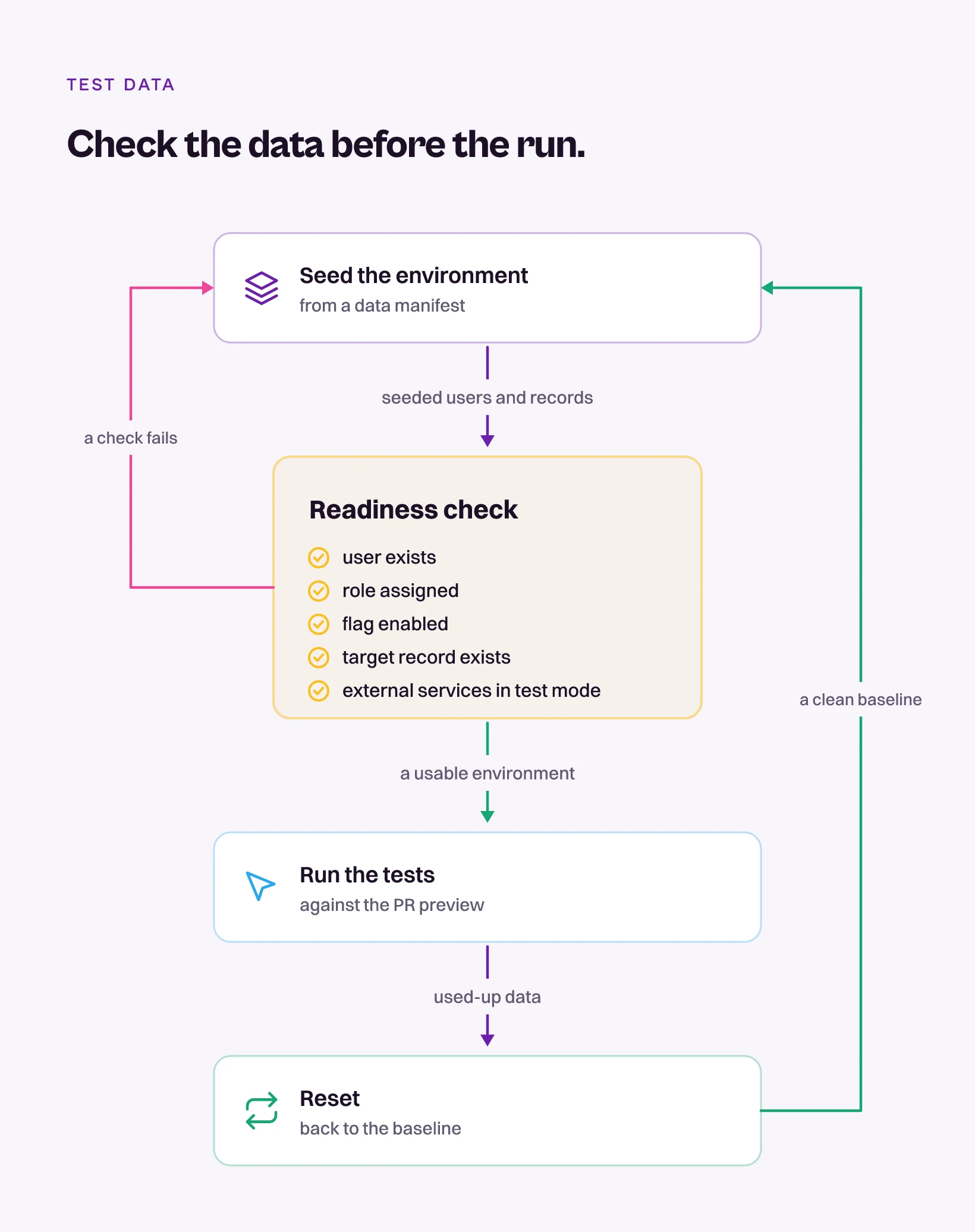
With that in place, a blocked run reports itself as an environment that was never ready, which hands the failure to the team that can fix it and changes the conversation in the pull request. Without it, an empty checkout and a broken checkout produce identical evidence.
The response is also the signal the next step waits on. Nobody tags the pull request until ready is true.
Grading a run that started on a failed check is grading a screenshot of an empty store. The check belongs to the deployment, and the deployment already holds every value it needs.
Step 4: Hand the Identity, the Scripts, and the Preview to Pie
Store the test identity in Credential Manager, wrap the seed and the reset as execution scripts a test step can call, and tag the pull request once the readiness response reports ready. Pie is an autonomous QA platform whose agents drive the app the way a person does, and they arrive at the same shelf and the same door a human tester would. The reaching is built in. The seeding stays yours, and the handover is five moves.
- Store the test identity in Credential Manager: Credentials are stored encrypted and used only during test execution, and each test case selects the credential it runs as, so a support-agent path and an admin path are two entries against one app rather than two suites. Store the identity the cohort rule from Step 2 targets, never an employee account.
- Turn the seed and the reset into execution scripts: An execution script is a command stored against your app and referenced from a test step as
#{script-name}. A step that calls#{seed-checkout}gets the manifest back, and the output is captured for the steps after it, so the order identifier it returns can go straight into a search field seconds later. The closing step calls#{reset-checkout}and puts the namespace back. - Put the flag flip in a setup script if your provider has an API: A script can call the flag provider as part of state setup, which applies the value your manifest names to the test identity before the first screen loads. Pie does not pick the flag. The manifest does.
- Cover the old and the new experience with one suite: The same suite can run against two account-level configurations, and both the flag-on path and the flag-off path get tested.
- Tag the pull request once
readyis true: An engineer types@pie-pr-bot testin a pull request comment, or/pieon a GitLab merge request. Each test in that run signs in as the credential it names, calls the scripts its steps reference, and goes looking for the records the manifest promised.
None of that seeds your database. The profile, the seed command, the reset and the expiry stay yours to own, and scripts are how a run reaches them.
Step 5: Run the Critical Path Three Times
Run the critical path three times through Pie with the same test identity before calling the preparation done, and require all seven of these to hold on every pass.
- Login completes without manual input: The run signs in without a typed code, a clicked link, or an approved prompt.
- The expected role and flag values are visible from a clean session: A sign-in that lands on last week’s UI is a wrong identity, not a passing test.
- Required records exist at the start of the run: The manifest names them and the readiness response confirms them.
- Writes complete inside the preview environment: Nothing the run creates lands anywhere near production.
- Reset returns the account to the same starting state: The third run begins exactly where the first did.
- Seeding twice succeeds without duplicate or conflicting records: The second manifest matches the first.
- Disabling the flag in a disposable preview hides the feature, and restoring it brings the feature back: Both directions work without manual session repair.
One clean pass proves the profile exists today. Three prove the reset works, the flag holds, and the next pull request begins where this one did.
The First Run Now Starts From a Known State
You now hold what the first run did not have. A manifest that names the record and its reset, a cohort rule that turns the flag on for one test identity, a readiness response the deployment answers before anyone is tagged, and a credential and two scripts stored in Pie so the run can reach all of it.
The empty shelf and the locked door each cost us a run that read like a tester making something up, and the fix was one seeded row and one cohort rule. Each pull request after this one inherits both, because the preparation now lives in the deployment and no engineer has to remember what the profile needs.
Tag the pull request. This time a red run is about the code.
Frequently Asked Questions
Build one small named fixture per user path instead of one shared dataset. A checkout fixture is an active customer, an in-stock product, a saved address and a sandbox payment method.
Give it an owner, a reset and an expiry, then seed it with one command that returns a manifest.
Target a test cohort your flag provider can evaluate, such as a dedicated tenant or a trusted test attribute, instead of enabling the flag for everyone.
Write the expected values into the preview manifest and verify the value that resolves for the signed-in test identity, not the global default.
The first run consumed or mutated the data the later runs needed. An order gets refunded, a promo code gets redeemed, and the fixture no longer matches the state the test assumes.
Reset between runs, or seed a fresh record with a unique prefix for each run.
Per run is the practical default for a preview environment. Per test is the safer choice for anything that mutates shared state. Pick one and write it down.
Either way the reset must be safe to run twice and must never touch records outside the preview namespace.
The two identities resolve different flag values, and the older one is usually pinned by a cached session, a sticky bucketing key or a local override.
Give the test identity a clean session, confirm the cohort attribute is set on it, and check the backend resolves the same cohort as the frontend.
Through execution scripts. A script is a command stored against your app and referenced from a test step, and Pie runs it mid-test to fetch or create the data that step needs.
The output is passed to later steps. The fixture, the seed command and the reset stay yours.
The flag has to resolve to on for the test identity Pie signs in with, not only for the organization. A feature that is dark for that account is a screen the run never reaches.
A script can flip it through your provider's API during setup. Pie never picks the flag.
Eight years building search and delivery systems at Amazon. The kind of scale where flaky tests block billion-dollar releases. Now CTO at Pie, building AI agents that adapt when your UI changes. LinkedIn →