What Is Retesting? How to Confirm a Bug Fix Before You Run Regression
One green run does not prove a bug is fixed. See how deep to retest, how many clean runs an intermittent fix needs, and what to run once the retest passes.

Your developer moves a ticket to Resolved, you run the failing test once, and it passes. You close the ticket. Two weeks later the same bug is back in a customer’s screenshot, because it only ever failed one run in ten.
A passing run feels like proof. It only counts when the retest could have failed. Here is how to retest a fix so that a green run means the bug is gone.
What you’ll learn
- A plain definition of retesting, and its other name, confirmation testing
- Three depths of retest, and which one a given fix needs
- The number of clean runs it takes to trust a fix for an intermittent bug
- What to run after a passing retest, and how Pie keeps watching the bug
What Is Retesting?
Retesting is re-running the tests that failed because of a defect, on the build that contains the fix, to confirm the failure no longer happens. ISTQB calls it confirmation testing, and its Foundation Level syllabus (v4.0.1) says confirmation testing “confirms that an original defect has been successfully fixed.”
A retest has one narrow question and two possible answers. The bug is gone or it is not. The steps that trigger it are already known, because someone wrote them down when the test failed, and the retest depends on that record. A bug report with no reproduction steps cannot be retested, only guessed at.
Bugs found by exploratory testing show the point clearly. No scripted case failed, so the steps in the report become the test case. Write them as carefully as you would write a test.
Retesting vs Regression Testing
Retesting asks whether this bug is fixed. Regression testing asks what else the change broke. Both run after a change and both re-execute existing tests, which is why they blur in conversation. They differ in what triggers them, how big they are, and what a pass tells you.
| Dimension | Retesting | Regression Testing |
|---|---|---|
| Question | Is this one defect gone? | Did the change break anything that worked? |
| Trigger | A defect was marked fixed | Any change that could reach existing behavior |
| Tests chosen | The ones that failed, or the reproduction steps | A set picked by impact analysis, from a handful to the full suite |
| Known in advance | No, it depends on what failed | Yes, the suite exists before the change |
| A pass means | The reported failure no longer occurs | No adverse consequence showed up in what you ran |
| A pass does not mean | The fix caused no side effects | The original bug is fixed |
The order follows from the two questions. A regression pass around a fix that never worked only tells you the neighbors are fine while the bug is still there. The syllabus agrees, saying regression testing covers a change “including a fix that has already been confirmation tested.”
Retesting confirms one fix, and regression testing checks everything around it. Run the retest first and let its result decide whether the regression run is worth starting.
How Much Should You Retest?
Retest to the depth the risk calls for. The ISTQB syllabus scales confirmation testing by risk, from the bare reproduction steps up to new tests for whatever the fix changed.
| Depth | What you run | Fits when |
|---|---|---|
| Reproduction steps | The steps from the bug report, on the fixed build | The fix is small and the release is close. The syllabus allows this fallback when time or money is short. |
| Every failed test | All tests that failed because of the defect | One defect failed several tests, so one green case says little about the rest. |
| Failed tests plus new ones | The above, plus new tests for what the fix added | The fix introduced a rule or state that no test covered, such as a validation that did not exist before. |
Two rules hold at every depth. Run against the build that holds the fix, and use the same steps and data that failed. Change the data and you have written a fresh test that happens to pass. The syllabus also prefers that the person who ran the original test runs the confirmation, since they know what the failure looked like.
How to Retest a Fix
A retest takes five moves, and the second one is the one people skip. Each move below takes minutes once the bug report is good.
-
Find the fixed build: Match the build number in the ticket to the build you are testing. A retest on the previous build fails for the wrong reason.
-
Watch it fail first: Run the reproduction on the build without the fix, or check that the original failure happened on the build just before the fix. A check that cannot fail cannot confirm anything.
-
Same steps, same data: Keep the account, the inputs and the environment the report names. Add any missing setup step to the report before you run.
-
Count the runs: One clean run settles a bug that failed every time. An intermittent bug needs more, and the next section shows how many.
-
Close or reopen: On a pass, close the ticket and hand off to regression. On a fail, reopen it with the new run attached, so development sees what changed.
Stop Closing Tickets on One Run
Track the bug in Pie. Every later run checks the fix again.
How Many Passes Prove a Fix?
A bug that fails every time needs one clean run. A bug that fails sometimes needs arithmetic. A founder on one of our calls described a client’s app that flipped between broken and fine from one day to the next. A single retest of an app like that settles nothing.
Say a checkout error shows up in one run out of ten. With a fix that did nothing, each new run would pass nine times out of ten anyway, so a single green run looks the same with or without the fix.
Stack clean runs and the odds shift. The chance that an ineffective fix passes n runs in a row is (1 − p) raised to the power n, where p is how often the bug failed before the fix. Here p is 0.1, so each row below is 0.9 raised to the number of runs.
| Clean runs in a row | Chance an ineffective fix passes them all |
|---|---|
| 1 | 90% |
| 5 | 59% |
| 10 | 35% |
| 20 | 12% |
| 30 | 4% |
The shortcut generalizes. For a bug that failed one run in N, about 3N clean runs leave under a 5% chance of a false all-clear, whatever N is. It is the statistician’s rule of three: with no failures in n runs, the true failure rate could be as high as about 3 in n at 95% confidence. A one-in-ten bug needs 30 runs, and a one-in-twenty bug needs 60.
The 0.9 is an assumed failure rate, so swap in your own bug’s rate. It varies from case to case. The math also assumes each run fails independently, and real flakes often cluster around timing, data or a shared environment, so vary whatever the original failure varied. Intermittent failures can also come from the test itself, and the guide to flaky tests covers that side, while how to fix flaky tests covers the repair. When you cannot afford 3N runs, write the count on the ticket (“passed 5 of 5, not confirmed”) and leave it open for monitoring.
What Runs After a Retest Passes
A passing retest earns the regression run. An impact analysis picks which cases from your regression test suite to run, scoped to what the fix touched:
- Changed area: The code the fix edited, and the screens that show it.
- Neighboring flows: The steps a user takes just before and after the fixed one.
- Shared code: Any other path that calls what the fix changed.
The reproduction should join that suite too. Once a bug has shown up, it has proven it can happen, so the retest becomes a permanent check. This is also where the automation question gets its answer. A retest cannot be scripted before the failure exists. The day after, it can, and how to automate regression testing covers the steps.
Let Pie Re-Check Every Tracked Bug
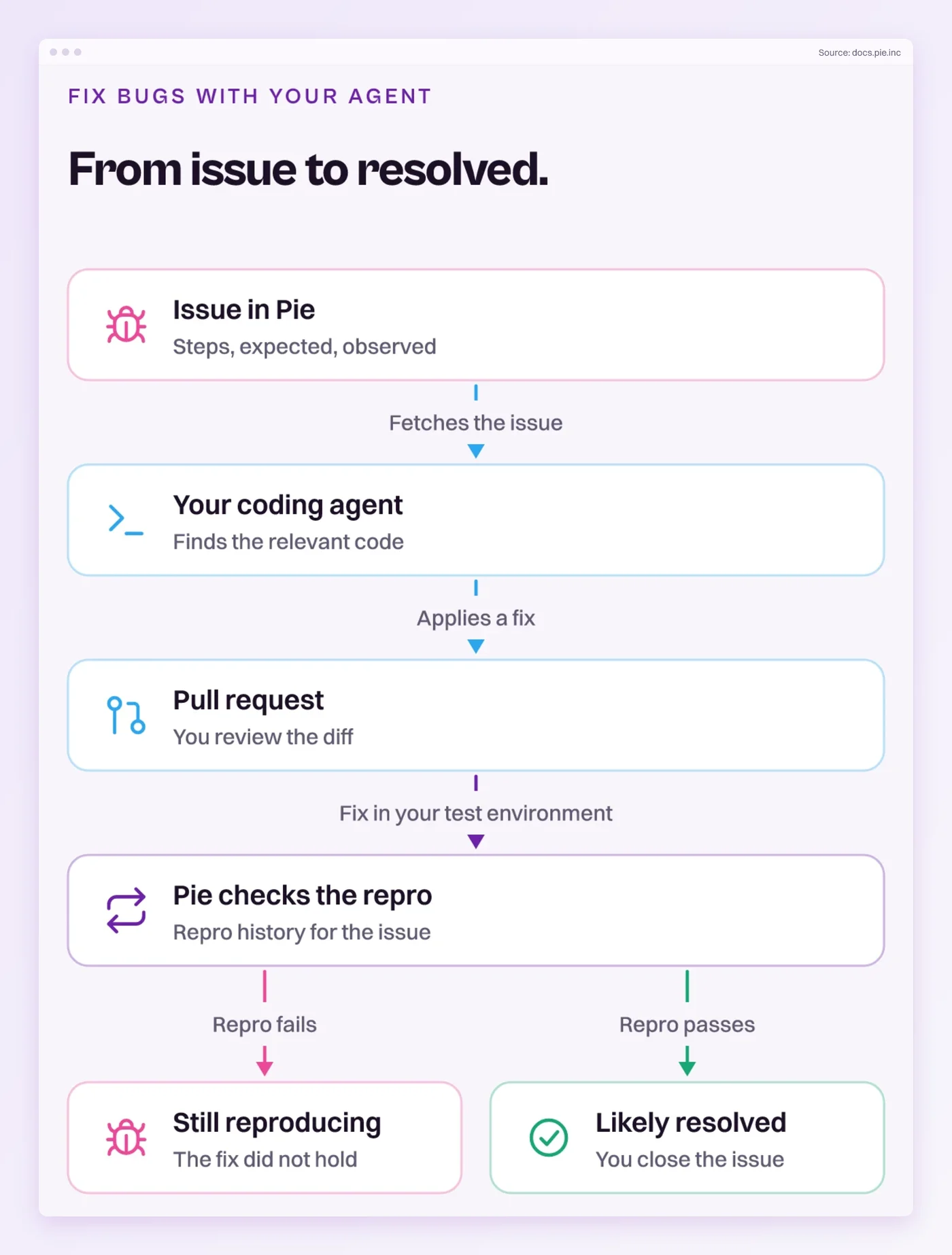
Tracking a bug in our agentic testing platform turns the retest into something that keeps running. Pie builds a repro test for the issue, and your later runs carry it forward.
- Track the bug: On a real bug, select Track it. Pie builds a repro test, a test case that reproduces the bug.
- Watch the repro: Pie re-checks each tracked issue on every run. While the repro test fails, the issue shows Repro and the bug is alive.
- Read the verdict: Once the repro no longer finds the bug in the most recent run, the issue shows Looks resolved. You pick Mark as resolved or Keep tracking.
- Ask from your agent: The MCP tool
get_issue_repro_historyreturns a verdict, its evidence source and the recent trend, so a coding agent can check the fix it just wrote.
When I walk a team through a tracked issue that has stopped reproducing, the answer goes one of two ways. Their team fixed it, or it is an intermittent bug that skipped this run and belongs on the list a while longer. Keep tracking is for the second case, and each later clean run adds to the 3N count.
Close the Ticket on Evidence
Retesting is the smallest check in testing, and the easiest to close too early. Run the same steps on the build that holds the fix and match the depth to the risk. When the bug fails only some of the time, count the passes.
The count is the part that slips. Thirty runs for one checkout bug rarely fit in a sprint, so the ticket closes on five and the bug comes back in a customer’s screenshot.
A tracked issue in Pie has its repro checked on every run, so the count builds from runs your team was doing anyway. How many of the tickets your team closed this month passed exactly once?
Know When a Fix Holds
Close tickets on a count. Pie keeps the repro running.
Frequently Asked Questions
Spent a decade in B2B SaaS sales before building Pie. Now obsessed with helping engineering teams ship without the fear of breaking things. LinkedIn →