7 Best Cypress Alternatives in 2026, Picked for the Wall You Hit
Cypress reviewers keep naming the same walls, from cross-origin flows to iframes to native mobile. Seven alternatives compared on which wall each one removes.

Cypress is good at what it was built for, and then it hits a wall. Your login bounces to a second domain and the test stops at the border. The payment step sits in a third-party iframe it cannot reach into. The app your users actually live in is not a browser at all.
Which wall you hit is the whole decision, and no feature matrix will make it for you. Browser counts and API polish are where these seven are hardest to separate. Sort them on who repairs the suite after a redesign and they stop looking alike.
What you’ll learn
- What Cypress reviewers complain about, and which three actually end a migration
- Which of the seven leaves the repair work on your team when the UI changes
- Which wall each tool removes, and which ones it leaves where it found them
- Why AI-written code makes the selector bill grow instead of shrink
What Cypress Users Actually Complain About
Cypress holds 4.7 out of 5 across 67 reviews on Capterra as of September 2026, and the complaints underneath that score are narrow and specific, which is what you want from a tool people mostly like. Three of them end migrations. The rest are friction that teams work around for years. Ranked by what each one actually costs you:
The three that actually force a move
- Cross-origin, multi-tab, and iframe limits: The one that ends migrations, and Cypress states it plainly on its own trade-offs page. “Cypress does not support controlling more than 1 open browser at a time.” Each test stays on one superdomain without
cy.origin, tabs need a plugin, and the same page grades iframe support “somewhat limited.” SSO handoffs and third-party payment iframes sit on the wrong side of that line. - Flakiness that retry-ability cannot reach: Cypress retries the query chain, which kills a class of timing failures. It cannot find an element whose selector stopped existing. One engineer in a 2022 Hacker News thread traced their unreliable suite to Cypress running in the browser’s main thread and interfering with React concurrent rendering. The failures that only show up in CI cost the most to chase.
- No native mobile, permanently: Cypress is unusually direct about this one. Its FAQ says Cypress “will never be able to run on a native mobile app,” only mobile web and browser-built apps. If your product ships to an App Store, you are buying a second tool the day you start.
The rest, mostly tax
- JavaScript and TypeScript only: The trade-offs page commits to it, saying “the only language we’ll ever support is the language of the web.” For a Python or Java or C# shop, the conversation ends there.
- WebKit support is still experimental: Chrome, Edge, and Firefox are all first-class, so this is narrower than the “Chromium-only” line people repeat. Safari’s engine, though, is still behind an
experimentalWebKitSupportflag, and the browser docs warn that “WebKit support is experimental, so you may encounter issues.” - Parallel execution and reporting: Reviewers name both as the pieces that strain once a suite outgrows a few hundred specs. Parallelization runs through Cypress Cloud, whose free tier stops at 500 test results a month, so growing past that is a plan decision rather than a config change.
- Hybrid sync and async commands: Engineers arriving from Selenium or plain async JavaScript trip over the model. One practitioner in that same thread said the “half-async-half-sync APIs are driving me mad.”
Underneath the flakiness sits a design decision that is not unique to Cypress. Every test finds its elements by selector, so a UI change breaks tests that had nothing to do with the change, and a person repairs each one by hand. Retry-ability makes that failure less frequent. It does not make it cheaper.
If flakiness is the specific thing driving you off, our breakdown of what causes flaky tests covers the root causes a framework swap leaves fully intact.
Five Questions That Decide Your Shortlist
Four of these five questions get asked in every comparison. The fifth almost never does, and it is the one that decides what your engineers spend next quarter on.
- Coverage: Which browser engines does it reach, does it get to WebKit and Safari, and does it test native mobile or web only?
- Language: JavaScript and TypeScript only, or the languages your team already writes?
- Setup and debugging: How long to a first green test, and what does a failure look like at 2am?
- CI behavior: Does it parallelize cleanly, or become the slow step everyone waits on before merge?
- Maintenance removed: Does it only run the selector-based tests you write, or does it take the authoring and repair loop off your team?
Score only the first four and every framework here finishes within a rounding error of the others, because that is exactly where they all compete. Add the fifth and the list reorders itself.
| Tool | What you author | Who fixes a broken test | Best for |
|---|---|---|---|
| Pie | Nothing, or plain English | Pie, on every run | Coverage without authoring |
| Playwright | Code in 4 languages | You, in code | The like-for-like upgrade |
| WebdriverIO | Code in JS or TS | You, in code | Web plus native mobile |
| Selenium | Code in 5 languages | You, in code | Polyglot teams |
| TestCafe | Code in JS or TS | You, in code | Fastest setup, no drivers |
| Nightwatch | Code in JS or TS | You, in code | Batteries-included E2E |
| Puppeteer | Code plus your own runner | You, in code | Chrome and Firefox scripting |
7 Best Cypress Alternatives in 2026
Each entry answers the same two questions. Which Cypress wall does it remove, and what does it still ask of you afterwards? Capabilities come from each project’s own docs and release notes, rechecked on 2 September 2026. They are ordered by how much of the complaint list above each one actually deletes.
1. Pie, No Suite to Author and None to Repair
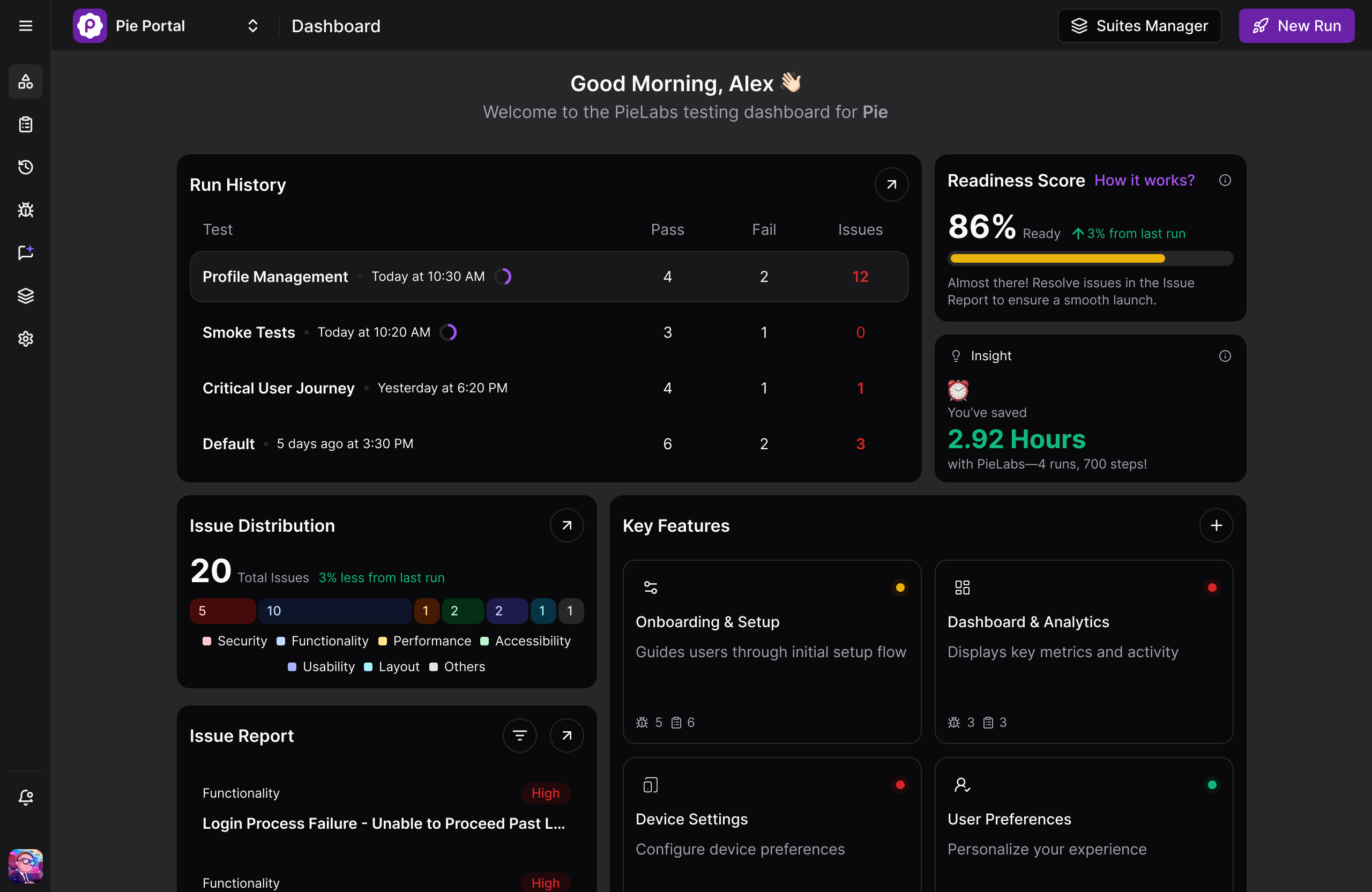
Pie is an autonomous QA platform, and it heads this list for one reason. Every other tool here hands you an editor and waits. Pie writes the suite itself.
Give it a staging URL or a mobile build and hundreds of AI agents go through the app the way a user would, map every feature, and turn that map into a regression suite through autonomous test discovery. Nobody writes a spec file, so the backlog of broken ones never starts.
Authoring stays available when you want it. Describe a specific or edge-case flow in plain English in Pie Canvas and Pie builds and runs it, and existing test cases import in whatever format they live in today.
At run time the agent looks at the screen rather than querying a locator you own, so renaming a class or restructuring the DOM does not put the test back in anyone’s queue. One set of test logic covers web plus native iOS and Android, which closes the mobile wall Cypress will never cross without a second toolchain.
Strengths:
- Hundreds of agents crawl the product and build the regression suite themselves, covering web alongside native iOS and Android
- The run adapts on its own through self-healing, so a redesign never sends the team back into the locators
- Plain-English authoring in Pie Canvas for the flows you want to define yourself, plus import of the cases you already have
- Pie Loop watches merged pull requests for regressions and drafts the fix as a PR your team reviews
Trade-offs:
- Web execution runs on Chromium rather than every browser engine, so a Safari-specific bug is not what this is for
- Native mobile execution happens on the iOS Simulator and the Android Emulator, not on a rack of real handsets
- Not a framework for hand-written unit or component tests, and not somewhere you point an existing spec file
”The time between having a release candidate ready and being fully tested has gone from two to three days to a few hours.”
— Philip Hubert, Director of Mobile Engineering, FiBest for: Teams whose real bottleneck is flaky, selector-bound tests and the hours spent repairing them, especially teams shipping web and native mobile together.
Not for: Load, security, or API contract testing, and not for teams who need every test versioned in the repo as code.
2. Playwright, the Like-for-Like Upgrade
Playwright is Microsoft’s open-source framework and the common destination for teams leaving Cypress, because it removes three of the walls above without asking anyone to change how they work. One API drives Chromium, Firefox, and WebKit.
Browser contexts turn multi-tab and multi-user scenarios into ordinary tests instead of a plugin hunt. It runs in Python, Java, and .NET as well as JavaScript and TypeScript, and our Playwright vs Cypress breakdown covers what the migration actually costs.
The adoption gap is no longer subtle. In the last week of August 2026, npm’s own registry counts recorded 87.5 million weekly downloads for playwright against 7.6 million for cypress. Raw registry pulls flatter every package equally, CI reinstalls included, but a gap above ten to one is not measurement noise. What none of it touches is who repairs the locator when the UI moves.
Strengths:
- Chromium, Firefox, and WebKit from one API, with multiple tabs and browser contexts built in
- Auto-waiting confirms an element is visible, stable, enabled, and receiving events before acting, which removes a class of timing failures
- Four language bindings, plus a trace viewer that steps through every recorded action with before and after DOM snapshots
Trade-offs:
- Still code-first, so engineers write, review, and repair every test with no authoring path for non-developers
- Device descriptors emulate a mobile browser viewport, so native iOS and Android apps stay out of reach
Best for: Teams leaving Cypress for browser coverage, multi-tab or cross-origin flows, or a language other than JavaScript.
Not for: Teams that need native mobile, or whose actual problem is authoring and repair rather than framework capability.
3. WebdriverIO, Web and Native Apps in One Codebase
WebdriverIO is the OpenJS Foundation’s Node.js framework, and it is the only framework here that reaches native mobile while staying in JavaScript. Its Appium integration reaches iOS, Android, and Tizen apps, plus desktop apps on macOS and Windows and TV apps on Roku, tvOS, and Android TV, all from the framework the web tests already use.
It has also quietly shed the reputation that used to keep people away. Since v8.14 it downloads and manages browser drivers itself, and v9 made WebDriver BiDi the default protocol while removing the old Chrome DevTools path entirely. The configuration surface is still larger than Cypress, but the driver chore that people remember is gone. What remains is a selector-based model, and there are structural reasons mobile E2E tests flake harder than web ones.
Strengths:
- One framework covers browsers plus native iOS, Android, and Tizen apps, with desktop and TV targets on top
- Drivers download and update themselves since v8.14, so per-browser setup is no longer a task
- WebDriver BiDi runs by default as of v9, with classic WebDriver still underneath
Trade-offs:
- Configuration stays more involved than Cypress or Playwright, particularly around TypeScript and services
- Authoring stays in JavaScript or TypeScript, with no Python, Java, or .NET binding to fall back on
Best for: JavaScript teams that need web and native mobile coverage from a single framework.
Not for: Teams that want to be running on day one, or whose test code is not JavaScript or TypeScript.
4. Selenium, the Polyglot Standard
Selenium earns its place on language alone, and for plenty of organizations that is the only thing that matters. Five official bindings cover Java, Python, C#, Ruby, and JavaScript. A Java shop that cannot rewrite its QA layer in TypeScript has exactly one real option on this page.
It implements the W3C WebDriver standard end to end and dropped the legacy JSON Wire Protocol in 4.9. Almost nothing in your pipeline will refuse it.
What you trade is ergonomics. Selenium waits for page loads automatically and ships an implicit wait, but that wait is off by default, and there is nothing equivalent to the actionability checks Cypress and Playwright apply before every interaction.
Waiting for an element to be visible or clickable is work you write yourself, and most Selenium flakiness traces back to a wait somebody guessed at. Our Cypress vs Selenium comparison covers the trade in detail.
Strengths:
- Five official language bindings, the widest of any tool here, plus the largest plugin and integration ecosystem
- Full W3C WebDriver compliance since 4.9, so any standards-based grid or cloud provider will take it
- A talent pool and training corpus built over more than two decades, since the project started in 2004
Trade-offs:
- No automatic waiting on element state, so stability work is hand-rolled through explicit or fluent waits
- Setup and assembly are the heaviest here, with runner and reporting layers bolted on separately
Best for: Polyglot organizations, especially Java and C# shops with existing QA infrastructure.
Not for: Small teams that want a fast start and a modern debugging experience.
Watch a Test Fix Itself
Show Pie the flow that keeps going red. Nobody on your team repairs it.
Book a Demo5. TestCafe, the Fastest Setup
TestCafe answers a narrower complaint than the others, and answers it completely. Its architecture is a proxy that injects an automation script into the page, which means, in the words of its own README, “you do not need WebDriver or any other testing software.”
No driver binaries, no grid, one install command. And because the automation rides inside the page rather than through a driver, Safari is an ordinary supported browser here rather than a flag you opt into, which is the one Cypress wall TestCafe quietly removes.
The waiting model is also stronger than its profile suggests. TestCafe waits for page loads and XHRs automatically before a test starts and after each action, and its assertions wait for elements to appear. The project is smaller than the leaders but healthy, with v3.7.6 shipping in July 2026 after a quiet stretch in 2025.
Strengths:
- No WebDriver and no browser drivers to install, with a first green test in minutes
- Automatic waiting for page loads, XHRs, and element appearance, with no hand-rolled timeouts
- Runs on Windows, macOS, and Linux across desktop, mobile, remote, and cloud browsers
Trade-offs:
- A smaller plugin ecosystem and community than Playwright or Selenium
- Selector-based like the rest of this group, and no native mobile app testing
Best for: Teams that want the shortest path from install to a passing cross-browser test.
Not for: Teams that need a deep plugin ecosystem, native mobile, or an exit from selector maintenance.
6. Nightwatch, Batteries-Included WebDriver
Nightwatch.js earns its spot for teams that want a Selenium-style stack without assembling one. Runner, assertions, and browser automation ship as a single package on the W3C WebDriver standard. It plugs into Selenium Grid and cloud providers, and it has carried React and Vue component testing since the v2 line landed in 2022. Development is steady, with v3.16.0 released in May 2026.
Nightwatch ran as an independent project from 2014 until BrowserStack acquired it in December 2021. Standardizing on it now means standardizing on a project whose roadmap sits inside a testing vendor. That is not a reason to rule it out, and it is not a footnote either.
Strengths:
- Runner, assertions, and automation in one install, with no library assembly
- W3C WebDriver standard with Selenium Grid and cloud provider integration
- Component testing for React and Vue alongside end-to-end coverage
Trade-offs:
- WebDriver setup and configuration are heavier than Cypress or TestCafe
- Smaller ecosystem than Selenium or Playwright, and the same selector brittleness as the rest
Best for: Node teams that want one integrated WebDriver framework rather than four libraries.
Not for: Teams wanting the lightest possible setup, or a project with no testing vendor steering its roadmap.
7. Puppeteer, Fast at a Job That Is Not Testing
Puppeteer lands last because it is not really trying to replace Cypress, and its own documentation does not pretend otherwise. It is a library, not a test framework, so there is no runner and no assertion library in the box. Where it wins is a narrow job done precisely.
One stale detail follows it around. Firefox support went stable at v23, so Puppeteer drives Chrome and Firefox now, over the DevTools Protocol or WebDriver BiDi. What it still cannot do is WebKit, or anything native on mobile, since its device support is viewport and user-agent emulation inside a desktop browser. We drew that line in detail in our Puppeteer vs Playwright breakdown.
Strengths:
- It talks to the browser over the DevTools Protocol with no framework layer in between, which is where the speed comes from
- Firefox joined Chrome as a stable target at v23, so the Chrome-only reputation is two years out of date
- Google’s Chrome Browser Automation team owns it, so the automation surface moves when Chrome does
Trade-offs:
- No WebKit engine, and mobile support is viewport emulation rather than native app automation
- You supply the runner and the assertions yourself, which for most teams means Jest or Mocha bolted on top
Best for: Crawling, capturing pages, and any scripted browser job that never needed a test runner.
Not for: Teams who need a regression suite, since neither a runner nor an assertion library ships in the box.
What a Framework Swap Does Not Fix
Six of the seven tools above break the same way. Each one finds its elements by a string, and falls over when that string stops matching the page. Move to any of them and you fix coverage, or language, or setup, and carry the flakiness across intact. Teams leaving Selenium walk into the same wall, which is why we ranked the Selenium alternatives by what each one actually removes.
That tax was manageable when interfaces changed slowly. A March 2026 study of 302,600 AI-authored commits across 6,299 GitHub repositories found more than 15% introduce at least one issue, and that 22.7% of those issues are still in the repository at its latest version. Machines write more of your screens every quarter, and each rewrite is another chance for a selector to stop matching. Testing AI-generated code is its own discipline now.
So the fork worth arguing about runs somewhere else. Stay inside the scripted model and a migration buys you a nicer API and the same bill. Leave it and there is no selector left to own, which is the trade Pie is built around. One of those choices is about next sprint. The other is still true in three years.
Pick the Alternative That Matches Your Wall
Name the wall you actually hit, then read one line. The shortlist collapses faster than any feature matrix suggests.
- “Cross-origin flows, iframes, or multiple tabs keep blocking us.” Playwright. Browser contexts make the scenarios Cypress restricts ordinary, and the migration is a syntax change rather than a rethink.
- “We need WebKit and Safari in CI, not behind a flag.” Playwright again. WebKit is a first-class engine there, not something you opt into with a config setting.
- “We’re a Java, C#, or Python shop.” Selenium. Five language bindings and the deepest integration ecosystem, at the cost of hand-rolled waits.
- “We need web and native mobile from one JavaScript framework.” WebdriverIO, or Pie if the mobile selectors are what you are dreading.
- “Our complaint is setup, not capability.” TestCafe. No drivers, no grid, a passing cross-browser test in minutes.
- “We want one package instead of four libraries.” Nightwatch, with BrowserStack’s stewardship factored into the decision.
- “We keep fighting flaky tests and repairing selectors.” Pie. Its agents write the suite and run it themselves, so nobody on your team authors or repairs a locator, on Chromium for web and on the iOS Simulator and Android Emulator for native.
If two of these describe you, take the framework fix first. A migration you can finish this quarter beats a category change you keep postponing.
Your Next Framework Has the Same Selectors
Cypress did not decline on you. You hit one of its four edges, a login that leaves your domain, Safari’s engine behind a flag, a team that writes Python, an app no browser opens. Name yours, because nothing above clears all four.
And not one of the frameworks removes the locator. Every one of them still asks a person to fix the test when a designer renames a class, and AI is writing more of those renames every quarter. We built Pie, an autonomous QA platform, so there is no locator left to repair. Every other tool hands that job back to you, politely, in a nicer syntax.
Ship Without the Repair Queue
Hand Pie the flows you keep fixing. The repair queue stops being yours.
Book a DemoFrequently Asked Questions
It depends on which Cypress limit you hit. If you need WebKit, multiple tabs, cross-origin flows, or a language other than JavaScript, Playwright is the strongest like-for-like swap and the usual destination.
If the reason you are leaving is flaky, selector-bound tests and the hours spent repairing them, no scripted framework changes that, because they all find elements the same way. That is the case for an autonomous platform like Pie, which generates the tests and repairs them by what the screen shows.
For most new web projects in 2026, Playwright is the stronger default. One API drives Chromium, Firefox, and WebKit, it handles multiple tabs and browser contexts, it runs in Python, Java, and .NET as well as JavaScript, and its auto-waiting confirms an element is visible, stable, enabled, and receiving events before it acts.
Cypress still wins on the debugging loop, where watching state change command by command beats reading a stack trace. Both bind tests to selectors, so both carry the same repair bill.
No. Cypress runs inside a browser, and its own documentation says it will never run on a native mobile app. It covers mobile web and responsive layouts, not native gestures, device APIs, or app behavior.
Teams needing native coverage either add Appium or WebdriverIO alongside Cypress, or move to a platform that runs web and native mobile from one test definition.
Yes. Cypress ships regularly, holds 4.7 out of 5 on Capterra, and still offers one of the best debugging experiences in web testing. Teams leave for specific architectural reasons, not because the tool declined.
If none of those walls is yours, no browser gap, no native mobile need, no polyglot requirement, and no growing repair backlog, staying on Cypress is a reasonable call.
Playwright, Selenium, WebdriverIO, Puppeteer, TestCafe, and Nightwatch are all open source and free to license. Playwright is the most common destination for teams leaving Cypress, and Selenium remains the polyglot standard with the widest language support.
What none of them removes is engineering time. You still author every test, anchor it to a selector, and repair that selector when the UI moves, which for most teams is the larger number.
Migrate if your blockers are the ones Playwright actually solves, which are WebKit and Safari coverage, multiple tabs, cross-origin flows, and multi-language support. The syntax will feel familiar, and the move is real work without being a rewrite.
Do not expect it to fix flakiness on its own. Both tools find elements by selector, so a UI change still breaks tests in Playwright. If maintenance is the whole reason you are moving, weigh a different category of tool.
Pie removes the step Cypress is built around. Rather than an engineer writing a spec bound to a CSS selector, Pie's agents explore the app, map its flows, and generate the regression suite, then run it by what the screen shows instead of by a locator someone maintains.
Coverage spans web and native iOS and Android from one definition, and Pie Loop catches regressions in merged pull requests and opens a fix your team reviews. Cypress still wins if you want every test in your repo, in code, under your control.
Not as Cypress code. Pie imports the test cases themselves in whatever format they live in today, including cases written down in a spreadsheet or buried in scripts, so a move does not start from zero.
Once imported, those cases stop being code anyone maintains, because Pie runs them by what the screen shows and adapts when the UI moves. New flows can be described in plain English rather than rebuilt as specs.
13 years building mobile infrastructure at Square, Facebook, and Instacart. Now building the QA platform he wished existed the whole time. LinkedIn →