Best Playwright Alternatives in 2026, Sorted by What Breaks a Test
Swapping Playwright for another framework moves your maintenance bill without lowering it. Seven alternatives compared on what makes each one break.

Your Playwright suite went red this morning and nothing is broken. A designer renamed a class, and every test bound to it stopped matching.
So the useful question to ask a replacement is not how fast it runs or how many languages it speaks. It is narrower. What has to change in my product before a test goes red for a reason that is not a bug? Ask that of the seven tools below and the field splits along a line the popularity rankings hide.
What you’ll learn
- The four reasons teams actually leave Playwright, and the one a swap cannot fix
- How seven alternatives compare on authoring, mobile reach, and what makes each one break
- What AI and codeless tools fix, and what they leave bound to the DOM
- Which alternative to pick for the constraint you actually have
Four Reasons Teams Look for a Playwright Alternative
Playwright rarely loses on capability, and a new web project is still a good place to start with it. It gets swapped out when a team’s constraints sit outside what a browser-driving framework was built to do. Four reasons come up over and over, and only one of them survives the switch.
1. Native Mobile Is Out of Scope
Playwright emulates a mobile device by setting viewport, user agent, and screen size on a desktop browser engine, which its own docs describe as the ability to “emulate a real device such as a mobile phone or tablet”. Emulating a phone browser is not the same as driving an .ipa or an .apk.
A team shipping a native app needs a second tool no matter how good Playwright is on web, and running two suites is the hidden cost nobody prices at the start.
2. Every Test Is Code
Playwright ships bindings for TypeScript, Python, .NET, and Java, which is generous, and all four still require an engineer to author and own each spec. If your QA function is people who know the product deeply and do not write TypeScript, the framework itself is the bottleneck, and no amount of tooling around it changes who has to type.
3. An Existing Investment You Cannot Rewrite
A running Selenium Grid, a Ruby codebase, five years of page objects. These are real switching costs, and they are the reason Selenium still ships releases in 2026 rather than the reason anyone starts new work on it.
4. Locator Maintenance, the Bill That Outlasts the Other Three
The first three are fit problems, and a framework swap genuinely solves a fit problem. This one is a cost problem. Every code-and-selector framework binds a test to the structure of your UI, so a redesign, a renamed class, or a restructured DOM breaks tests that found nothing wrong. Martin Fowler flagged it in his testing guide long before anyone shipped an AI testing tool, warning that “if you write tests that manipulate the HTML elements directly your tests will be brittle to changes in the UI”.
Playwright’s auto-waiting already removes an entire class of timing failures, which is exactly why what remains is so visible. A five-year study of a million-line commercial codebase, presented at ICST 2024, measured the drag at “at least 2.5% of the productive developer time”. On the roughly thirty developers in that study, it works out to most of a full-time headcount spent on tests that never found a bug. It is also the one number a framework swap does not move.
Three of these four are fixed by picking a different framework. The fourth is why most teams end up disappointed by the switch.
Playwright Alternatives at a Glance
Start with the map, then read the argument underneath it. The column that decides cost of ownership is the last one.
| Tool | What You Author | Native Mobile | What Breaks a Test |
|---|---|---|---|
| Pie | Nothing, or plain English | iOS and Android | User-facing behavior changes |
| testRigor | Plain-English steps | iOS and Android | Behavior changes, plus DOM edge cases |
| mabl | Recorded or AI-authored flows | iOS and Android | Attribute changes the healer cannot match |
| Cypress | JavaScript or TypeScript | No | Selector or DOM change |
| WebdriverIO | JavaScript or TypeScript | Through Appium | Selector or DOM change |
| Selenium | Java, Python, C#, Ruby, JS | Through Appium | Selector or DOM change, plus waits |
| Puppeteer | JavaScript or TypeScript | No | Selector or DOM change |
Read the last column top to bottom. Four of the seven break on exactly what Playwright breaks on, and those four are the ones most lists rank first.
We scored each tool on what you author, what it reaches, and what makes a test fail. Capability claims come from each project’s own documentation and ratings from Capterra, checked in August 2026.
7 Best Playwright Alternatives in 2026
These are ordered by how much of the maintenance bill each one removes, which is the axis the whole comparison turns on. It is not a popularity ranking, and it is deliberately not the order most lists use. Every entry answers the same two questions. What does it fix about Playwright, and what does it still ask of you?
1. Pie, Autonomous QA With No Test to Author
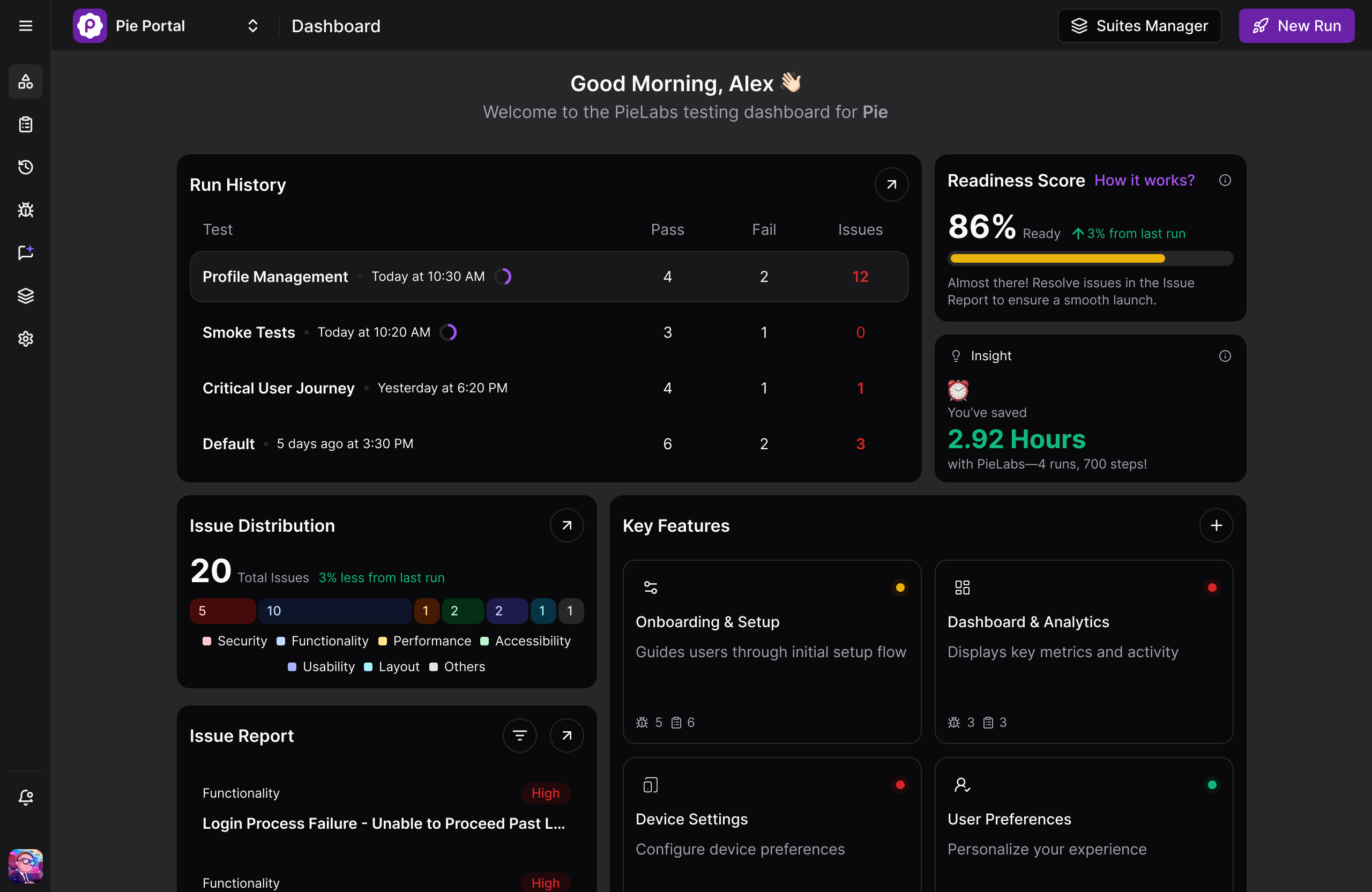
Pie is ours, and we put it first for one reason. It is the only entry that deletes the authoring step every other tool keeps, which is the axis this whole list is sorted on.
Point our agents at a staging URL or a mobile build and they explore the app the way a user would, map every feature, flag the areas that carry risk like checkout flows, settings panels, and auth gates, then rank by criticality and generate the regression suite through autonomous test discovery. Day-one coverage lands at 60 to 80 percent of core flows. Nobody writes a spec, so the repair backlog that ends most suites never starts forming.
Authoring is still there when you want it. Describe an edge-case flow in plain English in Pie Canvas, or bring the cases you already have in whatever format they live in today. Execution is vision-first either way, so nobody writes or repairs a locator and a renamed class stops being an event, and one set of test logic covers web plus native iOS and Android instead of the second suite a Playwright team needs the moment it ships an app.
Strengths:
- Agents map the app and generate the regression suite before anyone writes a test, across web and native iOS and Android
- Vision-first execution and self-healing tests, so a redesign does not send anyone back to the locators
- Plain-English authoring in Pie Canvas when you want a specific flow, plus ingest of the test cases you already have
- Pie Loop drafts a fix when a regression lands in a merged pull request and opens it for your team to review
- SOC 2 Type 2 certified
Trade-offs:
- Web execution runs on Chromium rather than every browser engine, so a Firefox or Safari matrix is not covered
- Native mobile runs on iOS Simulator and Android Emulator, which will not surface hardware-specific behavior like Bluetooth, NFC, or thermal throttling
- Tests do not live in your repo in your language, which is the wrong trade for a team that wants programmatic control of a specific browser API
Pricing: Custom, contact for a quote.
Rating: 5.0 out of 5 on Gartner Peer Insights.
”The time between having a release candidate ready and being fully tested has gone from two to three days to a few hours.”
— Philip Hubert, Director of Mobile Engineering, FiFi, the smart pet collar company, had twelve or more engineers pulled onto manual testing instead of building. That work now sits with one dedicated QA engineer, and the rest went back to shipping. Full numbers are on the Fi case study.
Best for: Teams shipping often who want regression coverage across web and native mobile that keeps pace with the product without anyone authoring or repairing tests.
Not for: Teams whose main job is load, security, or API contract testing, or who need a Firefox and Safari browser matrix.
2. testRigor, Tests Written the Way You Would Describe Them
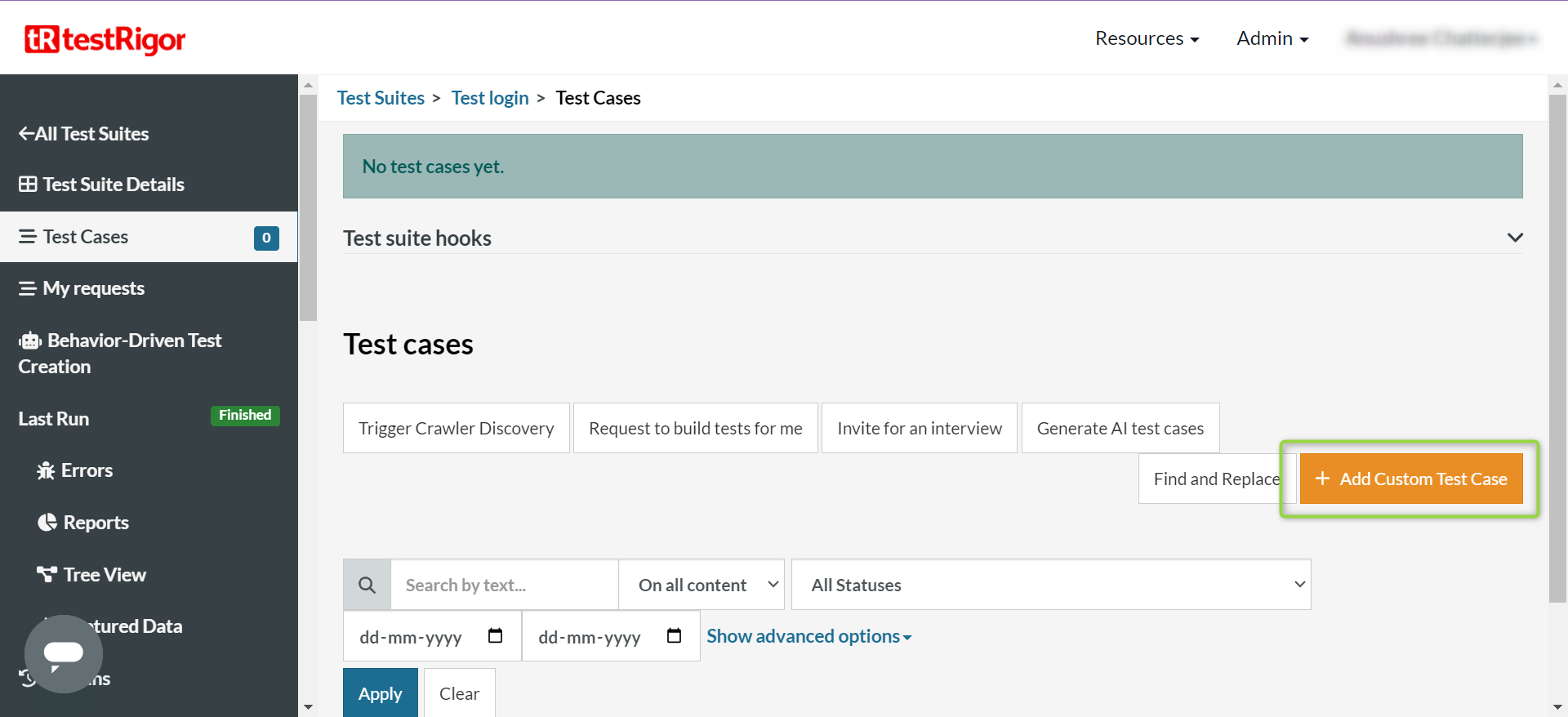
testRigor earns second place because it removes the code without removing your control of what gets tested. A step reads like a sentence, click "Add to cart", and testRigor resolves that phrase against a priority list of on-page attributes, starting with visible text and falling through placeholder, value, test id, name, and aria-label before it reaches a CSS class. Because a test references what a person would point at, it survives a lot of the DOM churn that snaps a Playwright locator.
The nuance worth knowing is where that resolution happens. testRigor is DOM and accessibility-attribute based by default, with an opt-in OCR layer you enable per step for canvas dashboards, embedded PDFs, and text baked into images. It makes the binding more forgiving. It does not remove it.
Strengths:
- Plain-English authoring puts test writing in reach of people who know the product but not TypeScript
- Native and hybrid iOS and Android from the same script as web, with APK and AAB uploads handled directly
- Per-step OCR for canvas, PDF, and image-only content that defeats attribute matching
Trade-offs:
- Less fine-grained low-level control than code, which matters if you need to reach into a specific browser API
- The plain English is the test, so the phrasing itself becomes something to keep in step as your UI copy changes
- No built-in test management layer, which has left reviewers tracking cases in spreadsheets once a suite grows past a handful
Pricing: Custom, priced on the parallel infrastructure your tests run on rather than per user or per test.
Rating: 4.6 out of 5 from 5 reviews on Capterra.
Best for: QA teams that own testing end to end and want to author in English rather than wait on engineering.
Not for: Teams that want every test in the repo under version control alongside the application code.
3. mabl, Low-Code Authoring With AI Healing
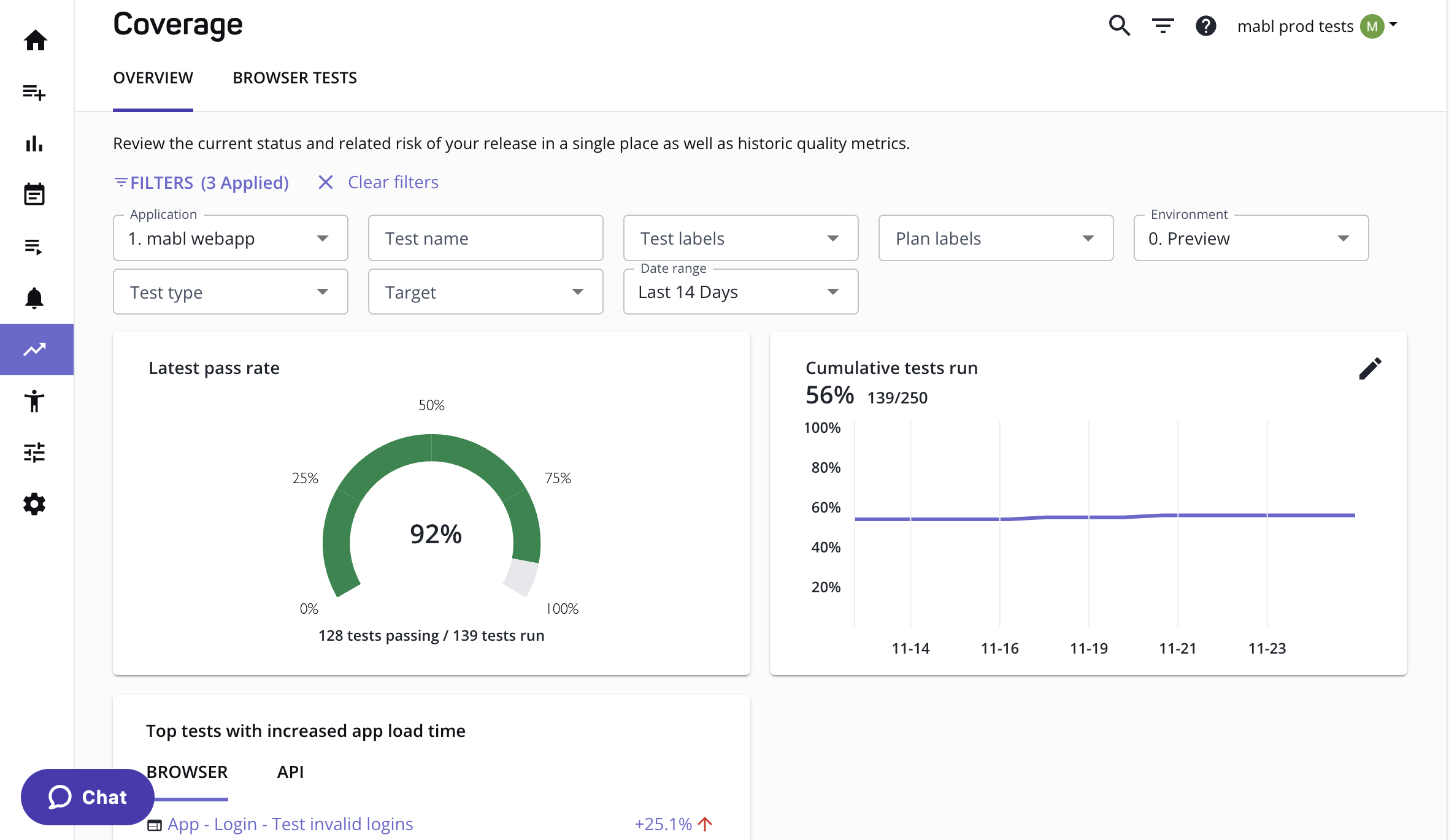
mabl records a flow in a browser through its desktop Trainer, or generates one from a description or a linked ticket, then keeps it running as the interface moves. Its healing model collects several signals for every element it touches, including text, role, position, nearby labels, and structural context, and when the primary locator stops matching it picks the most likely intended element from what is left. On cloud runs it adds generative matching for semantic similarity in new text.
That is genuinely useful and it is worth being precise about what it is. The signals mabl matches on are DOM-derived attributes, so the “visual context” in its copy is one input among several rather than pixel recognition. Healing here repairs the locator inside the selector model. It does not retire the model.
Strengths:
- Functional, performance, and accessibility checks in one platform, with Core Web Vitals and SLA thresholds on the performance side and axe-core against WCAG 2.0 and 2.1 on accessibility
- Native, hybrid, and cross-platform mobile coverage including Swift, Kotlin, React Native, and Flutter
- Cloud execution with no grid of your own to keep alive
Trade-offs:
- Authoring runs through a desktop Trainer app rather than the browser alone, and reviewers have flagged it as heavy enough to struggle on a low-RAM machine
- Healing operates within the DOM model, so a rebuild that changes structure and copy at once can still break a flow
- Cloud runs draw on a monthly credit pool, which makes suite growth a budgeting conversation
Pricing: Custom, with a 14-day free trial and 500 cloud test-run credits a month on the base plan.
Rating: 4.0 out of 5 from 67 reviews on Capterra.
Best for: QA teams that want a visual authoring surface and accessibility plus performance coverage in the same place as functional tests.
Not for: Engineering-led teams that want tests as code, or anyone whose core problem is the selector model itself.
Stop Maintaining Selectors
Point Pie at your app. Get a suite that survives the next redesign.
Book a Demo4. Cypress, The Best Debugging Loop on the List
Cypress is the alternative most Playwright refugees actually try, and the reason is architectural. It executes inside the browser in the same run loop as your application, rather than driving it from the outside, which is what makes its debugger genuinely different. Cypress captures a snapshot for every command, so you step backward through a failing run and watch the DOM as it was at each step instead of reconstructing it from a trace.
The JavaScript-only constraint is a design decision rather than a gap, and the docs do not hedge about it. “The only language we’ll ever support is the language of the web: JavaScript.” Browser reach is more nuanced than most comparisons admit, with Chrome, Edge, and Firefox stable on their latest three major versions while WebKit stays explicitly experimental, gated behind a config flag and a separate install. Our Playwright vs Cypress comparison goes through the trade in detail.
Strengths:
- Time-travel debugging with a snapshot per command, which is the feature reviewers name most often
- Runs in the same run loop as the app, so retries and network stubbing are unusually direct
- A large, active ecosystem at 50,900 GitHub stars and 7.4 million weekly npm downloads as of August 2026
Trade-offs:
- Safari coverage is experimental rather than production-ready, and the docs say so plainly, warning that WebKit support is experimental and that you may encounter issues
- Cypress cannot drive more than one browser at a time. Its docs call iframe support “somewhat limited”, and multiple tabs need the separate
@cypress/puppeteerplugin - Selector maintenance is untouched, which is the cost Playwright already carries
Pricing: Free and open source. Cypress Cloud has a free tier capped at 500 test results a month, with the Team plan at $67 a month billed annually.
Rating: 4.7 out of 5 from 67 reviews on Capterra.
Best for: JavaScript-native front-end teams whose bottleneck is diagnosing failures rather than writing them.
Not for: Teams that need Safari coverage, non-JavaScript authoring, or native mobile.
5. WebdriverIO, One Framework Across Web and Native Mobile
WebdriverIO is the answer when you want a single Node.js framework covering browsers and native apps in code. It speaks the WebDriver protocol, and for mobile it delegates to an Appium server, which drives iOS through XCUITest and Android through UIAutomator2. Appium is healthy, with [email protected] shipped in July 2026, so this is a live path rather than a legacy one.
The cost is wiring. Playwright Test ships its runner, reporter, and parallelization defaults in one config file, whereas wdio.conf.js asks you to choose and connect a test framework, reporters, services, and lifecycle hooks yourself, plus @wdio/appium-service for the mobile path. That surface area is why the mobile setup has its own folklore, and our WebdriverIO vs Playwright breakdown walks through where the trade lands.
Strengths:
- One framework and one language across web and native iOS and Android
- Actively released, with v9.30.1 out in August 2026
- Protocol-level access when you need to drop below the abstraction
Trade-offs:
- Config is the real onboarding cost, not the API. The mobile path needs
@wdio/appium-servicewired in on top of a runner, reporters, and hooks you have already had to choose - A smaller ecosystem than the rest of this list at 9,800 GitHub stars and 3.1 million weekly npm downloads
- The mobile layer is Appium’s, so its failure modes become yours
Pricing: Free and open source. Device infrastructure is yours to provide.
Rating: No Capterra listing for the framework.
Best for: Teams that ship both web and a native app and want one code-first framework across both.
Not for: Teams that want to be running the day they install, or that have nobody to own the Appium layer.
6. Selenium, The Standard Everything Else Is Measured Against
Selenium is the closest architectural cousin to Playwright. Both drive browsers out of process, and both support several languages. Its own tagline is still the bluntest line in the category. “Selenium automates browsers. That’s it!” It underpins the W3C WebDriver standard, it supports Java, Python, C#, Ruby, and JavaScript officially with Kotlin riding the Java bindings, and it is very much alive, with 4.47.0 released in August 2026.
What it does not have is Playwright’s waiting model. Selenium gives you implicit waits and explicit waits and asks you to build a strategy from them, and its own documentation warns against mixing the two. Teams migrating in the other direction usually discover that the waiting layer they had for free is now theirs to maintain. If you are working through this decision from the Selenium side, our ranked list of Selenium alternatives covers the same field from that angle.
Strengths:
- The widest official language support of anything here, which is often the deciding constraint
- The mature integration ecosystem, and compatibility with an existing Grid you already run
- Genuinely broad browser engine reach through WebDriver
Trade-offs:
- No built-in actionability auto-waiting, so a waiting strategy is work you own
- Heavier setup than Playwright’s batteries-included install
- Selector maintenance, plus the grid maintenance underneath it
Pricing: Free and open source. Grid infrastructure is yours to run or rent.
Rating: No Capterra listing for the WebDriver library, only for the separate Selenium IDE product.
Best for: Teams with a language requirement Playwright does not serve, or an existing Grid investment worth preserving.
Not for: New projects with a free choice, where Playwright’s auto-waiting is a real head start.
7. Puppeteer, A Library Rather Than a Test Framework
Puppeteer belongs on the list because people keep shortlisting it, and it is rarely what they are actually looking for. Its own docs describe it as “a JavaScript library which provides a high-level API to control Chrome or Firefox over the DevTools Protocol or WebDriver BiDi,” maintained by the Chrome DevTools team at Google. That is an accurate self-description and it is also the limitation. There is no test runner and no assertion library in the box, and the FAQ points you at community projects like jest-puppeteer for the testing conveniences.
For scripting, scraping, and PDF generation against Chrome it is excellent and enormously popular, at 95,400 GitHub stars and 11.5 million weekly npm downloads. As a Playwright replacement for an end-to-end suite it is a step backward, because you rebuild the runner, the reporting, and the parallelization Playwright already gave you. Our Puppeteer vs Playwright comparison walks through where the line falls.
Strengths:
- Direct, low-level control of Chrome through the DevTools Protocol
- Small dependency footprint for scripting and automation jobs
- Backed by the Chrome DevTools team, so protocol support tracks the browser closely
Trade-offs:
- No runner and no assertions, so an end-to-end suite means assembling one
- Chrome and Firefox only, with no WebKit engine
- Web only, and selector-bound like the rest of this group
Pricing: Free and open source.
Rating: No Capterra listing for the library.
Best for: Scripted browser automation, scraping, and PDF generation where you do not need a test framework at all.
Not for: Replacing an end-to-end suite, which is what most people arrive looking to do.
Which Alternative Fits Your Team
Match the tool to the constraint that pushed you off Playwright, not to the name at the top of a ranking. The fastest route to a wrong decision is swapping frameworks for a problem a framework swap cannot solve.
- Pick Cypress if your team is JavaScript-native and diagnosing failures is what eats the week.
- Pick Selenium if you need a language Playwright does not bind, or you already run a Grid worth keeping.
- Pick WebdriverIO if you ship web and a native app, want both in code, and have someone to own the Appium layer.
- Pick Puppeteer if what you actually need is scripted Chrome automation rather than a test suite.
- Pick testRigor if you want the people who know the product writing the tests in English.
- Pick mabl if you want a visual authoring surface with accessibility and performance checks in the same platform.
- Pick Pie if you spend more time repairing tests than writing features, and you need web and native mobile covered without a second suite.
That last case is more common than teams admit, and it is the one every framework on this list inherits unchanged.
If your constraint is fit, almost any of these works. If your constraint is maintenance, only the top three change the number.
Autonomy Is What Comes After Automation
Automation set out to remove the manual execution of tests, and it did that completely. What it never touched were the two jobs on either side of the run. Someone still authors every test, and someone still repairs it when the interface moves. That work scales with the size of your product rather than the size of your team, which is why the bill keeps growing on a suite nobody is adding to.
Autonomous QA moves those two jobs to agents. Discovery, authoring, and repair stop being sprint work, and the judgment calls stay exactly where they belong. Your team still decides what ships, what a failure actually means, and where an exploratory pass is worth an afternoon. What comes back is the week that used to go into locators.
What you are buying is not a suite that never misses. It is a release you can trust without reading every line of the suite yourself. The table below is where that difference actually shows up.
| Capability | Playwright | Cypress | Selenium | Pie |
|---|---|---|---|---|
| Native iOS and Android apps, in the box | ✗ | ✗ | ✗ | ✓ |
| Tests survive a renamed CSS class | ✗ | ✗ | ✗ | ✓ |
| No selectors for anyone to author | ✗ | ✗ | ✗ | ✓ |
Three rows, one pattern. Every code-and-selector tool on this page answers the same way, which is why swapping one of them for another moves so little.
Sort the Field by What Breaks It
Cypress for the debugging loop, Selenium for breadth and grids, WebdriverIO for web plus native in code, Puppeteer for scripting, testRigor and mabl for authoring without engineers. None of them wins for every team, and a list that pretends otherwise is selling you something.
So take one question into the shortlist instead of a feature matrix. What has to change in my product before this test goes red for a reason that is not a bug? Four of these seven give you the answer Playwright already gives you. Sort by that, and the decision stops being a matter of taste.
Less Maintenance. More Shipping.
Bring the tests you have. Keep the coverage without the repair work.
Book a DemoFrequently Asked Questions
There is no single best one, because the right choice depends on the constraint that pushed you off Playwright. Cypress is the strongest pick for JavaScript teams that want the best debugging loop. Selenium wins on language breadth and on an existing grid you cannot rewrite. WebdriverIO reaches native mobile through Appium.
If the thing you want to escape is selector maintenance rather than syntax, no code-and-selector framework helps, because all of them keep the model. Autonomous platforms like Pie are the different answer.
Some can. Playwright, Cypress, and Puppeteer are web only, and Playwright's device descriptors emulate a mobile browser rather than driving an app binary. WebdriverIO reaches iOS and Android by delegating to an Appium server.
Among the AI and codeless tools, testRigor and mabl both cover native iOS and Android, and Pie runs one set of test logic across web and native mobile. Check the execution environment too, because most of this category runs on simulators and emulators rather than physical hardware.
Cypress is a good alternative for teams that are JavaScript native and value the debugging loop above browser breadth. It runs inside the browser in the same run loop as your app, which is what powers its time-travel debugger, and reviewers rate it 4.7 out of 5 on Capterra.
The trade-offs are JavaScript-only authoring by design, experimental rather than stable WebKit support, and no help at all with selector maintenance, which Playwright also carries.
Yes. testRigor lets you write steps in plain English, and mabl records or generates flows and repairs them when attributes shift. Both lower the authoring barrier a long way below writing Playwright code.
Worth knowing how they find elements. Both resolve against DOM and accessibility attributes by default, with visual and AI matching layered on top, so the binding gets more forgiving rather than disappearing. Pie is the one that removes the authoring step instead of simplifying it.
Not the flakiness that matters. Playwright already auto-waits on actionability checks before every action, so moving to another code-and-selector tool usually trades a strong waiting model for a weaker one.
What survives auto-waiting is structural. Locators break when the DOM changes, and no amount of waiting repairs a selector that no longer matches. Only approaches that stop binding a test to a locator address that directly.
Several are. Cypress, Selenium, WebdriverIO, and Puppeteer are open source and free to run, exactly like Playwright, though Cypress Cloud caps its free tier at 500 test results a month before you reach the paid Team plan.
testRigor, mabl, and Pie all price on request as platforms. The more useful comparison is total cost rather than licence cost, because an open-source framework is free to adopt and expensive to keep green.
Pie removes the step Playwright is built around. Rather than an engineer writing a spec bound to a locator, Pie's agents explore the app, map its features, and generate the regression suite, then execute by what the screen shows so a renamed class changes nothing. Coverage spans web and native iOS and Android from one definition.
Playwright still wins when you want every test in your repo, in your language, with fine-grained control of a specific browser API, and it reaches Firefox and WebKit where Pie runs on Chromium.
The test cases, yes. Pie ingests existing cases during onboarding in whatever format they live in today, whether that is a spec file, a spreadsheet, or a list in a wiki, so a switch does not start from an empty suite.
What does not carry over is the code itself, and that is the point of moving. Those cases stop being scripts anyone maintains, because Pie runs them by what the screen shows and adapts when the interface moves.
Eight years building search and delivery systems at Amazon. The kind of scale where flaky tests block billion-dollar releases. Now CTO at Pie, building AI agents that adapt when your UI changes. LinkedIn →